
Feature requests arrive in support tickets, sales calls, product reviews, and direct messages. Once they sit in separate places, product teams lose the pattern behind the individual request and customers receive few meaningful updates.
Upvoty gives teams one place to collect requests, group duplicate demand, prioritize work, and show progress. The result is a visible feedback process that helps customers see their voice in the product.
Quick answer: how to use user feedback software
Set up the workflow in this order:
- Create a feedback board for requests, problems, and product ideas.
- Capture feedback through a portal, in-app widget, or support-driven submission flow.
- Merge duplicates and add context such as customer segment, revenue, and urgency.
- Prioritize validated requests against product goals and delivery effort.
- Publish roadmap progress, then notify voters through a changelog when work ships.
How user feedback software turns requests into product decisions
A useful system creates a path from raw input to a decision customers can follow. Start with a focused board structure. A SaaS product team could use categories such as Integrations, Reporting, Mobile, and Billing rather than a single unfiltered stream.
Consider a project management SaaS that receives requests for a template library. A customer submits “More project templates” through feedback.yourcompany.com. Another customer asks for “Agency campaign templates” through support, while a third requests a “Marketing launch checklist.” The team merges those related posts into one request, keeps the original wording as context, and assigns it to the Templates category.
That consolidation changes the decision. Three scattered messages become a single demand signal with clear use cases.
Use a branded feedback board as the public source of truth. Customers can search before submitting, vote on ideas they care about, and add comments that explain their situation. Give each board a clear submission prompt, such as “What would help your team plan projects faster?” Specific prompts produce better context than a blank text area.
For feedback gathered inside the product, place the entry point where the experience happens. An in-app feedback widget can capture the request while the customer still has the page, task, or workflow in view.
!Public voting boards for feedback and feature requests
How to collect better feedback with a feedback portal and widget
Open submission alone produces uneven input. Guide people toward information that helps a product manager assess the request. Ask what task the person is trying to complete, how often it occurs, and what workaround they use today.
In the template-library example, “Add templates” gives little direction. “Our agency recreates the same client onboarding board every month” identifies a repeatable job and a likely audience. Support agents can add account context before creating a post, while customers continue to vote and comment publicly.
Keep one operating rule: capture feedback where it appears, then route it to one system. A team that maintains separate lists in a help desk, spreadsheet, and product tool creates duplicate work and fragmented reporting.
Privacy also needs a deliberate setup. Keep sensitive account details in internal notes, avoid placing personal data in public post titles, and set clear participation expectations. Teams serving people in the EU should review the European Commission’s data protection guidance alongside their own privacy process.
How to prioritize customer feedback beyond vote totals
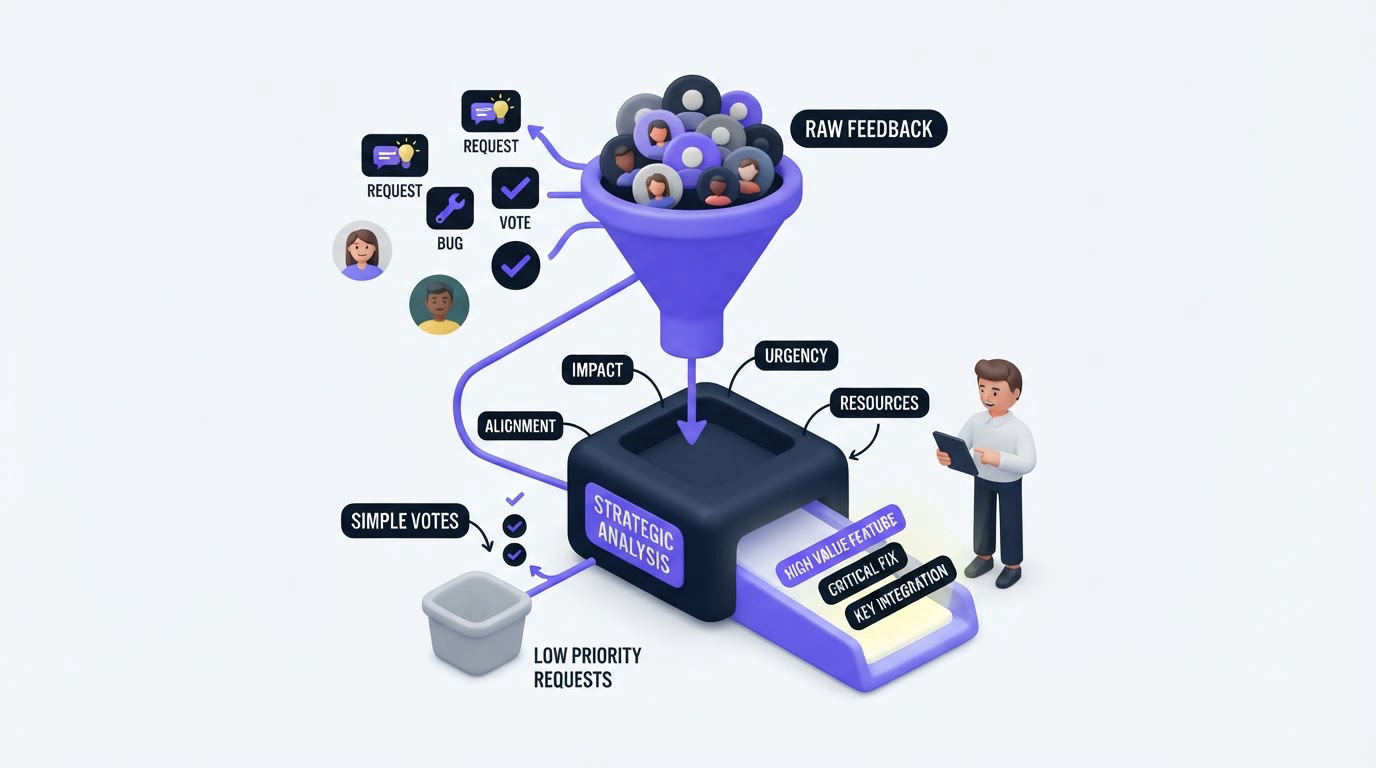
Votes provide an accessible demand signal, yet they need business context. A request with 30 votes from inactive trial users calls for a different decision than a request with eight votes from strategic customers who rely on the capability every day.
For the template-library request, the team could tag voters by plan and customer type. It may find that agencies account for 18 of the 27 votes and repeatedly mention onboarding. That evidence supports a narrower first release: agency onboarding and campaign templates, rather than a large general-purpose gallery.
Use a review cadence that fits your release cycle. Weekly triage works well for active boards. During each review, merge new duplicates, remove irrelevant submissions, identify rising themes, and assign a status to posts that require a product decision.
| Prioritization input | What it reveals | Template-library example |
|---|---|---|
| Votes and comments | Visible demand and language customers use | 27 voters ask for reusable starting points |
| Segment | Which audience feels the issue most | Agencies make up 18 voters |
| Revenue context | Commercial weight behind the request | Several higher-tier accounts mention it in renewal calls |
| Product strategy | Fit with the current direction | Faster onboarding is a quarterly objective |
| Delivery scope | The smallest useful release | Launch six agency templates before a full gallery |
For a practical scoring approach, read how to prioritize customer feedback by revenue, segment, and demand. Keep the score visible to the product team, while keeping commercial details private from the public board.
A frequent failure mode is treating every vote as a product commitment. Set expectation labels early. “Under review,” “planned,” and “in progress” give customers a current answer without promising a delivery date before the team has validated scope.
How Upvoty supports the full user feedback software workflow
The manual workflow quickly becomes heavy when requests come from multiple channels. Upvoty keeps the customer-facing experience and the product team’s decision space connected.
First, create a portal or embed the feedback widget where customers already work. Configure categories and custom submission fields so a report arrives with useful context. Public boards make existing ideas searchable before a customer creates another version of the same request.
Next, the team works from the feedback dashboard. Merge closely related submissions, apply smart tags, add internal notes, and use segments to understand who is asking. In the template example, the product manager groups three template posts, tags the theme as “agency workflow,” and checks the voter mix before assigning priority.
Then move the approved item onto a public roadmap. The team can show that the template library is planned, later mark it in progress, and keep customers informed without repeating the same status update in dozens of tickets. Learn how to structure that communication in this guide to building a public product roadmap customers can trust.
Finally, publish the shipped update through the changelog and notify the people who voted. The release message can say that six agency templates are available, link to the relevant product area, and invite follow-up feedback. That closes the loop with a concrete outcome.
!Public roadmap so customers know what is next
What to look for in user feedback software
Choose software based on the path your feedback needs to travel. A voting page is useful for discovery, yet product teams also need tools for moderation, prioritization, and follow-through.
Look for a system that gives you control over public and private feedback, categories, statuses, segmentation, and branding. Integrations also matter when support, engineering, and product teams work in different places. Upvoty offers integrations for routing updates into existing workflows, plus an API for teams with a custom data flow.
Accessibility deserves attention as well. Public feedback pages should use readable contrast, clear labels, and keyboard-friendly interactions. The W3C Web Content Accessibility Guidelines provide a practical baseline for reviewing customer-facing experiences.
Before selecting a platform, run a small test with a real workflow: submit five requests from different sources, merge two duplicates, identify the high-value segment, publish one roadmap update, and send one release notification. The exercise exposes gaps far better than a feature checklist.
FAQ about user feedback software
What is user feedback software used for?
User feedback software collects product ideas, feature requests, and customer problems in one place. Product teams use it to find patterns, assess demand, make prioritization decisions, share product progress, and communicate releases to the people who asked.
Should feature voting decide the roadmap?
Use voting as one input in a broader decision. Combine vote volume with customer segment, revenue context, strategic fit, support impact, and engineering scope. This produces a roadmap shaped by evidence and product judgment.
Can customer feedback be private?
Yes. Many teams use a public board for broadly useful ideas and private feedback areas for account-specific, sensitive, or internal requests. Separate visibility settings help teams collect candid input while protecting customer information.
How do you close the feedback loop after a feature ships?
Change the request status, publish a clear changelog entry, and notify the voters. Include what shipped, who it helps, and where customers can use it. This guide explains the process for closing the customer feedback loop with a changelog.
When should a SaaS company add a public roadmap?
Add a public roadmap once your team can maintain accurate statuses and communicate product direction with care. Start with broad stages such as Planned, In Progress, and Shipped. Avoid dates until delivery confidence supports them.
Bring your requests, customer context, roadmap updates, and release communication into one workflow. Try Upvoty to give customers a clear place to contribute and give your product team a clearer basis for action.