
Feature requests arrive through support tickets, sales calls, email, and chat. Without one shared system, duplicate requests pile up, product decisions lose context, and customers wait without an update. Upvoty gives SaaS teams a practical place to collect, organize, prioritize, and communicate product feedback.
Quick answer: how to use a product feedback tool
Set up the workflow in this order:
- Create a feedback board for requests and let customers submit and vote.
- Add an in-app widget so feedback arrives while customers are using the product.
- Merge duplicates, tag each request, and attach customer or account context.
- Prioritize requests using demand, customer segment, revenue context, and product fit.
- Move selected work to a public or private roadmap.
- Publish changelog updates and notify every voter when work ships.
A strong product feedback tool keeps the evidence behind a decision connected from the first request through release. That makes it easier for product, support, and sales teams to give customers a consistent answer.
What a product feedback tool should do
A feedback system earns its place when it reduces the manual work between customer input and a confident product decision. Look for four connected jobs: collection, organization, prioritization, and communication.
Collection needs to meet customers where they already work. A public board is useful for discoverability and voting, while an embedded widget captures feedback at the moment of friction. Upvoty offers both feedback boards and a feedback widget, so teams can use one shared source of truth without forcing every customer to visit a separate portal.
Organization keeps a popular request from appearing as 20 separate posts. Moderation, merging, smart tags, internal notes, and assignees preserve the original customer language while giving the team a workable backlog.
Prioritization needs context beyond a vote count. A request from a strategic segment, a repeated support issue, or a workflow blocker may deserve attention before a broadly appealing enhancement. Read how to prioritize customer feedback by revenue, segment, and demand for a decision model that brings those inputs together.
Communication shows customers what happened after they spoke up. A roadmap and changelog make progress visible and help support teams point to a current, consistent update.
How to collect product feedback from the right places
Start with two collection paths: a dedicated board and an in-product entry point. Each serves a different moment in the customer journey.
| Collection path | Best moment to use it | What customers provide | Operational consideration |
|---|---|---|---|
| Public feedback board | Customers have an idea or want to browse existing requests | New posts, votes, comments | Requires moderation and clear categories |
| In-app feedback widget | Customers encounter friction during a task | Context-rich request or issue report | Place it near relevant workflows instead of every screen |
| Support and sales intake | A conversation reveals a recurring need | Account context and exact use case | Train teams to add requests to the same board |
| Private board | Internal users, beta groups, or enterprise customers share sensitive input | Controlled feedback and discussion | Define access rules before inviting users |
Consider a B2B scheduling platform with /feedback as its public board and an in-app widget on its booking-rules screen. Customers repeatedly ask for "buffer time by service." One customer submits the request through the widget after setting up a complex appointment type. Three others find the public post and vote for it instead of creating fresh requests.
That sequence gives the product manager one request, four signals of demand, and a useful description of the job customers are trying to complete. It also prevents the support team from maintaining a separate spreadsheet of similar tickets.
Use plain prompts such as "What would make scheduling easier?" Avoid a blank form with no context. Ask for the workflow, the current workaround, and the impact on the customer. For accessible forms, follow the W3C guidance on form labels and instructions so every customer can understand what each field requires.
How to organize feature requests before prioritizing
Exporting requests to a spreadsheet each week creates a stale copy of the backlog. Keep the active feedback record in one place, then apply a repeatable triage process.
First, review new submissions for duplicates. Merge the scheduling platform's posts for "service-specific buffers," "cleaning time," and "extra time between appointments" into the original request when they describe the same underlying capability. Preserve useful comments because they often explain different use cases.
Next, tag the merged request. The team might apply booking rules, operations, and multi-service. Add an internal note from support: several customers currently create a separate service merely to create a longer gap. This turns vague demand into a clear problem statement.
Then assign ownership. A product manager can investigate scope while an engineer adds technical constraints. Teams using Jira or Linear can connect delivery work through Upvoty integrations, keeping customer evidence available while implementation moves forward.
For a fuller operating process, use this feature request management workflow. It helps teams establish intake rules before the board becomes crowded.
How to prioritize feedback without relying on vote totals alone
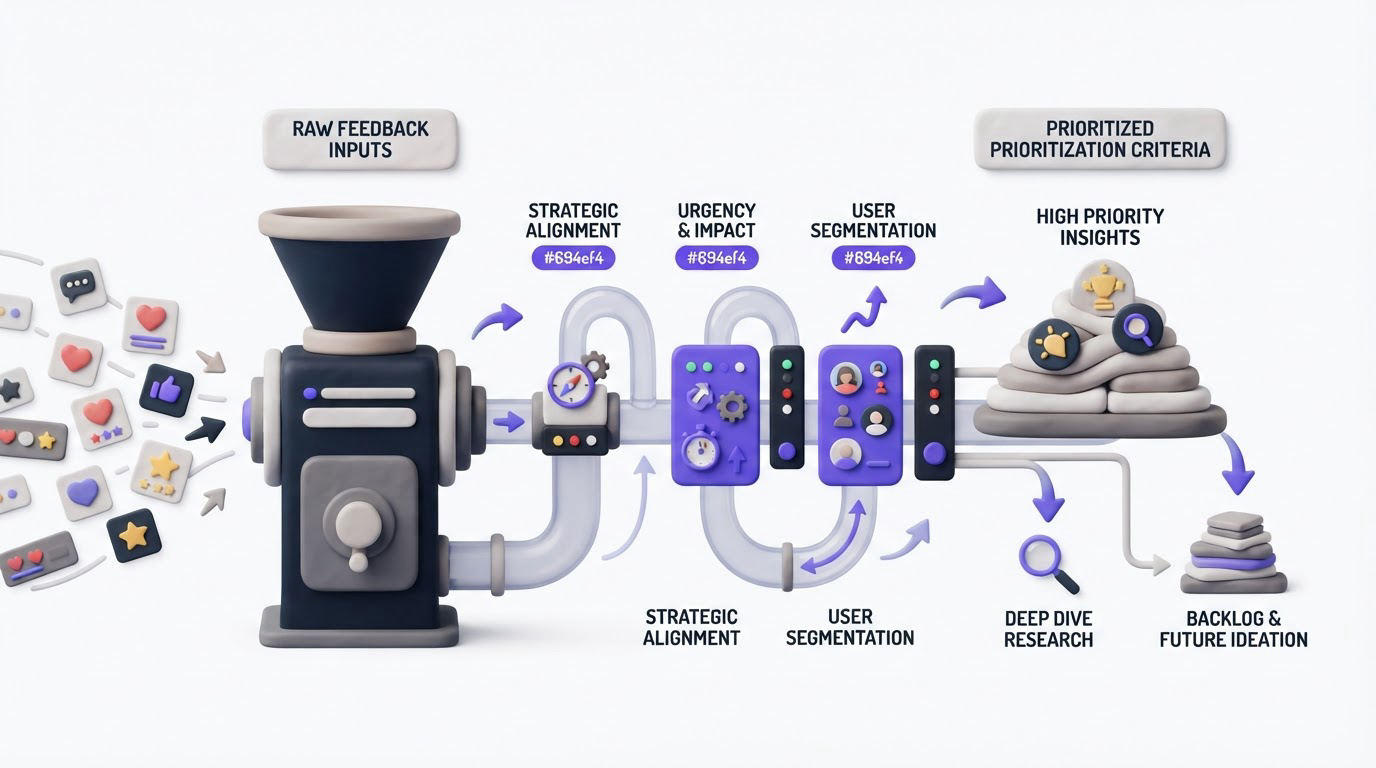
Votes reveal visible demand. They work best as one input among several.
For the scheduling platform, the "buffer time by service" request has four votes. Two come from customers with multiple appointment types, and support has linked the request to onboarding friction. A separate request for color themes has 18 votes, mostly from free users. The product team may choose buffer rules first because the request resolves a core operational problem for an important segment.
Review each candidate against these questions:
- Which customer segment experiences the problem?
- How often does the workflow occur?
- What workaround do customers use today?
- Does the request support the product strategy for the next release?
- What delivery effort and technical risk does it introduce?
Record the reason for the decision inside the request. A short note such as "Selected for Q3: removes a booking workaround for multi-service accounts" gives support and sales a reliable explanation. It also makes later review easier when a request remains under consideration.
Avoid promising dates from the feedback board before the delivery team has sized the work. Product feedback creates a queue of evidence, while release commitments require scope, capacity, and technical validation.
See the full product feedback workflow in Upvoty
Upvoty is designed around the handoff from customer signal to customer update. Here is how the scheduling platform's request moves through the product.
A customer opens the board or in-app widget and submits the buffer-time idea. Other customers vote and comment on the same post. The team moderates incoming posts, merges duplicates, adds tags, and records internal notes that customers cannot see.
The product manager filters the feedback by segment and tag, reviews demand in the dashboard, and assigns a priority. Once the team approves the work, they add it to a public product roadmap under a clear status such as Planned or In Progress.
!Upvoty public voting board showing feedback and feature requests
After the release, the team publishes a changelog entry explaining that buffer time can now vary by service. Upvoty can notify voters automatically, closing the loop with people who asked for the capability. See the process in more detail in how to close the customer feedback loop with a changelog.
This connected workflow is especially useful when requests begin publicly and planning happens internally. Customers see progress without gaining access to internal prioritization notes or delivery discussions.
Use a public roadmap to set expectations without overpromising
A roadmap gives customers a place to see what the team is exploring, planning, and shipping. It also reduces repetitive "when will this be available?" conversations.
Publish only the level of detail that remains useful when plans change. For the scheduling platform, "Service-specific booking buffers" is a better roadmap item than a detailed engineering task. The customer-facing title explains the outcome, while internal tasks can carry the technical detail.
Keep statuses meaningful and current. An item that stays in Planned for months weakens trust. Move it back to Under Consideration when priorities change, then explain the update where appropriate. The guide to building a public product roadmap customers can trust covers practical status rules and wording.
!Upvoty public roadmap showing planned and in-progress product work
Use a private board or private roadmap when feedback includes customer-specific workflows, security requests, or commercial discussions. Establish a clear privacy policy for any personal data submitted through feedback forms. Teams serving EU residents should also understand the European Commission's overview of GDPR obligations.
Common product feedback tool mistakes
The most common failure mode is treating the board as a passive suggestion box. Requests arrive, votes grow, and nobody provides a status or decision. Customers eventually stop contributing because the outcome is unclear.
Set a recurring review cadence. Review new posts weekly, evaluate priority candidates during planning, and publish release updates as work ships. Give support and sales access to approved status language so they can respond consistently.
Another problem appears when every vote has equal weight. A voting board should remain open and fair, while prioritization should account for product direction, affected workflows, account context, and feasibility. Capture those factors in internal notes rather than hiding the entire process from customers.
Finally, resist building an oversized taxonomy on day one. Begin with a few categories that reflect your product areas. Add tags only when they improve filtering or reporting.
FAQ about product feedback tools
What is the best product feedback tool for a SaaS company?
The best fit collects feedback where customers already interact with your product, makes duplicate management simple, supports context-based prioritization, and provides a roadmap and changelog for follow-through. Compare your requirements against a practical product feedback tool selection guide before committing to a workflow.
Should feature requests be public or private?
Use a public board when customer discovery, voting, and transparent updates support your goals. Use a private board for beta programs, internal teams, sensitive workflows, or enterprise accounts. Many SaaS teams use both paths and manage them in one system.
How do you handle duplicate feature requests?
Merge posts that describe the same customer outcome, retain their votes and comments, then add a concise title that customers can recognize. Review merge decisions during moderation so unrelated needs do not get grouped together.
Can customers see internal product priorities?
Customers can see the public status and roadmap item you choose to share. Keep scoring notes, account context, implementation concerns, and internal discussions private. This approach supports transparency while protecting planning details.
How quickly should teams respond to feedback?
Acknowledge new feedback through visible moderation and keep status changes current. Timing depends on volume and planning cycles, though a predictable weekly review is more useful than sporadic activity.
Build a feedback workflow that gives customers a voice and gives your team usable product evidence. Try Upvoty to collect requests, prioritize the work that fits your strategy, and keep voters informed through release.