
A customer finds a reporting problem, opens a separate support page, and forgets the exact screen where it happened. The resulting message says, “Export is broken,” leaving your team to request the account, browser, report type, and steps needed to reproduce it.
An in-app feedback widget prevents that information loss when it is placed and configured properly. Upvoty can connect this collection point to the same feedback board used to organize requests, votes, roadmap decisions, and updates.
Quick answer: how to set up an in-app feedback widget
Use this workflow to collect useful feedback without interrupting the product experience:
- Place the widget where users can find it without blocking primary controls.
- Choose triggers based on the page and the kind of feedback expected there.
- Keep the submission form short, but ask users to describe the outcome they wanted.
- Allow screenshots and attachments while protecting sensitive information.
- Capture relevant product and account context automatically.
- Route every submission into one feedback board with consistent categories.
- Confirm receipt, update statuses, and close the feedback loop after release.
We will use one example throughout this guide. Atlas Reports is a fictional B2B SaaS product with dashboards at app.atlasreports.com/dashboards, an export flow at app.atlasreports.com/reports/export, and account settings at app.atlasreports.com/settings. Its team receives feature requests in chat, bug reports through email, and comments copied into an internal document. The example shows how that team could replace those disconnected paths with one in-product workflow.
1. Where to place an in-app feedback widget
A widget should be consistently available, visually restrained, and clear about what happens when someone opens it. The bottom-right corner works for many web applications because users recognize it as a help or feedback location. It can fail when that corner already contains chat, cookie controls, save buttons, or pagination.
Inspect each major product screen before selecting a global position. On the Atlas Reports export page, the bottom-right corner contains the primary “Export report” action. A feedback launcher placed beside it competes with the task the customer came to complete. Moving the launcher to the left edge preserves access without crowding the export controls.
Placement should also account for responsive layouts. A widget that occupies little space on a desktop can cover an input, navigation control, or mobile browser toolbar on a narrow screen. Test at actual viewport sizes rather than shrinking a desktop browser until the layout looks approximately right.
The following comparison helps narrow the options.
| Widget placement | Best fit | Main risk | Practical safeguard |
|---|---|---|---|
| Bottom-right corner | Products without chat or floating actions | Covers save, next, or pagination controls | Add enough spacing and test every core workflow |
| Bottom-left corner | Interfaces with primary actions on the right | Conflicts with navigation drawers or accessibility controls | Keep the collapsed state narrow |
| Header or help menu | Dense dashboards and administrative tools | Users may overlook it | Use a direct label such as “Feedback” |
| Contextual page button | Complex features that need specific comments | Collection becomes inconsistent between pages | Pair it with a persistent global option |
| Post-action prompt | Feedback about a completed export, search, or setup flow | Interrupts users when shown too often | Trigger only after meaningful actions |
Make the trigger large enough to operate accurately. The WCAG 2.2 guidance on target size explains why small interactive controls create problems for people with limited dexterity and for anyone using a touch display.
Do not make the launcher pulse continuously or reopen after dismissal. Attention-grabbing behavior can increase submissions in the short term, but it trains customers to treat the widget as an obstruction. A stable label usually performs a more useful job: it remains available when a customer has something specific to report.
2. How to trigger an in-app feedback widget at the right time
A persistent launcher covers general feedback. Contextual triggers capture reactions tied to an action or page. Most SaaS products need both, but each trigger should have a defined purpose.
Atlas Reports adds a persistent “Feedback” button across authenticated pages. It also places a smaller “Suggest an improvement” link below the report export options. When opened from that link, the form already knows the customer was using the export workflow.
That context changes the quality of the submission. “Add scheduled delivery” is more useful when it arrives with the export page attached than when it enters an inbox without a product area. The team can route it directly to the reporting category and compare it with related requests.
Trigger a form after a meaningful event only when the timing adds information. Good moments include finishing onboarding, completing a repeated workflow, using a newly released feature, or encountering a handled error. Avoid prompts immediately after login, on every page load, or while the user is entering data.
Frequency controls matter. If a customer dismisses a contextual prompt, suppress it for an appropriate period or until the underlying event changes. Otherwise, the prompt measures tolerance rather than sentiment.
Keep support and product feedback paths distinct. An urgent account-access problem should not wait on a feature review board. Label the widget clearly and provide a support route for billing, security, data loss, or service incidents. Product feedback can still include bugs, but customers need to know which channel handles time-sensitive problems.
3. What an in-app feedback form should ask
Long forms reduce completion. Forms that ask only for a title produce vague entries. A useful submission flow sits between those extremes by requesting a small amount of information that the user knows and capturing the rest automatically.
Start with a feedback type when it affects routing. “Feature request,” “Problem,” and “General feedback” are usually easier for customers to understand than an internal taxonomy. Do not expose a long list of product components or engineering labels.
Next, request a concise title and a description. The description prompt should ask what the customer was trying to accomplish, what happened, and what they expected. That wording produces more useful evidence than a blank field labeled “Details.”
For Atlas Reports, a customer requests scheduled exports. The original title is “Email reports.” The form asks for the desired outcome, and the customer explains that finance managers need a spreadsheet delivered every Monday before they open the application. The team now understands the job, recipient, format, and cadence. It can consider scheduled delivery, saved subscriptions, or an API instead of implementing the first phrasing literally.
Use conditional fields sparingly. Selecting “Problem” can reveal a question about reproducibility. Selecting “Feature request” can reveal an optional question about frequency or current workaround. This keeps the initial screen short while collecting details relevant to the submission type.
Avoid asking customers to supply information your application already has. Email address, plan, workspace identifier, current URL, and application version should be passed with the submission when appropriate and permitted. Requiring customers to look up those values creates friction and introduces errors.
The form should also set expectations near the submit button. State whether feedback may appear on a shared board, whether personal details will remain private, and whether a response is guaranteed. Public feedback does not mean every field should become public.
4. How to collect screenshots and useful bug reports
Screenshots shorten bug investigation when they show the state of the interface, selected filters, and visible error messages. They can also expose customer names, financial figures, access tokens, email addresses, or confidential documents.
Give the user control. Let them review an attached screenshot before submission, remove it, or replace it with a cropped version. Add a short warning asking them to hide sensitive data. Do not silently capture the screen when the widget opens.
Uploaded files must be treated as untrusted input. The OWASP File Upload Cheat Sheet recommends controls such as allow-listed extensions, generated filenames, file-size limits, authorization checks, and storage outside the web root. These protections apply even when uploads come from authenticated customers.
A screenshot is evidence, not a complete bug report. The form still needs the expected result and a short description of what happened. For complex problems, request steps only after the user identifies the report as a bug.
Atlas Reports initially allows a customer to submit “CSV broken” with an image of an error banner. Engineering cannot reproduce it because the failure occurs only when the report contains a calculated currency column. The revised bug form asks three conditional questions: what action caused the problem, whether it happens every time, and what result was expected. The customer mentions the calculated column. Investigation can begin without a five-message support exchange.
Collect console logs or network traces only when there is a clear operational reason and appropriate consent. Those records can contain credentials, personal data, query values, and internal endpoints. For a general-purpose feedback widget, the risk often outweighs the convenience.
5. What user context to capture with in-app feedback
Context makes feedback easier to reproduce, segment, and prioritize. Excess context creates privacy and security exposure. Capture fields because a product, support, or engineering decision uses them, not because they are technically available.
Useful context often includes the current path, product area, application version, browser family, operating system, language, workspace identifier, and customer segment. Account plan or lifecycle stage may help with prioritization, provided the team understands that a high-value account is not automatically evidence of broad demand.
For Atlas Reports, the scheduled export request includes /reports/export, the reporting product area, a workspace identifier, and the user’s administrator role. It does not include the report contents or the names of finance recipients. The bug submission includes the browser and application version because those fields aid reproduction.
Use stable internal identifiers rather than placing personal information in labels or tags. A workspace ID such as ws_18492 is easier to control than a board tag containing a company name and email address. Limit who can see private context, and keep public board content separate from internal metadata.
Data minimization should influence the schema from the start. Article 5 of the EU General Data Protection Regulation states that personal data should be adequate, relevant, and limited to what is necessary for its purpose. Even when another privacy regime applies, that is a sound design constraint.
Document each captured field, its purpose, where it is stored, and how long it remains. Then test submissions from logged-out, trial, standard, and administrative states. Missing context should degrade safely rather than breaking the form.
6. How to route in-app feedback into a central board
Collection is only the front door. If widget submissions land in a mailbox that someone later copies into a spreadsheet, the team still has duplicate requests, inconsistent labels, and no reliable history.
Send all product feedback into one system of record. That does not require every entry to be public. A central board can contain public ideas, private submissions, merged duplicates, internal notes, categories, votes, and status changes while preserving one record for each underlying need.
Atlas Reports routes submissions according to the page and feedback type. Requests from /reports/export enter the reporting category. Problems receive an initial bug label and remain private until reviewed. General ideas enter a triage queue. A product manager reviews new entries on a regular schedule, merges duplicates, rewrites unclear titles without changing the original meaning, and requests clarification when required.
This is where feature voting becomes useful. Voting should add evidence about demand, not replace product judgment. A request with 40 votes may represent a minor convenience, while a request with five votes may block renewal for a critical segment. Combine votes with user context, strategic fit, effort, workarounds, and the severity of the underlying problem.
The detailed feature request management workflow explains how to move requests from collection through deduplication and prioritization. For teams deciding how to weigh account value and segment demand, this guide to customer feedback prioritization adds a practical scoring approach.
Routing rules need an owner. Automation can assign an initial category, but ambiguous requests still require human judgment. “Let me share reports” could mean public links, scheduled email, permissions, embedded dashboards, or exports. Incorrect automatic merging destroys useful distinctions.
A well-maintained feedback board also gives customers a place to search before submitting. When they find the scheduled export request, they can vote and add their use case instead of creating another copy.
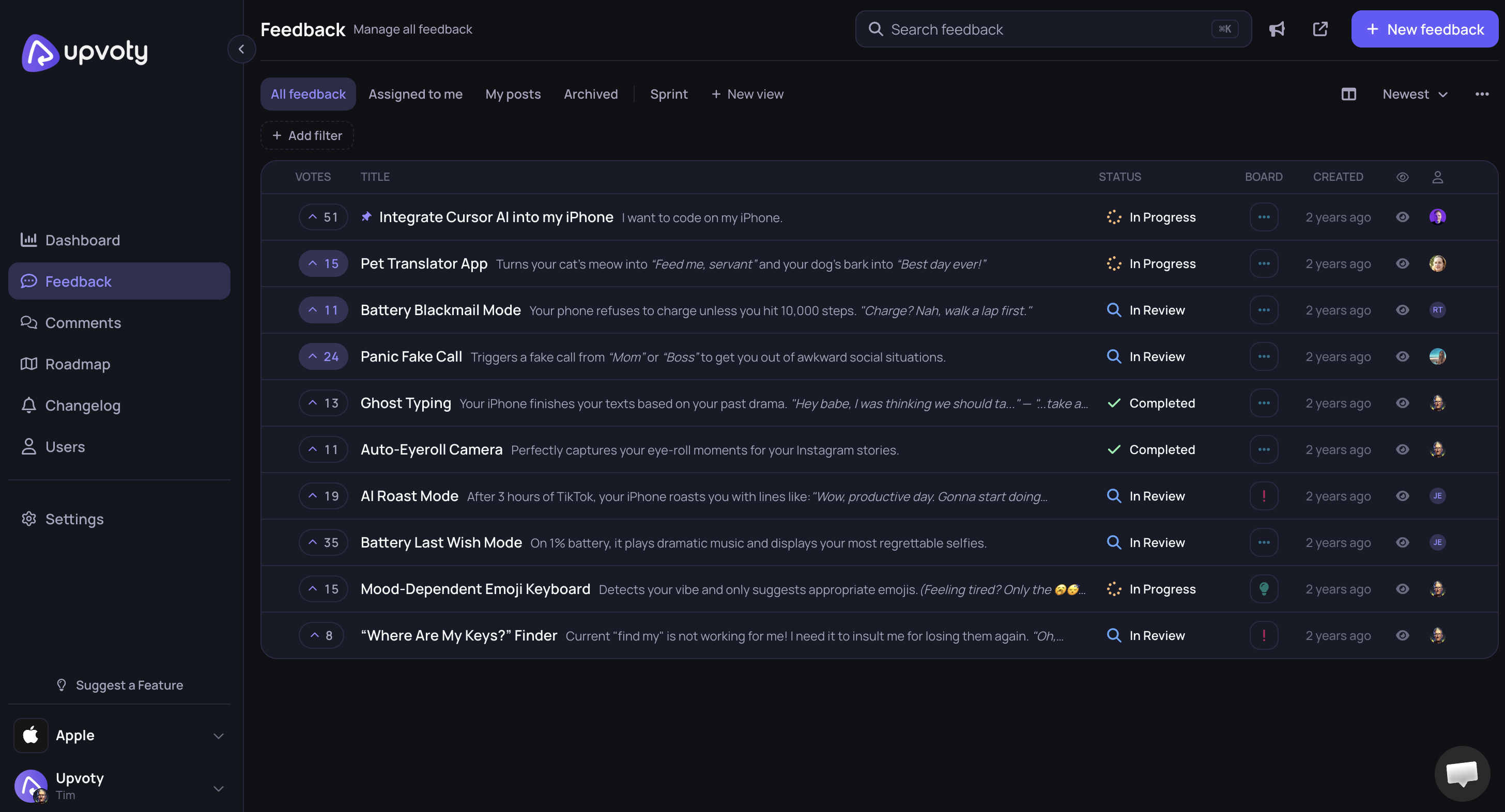
The image below shows how feedback and feature requests can be managed from a central dashboard rather than scattered across separate channels.
7. How the in-app feedback workflow runs in Upvoty
A manual workflow can work at low volume, but every handoff creates another opportunity to lose context. Upvoty reduces those handoffs by connecting collection, the central board, prioritization, roadmap communication, and release updates.
First, the customer submits feedback from the product. The submission is directed into the relevant Upvoty board, where related ideas can be reviewed together. The team keeps the customer’s explanation attached to the request instead of rewriting it into an isolated task immediately.
Next, the team reviews the entry. It can organize submissions on the board, identify duplicates, and see voting activity. For Atlas Reports, “Email reports,” “Monday spreadsheet delivery,” and “Scheduled CSV exports” can be evaluated as related expressions of the same need. The product team can preserve the use cases while consolidating the visible request.
The request then moves through a status workflow. Customers can see whether an idea is under consideration, planned, in progress, or completed according to the statuses the team publishes. Statuses should represent real commitments. Moving every popular idea to “planned” may feel responsive, but it turns the board into an unreliable promise list.
When scheduled exports are accepted, the team can place the initiative on a product roadmap. Roadmap entries communicate direction without exposing every engineering task or fixed delivery date. The guidance on building a public product roadmap customers can trust covers how to set that boundary.
After release, the workflow continues through a product changelog. The team publishes what changed, updates the original request, and gives interested customers a reason to return. This final step is often missed, even though it converts collected feedback into visible follow-through. See the full process for closing the customer feedback loop with a changelog.
This connected model is the central point: an in-app widget should not be treated as a small contact form. Its value comes from preserving a line between the moment a customer reports a need and the moment the product team communicates a decision or release.
Common in-app feedback widget mistakes
The first mistake is using one unlabeled text box for support, sales questions, bugs, and product ideas. It looks simple but shifts all classification work to the receiving team. Customers with urgent issues also assume that submission means immediate support.
The second is collecting too much information. Requiring priority, department, category, impact, frequency, and a detailed workaround feels like an internal ticket form. Most customers will abandon it or choose arbitrary answers.
The third is publishing submissions automatically. Spam, personal information, security reports, angry account-specific comments, and duplicate ideas can appear on the board before review. Add moderation before anything becomes public.
Another failure mode is stripping away the original context during triage. A product manager may convert “Finance managers need a spreadsheet every Monday” into “Build recurring exports.” Engineering receives a proposed feature but loses the user, cadence, and business process that should guide design decisions.
Teams also make the widget prominent while neglecting the board behind it. An overflowing queue with stale statuses sends a worse signal than having no public board. Assign ownership and define a realistic review schedule before increasing submission volume.
Finally, do not promise direct implementation. A confirmation such as “We received your feedback and will review it” is accurate. “We’ll build this soon” is not, unless the work has actually been committed.
How to measure whether your in-app feedback widget works
Submission volume alone is a weak measure. An increase might indicate better access, a confusing release, repeated errors, or an aggressive prompt.
Measure the completeness and usefulness of submissions. Review how often the team can understand a request without contacting the customer, how many entries are merged as duplicates, how many bugs contain reproducible steps, and how many requests include usable product context.
Track operational measures as well. Time to first review shows whether the queue has an owner. The share of entries with an updated status reveals whether the board reflects current decisions. The number of released items connected to original requests shows whether feedback survives planning and delivery.
Qualitative review remains necessary. Read a sample of submissions from each trigger and compare them. If post-export prompts generate only “works fine” responses while the persistent widget produces detailed requests, remove the low-value prompt. If screenshots repeatedly contain confidential data, redesign the warning or disable capture on sensitive screens.
In-app feedback widget FAQ
Should an in-app feedback widget replace customer support?
No. Use it for product ideas, usability observations, and non-urgent bugs. Keep a clearly marked support path for access problems, billing questions, outages, security concerns, and other issues that need a defined response time. Both channels can feed product insight into the same board after review.
Should feedback submitted through the widget be public?
Not automatically. Moderate each submission first. Remove personal details, investigate security-related reports privately, merge duplicates, and confirm that the wording is appropriate for a shared board. Customers should know before submitting if part of their message may become visible.
How many fields should an in-app feedback form have?
Start with feedback type, title, and description. Add conditional questions for bugs or specific workflows. Capture known account and product context behind the form rather than asking the customer to enter it. Every required field should support a real routing, reproduction, or prioritization decision.
Can an in-app feedback widget collect anonymous feedback?
It can, but anonymous submissions reduce the ability to ask follow-up questions and understand account context. Anonymous feedback may suit public pages or privacy-sensitive research. Inside an authenticated SaaS product, associating the submission with a controlled user or workspace identifier is usually more useful, provided that collection is disclosed and protected.
Do votes determine which feature should be built next?
Votes show expressed demand among people who saw the request and chose to participate. They do not measure strategic fit, implementation cost, severity, or demand from less vocal customers. Use votes as one input alongside segments, customer evidence, product direction, and technical constraints.
When should feedback move to a public roadmap?
Move an item when the team has made a genuine product decision and is comfortable communicating it. Do not use a roadmap as a holding area for every popular suggestion. Keep uncertain ideas on the feedback board until discovery, priority, and scope are sufficiently clear.
A useful widget starts the conversation, but the board, roadmap, and changelog prove that the conversation goes somewhere. Use Upvoty to connect in-app feedback with your product workflow and give customers one consistent place to submit, follow, and understand product decisions. Read next: How to Choose Feedback Software for a Growing SaaS Team. Read next: How to Set Up an In-App Feedback Widget Without Disrupting Users. Read next: Product Feedback Management. Read next: Product Feedback Portal for SaaS Product Teams. Read next: Website Feedback Widget. Read next: How to Collect Feedback Inside Your SaaS Product With an In-App Feedback Widget.


