
Feature requests arrive through support tickets, sales calls, interviews, and inboxes. Without one shared process, duplicate ideas multiply, product decisions lose context, and customers never hear what happened next. Upvoty gives product teams a focused place to collect feedback, weigh demand, publish plans, and communicate releases.
Quick answer: how to manage customer feedback
Use customer feedback management software to run this workflow:
- Capture requests through a feedback portal, widget, or connected customer channels.
- Merge duplicates into one clear problem statement and preserve every voter.
- Add customer context such as segment, plan, revenue, use case, and urgency.
- Prioritize validated requests alongside product strategy, effort, and risk.
- Publish selected work on a roadmap with realistic status updates.
- Announce shipped work in a changelog and notify the people who voted.
What customer feedback management software should solve
A useful system gives every request a durable home. Customers can search before submitting, vote on existing ideas, add use-case detail, and see progress. Your team can then move from raw comments to a decision backed by demand and customer context.
Consider Deskloop, a fictional B2B scheduling platform. Its account executives logged “calendar sync” requests in HubSpot, support received similar tickets, and the product manager maintained a spreadsheet with 47 rows. Several requests described the same Microsoft 365 permission issue, yet they were counted as separate opportunities. The team chose a large reporting project while the sync issue remained unresolved.
A feedback workflow would have consolidated those reports into one post: “Support Microsoft 365 delegated calendar permissions.” The post would retain every voter, attach the affected customer segment, and give product a single record to assess. That turns scattered anecdotes into an auditable product input.
How to collect customer feedback in one place
Start by deciding where customers should submit feedback. A public portal works well for broad product communities because it helps people discover and vote for existing ideas. An embedded widget shortens the path for feedback gathered inside the product. Private boards suit enterprise accounts, beta programs, and internal teams.
For Deskloop, place a feedback widget on the scheduling settings page, where the Microsoft 365 issue occurs. Add a portal link to the help center and include it in support macros. Sales can submit account feedback through an internal process, with the account name and contract context attached.
Use a short custom form that asks for the job the customer is trying to complete, the current workaround, and their environment. Capture only data that supports a future decision. If personal data is collected, establish retention and access rules consistent with the GDPR data-processing principles in Article 5.
A clear submission flow also reduces vague requests such as “make integrations better.” Ask customers to describe the system, action, and expected result. Deskloop’s improved request became specific enough for engineering to investigate.
How to organize customer feedback without losing context
Organization has two jobs: make related feedback easy to find and preserve the evidence behind it. Create a small set of categories based on your product areas, then add tags for recurring themes such as onboarding, permissions, reporting, and mobile.
Merge duplicate posts promptly. The wording may vary, but the underlying customer job can be identical. Keep the strongest title, link related reports, and move votes to the surviving post. Duplicate merging produces a more accurate view of demand than a long list of similar titles.
For Deskloop, “Outlook shared calendars,” “delegate access,” and “Microsoft 365 calendar sync fails” belong under the same permission issue. A separate request for Google Calendar availability remains separate because it requires a different technical solution and serves a different customer group.
Apply segments before prioritization. An idea supported by five administrators at high-value accounts can warrant more attention than an idea with 20 votes from trial users. Read how to prioritize customer feedback by revenue, segment, and demand for a practical framework that brings those signals together.
How to prioritize customer feedback for product decisions
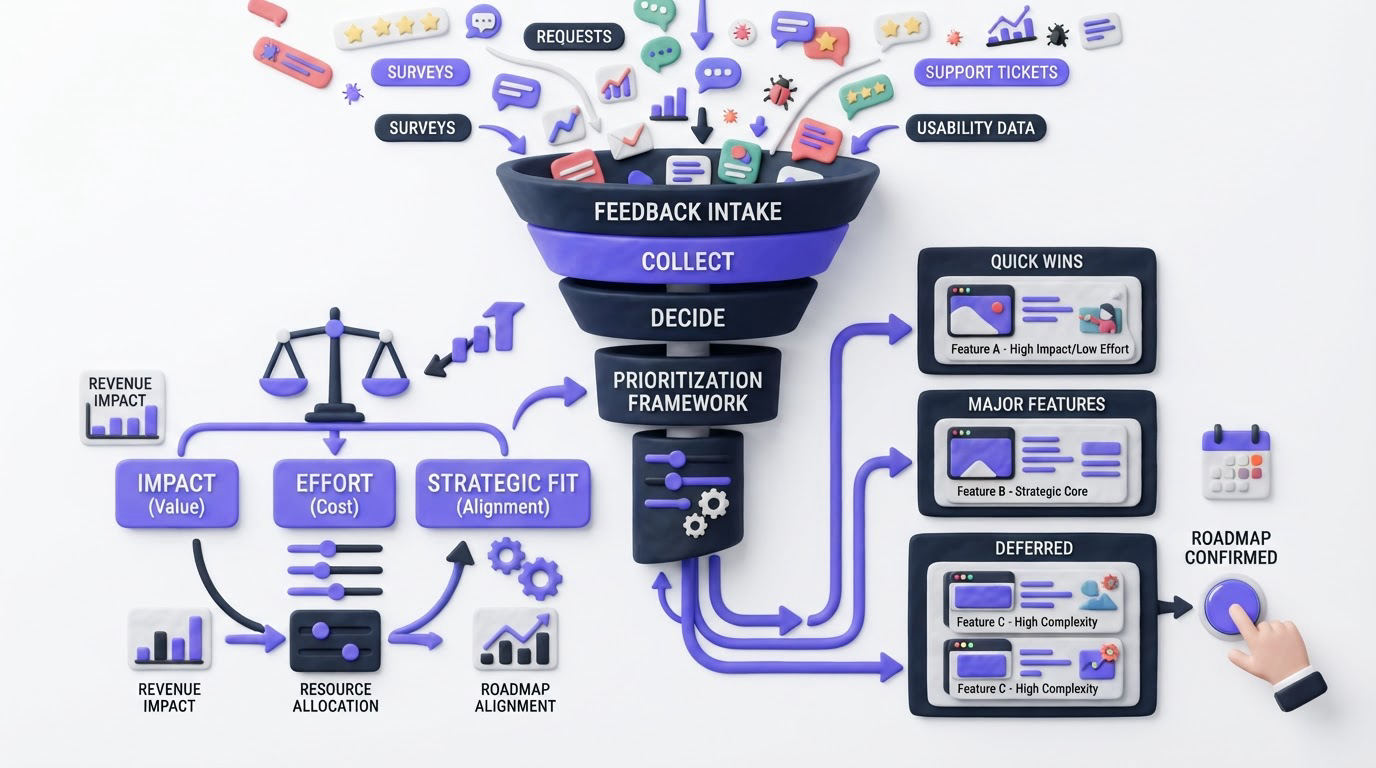
Votes reveal the number of people who raised a hand. Product teams still need to assess impact, feasibility, strategic fit, and confidence. Give each request an owner and a visible priority so customer-facing teams can explain the current state.
Use a consistent review cadence. A weekly triage works for busy SaaS products. During that review, group similar ideas, check segment data, confirm the problem with support or sales, and assign one of four outcomes: investigate, planned, declined, or already available.
| Decision input | What to review | Deskloop example | Product action |
|---|---|---|---|
| Demand | Voters, comments, related tickets | 31 voters and 18 support conversations | Treat as a recurring problem |
| Customer value | Segment, account context, workflow impact | Affects administrators managing team schedules | Raise urgency for B2B accounts |
| Strategic fit | Current product direction and commitments | Calendar reliability supports core scheduling | Include in the next reliability cycle |
| Delivery effort | Technical scope, dependencies, risk | Requires Microsoft 365 permission handling | Break work into investigation and delivery |
| Confidence | Quality of evidence and reproducibility | Support reproduced the issue in two environments | Move from investigate to planned |
Avoid turning voting into an automatic roadmap. A request can have broad appeal and still require discovery, security review, or a different solution than customers originally proposed. Record the reasoning in internal notes so the next person reviewing the request has the full picture.
For a deeper process from intake through delivery, see this feature request management workflow.
How Upvoty manages customer feedback from request to release
Upvoty is built around the full feedback loop rather than a disconnected suggestion box. Here is how Deskloop’s team would run the Microsoft 365 issue through the product.
First, they publish a branded feedback board where customers can submit, search, comment, and vote. The product manager moderates incoming posts and uses Merge AI to help consolidate overlapping requests. Smart tags and segments add structure without forcing the team back into a spreadsheet.
Next, the team reviews the unified request in the feedback dashboard. Internal notes hold investigation details, while assignees and priorities make ownership visible to the team. Analytics helps the product manager inspect trends and demand before carrying the request into planning.
Then, once the work is approved, Deskloop adds it to its public roadmap with a status such as Planned or In Progress. Customers can see that the team has acknowledged the issue without being promised an unsupported launch date. Follow the principles in this guide to building a public product roadmap customers trust when choosing what to share.
This dashboard view shows the operational side of managing, categorizing, and reviewing feedback.
!Upvoty feedback management dashboard with feedback items and analytics
Finally, after the permission update ships, Deskloop publishes a release entry through its changelog. Auto-notify voters can alert the people who requested the feature, creating a direct connection between their input and the outcome. Learn more about closing the customer feedback loop with a changelog.
How to choose customer feedback management software
Choose software based on the workflow your team needs to run every week. A simple voting board may suit an early-stage product with a small community. Teams handling multiple customer segments, public communication, and a steady release cadence benefit from a connected portal, roadmap, and changelog.
Assess these areas during evaluation:
- Submission options for public, private, and in-app feedback
- Duplicate merging, moderation, tagging, and internal collaboration
- Segmentation that connects votes to customer context
- Roadmap and changelog tools for customer communication
- Integrations with the systems your product, support, and sales teams use
- Privacy controls, export options, and roles for sensitive feedback
Accessibility deserves attention when your portal serves a broad customer base. Ask vendors how their interface supports the W3C Web Content Accessibility Guidelines, especially for keyboard navigation, contrast, and form labels.
Canny, Featurebase, and Nolt are common options in this category. Compare the workflow behind each product, including how it handles intake, consolidation, segmentation, and release communication. Current feature limits and plans can change, so review each vendor’s pricing page during procurement. If you are evaluating Upvoty against Canny, use the detailed Upvoty versus Canny comparison to focus the review on practical fit.
Customer feedback management software FAQs
What is customer feedback management software?
Customer feedback management software collects customer suggestions, feature requests, and product issues in a central workspace. Teams use it to organize submissions, identify recurring needs, prioritize work, share roadmap progress, and communicate shipped improvements.
Should feedback boards be public or private?
Public boards work well when customers benefit from seeing, voting on, and discussing shared ideas. Private boards suit sensitive enterprise feedback, partner programs, and internal planning. Many teams use both: a public community board and private boards for selected groups.
How many votes are enough to build a feature?
There is no universal threshold. Review votes alongside account fit, revenue context, customer impact, strategic direction, delivery effort, and confidence in the evidence. A well-documented issue that blocks a core workflow may deserve fast action with relatively few voters.
Can a small product team manage feedback without a dedicated tool?
A spreadsheet can work briefly when request volume is low. It becomes difficult to maintain once duplicates, multiple channels, ownership, voter updates, and roadmap communication increase. A dedicated system keeps the history attached to each request and reduces manual follow-up.
Create one place for requests, make prioritization visible, and give customers a clear route back to the outcomes they helped shape. Try Upvoty to run feedback boards, roadmaps, and changelogs in one connected workflow.