
A Shopify app team can receive ten requests for the same feature and still lack the information needed to build it. The requests may come from stores with very different workflows, plans, order volumes, and retention value.
Feature voting turns scattered requests into a consistent demand signal when each vote carries merchant context. Upvoty gives teams a focused place to collect, group, segment, and act on that feedback without letting the roadmap become a popularity contest.
Quick answer: how to use feature voting for a Shopify app
Set up feature voting around decisions your team can actually make:
- Create one board for product requests and define a clear scope for submissions.
- Ask for merchant context, including store type, plan, order volume, and the job the merchant is trying to complete.
- Merge duplicate requests into one outcome-based post before reviewing vote totals.
- Segment voters to see which merchant groups create the demand.
- Score each request using demand, segment value, strategic fit, confidence, and delivery effort.
- Publish a small set of committed items on a roadmap and notify voters when work ships.
Set up feature voting around one roadmap decision at a time
A voting board needs a narrow operating purpose. Broad prompts such as “What should we build next?” attract vague ideas and make comparison difficult. Ask merchants for improvements within the parts of the app where your team has a genuine upcoming decision.
For example, consider BundlePilot, a hypothetical Shopify app that lets merchants create product bundles. Its team is planning the next quarter and has two possible investments:
- Bundle-level inventory reporting for larger catalog operators.
- Automatic discount conflict detection for merchants running several promotions.
The team creates a board titled “BundlePilot product requests” and adds three categories: bundle management, reporting, and discounts. The submission form asks two questions: “What task are you trying to complete?” and “How does this issue affect your store today?” Those prompts produce evidence that a simple feature name cannot provide.
Keep the board focused on customer-facing product choices. Send bugs to support, partner requests to the partnerships workflow, and one-off implementation work to the account team. This separation keeps vote totals readable.
A feature request management workflow can help establish ownership, review cadence, and rules for handling each incoming post.
Define who can vote
Open boards create reach. Authenticated boards create cleaner attribution. Shopify app teams usually get the most useful result when voters identify themselves through the app, an account, or an invitation sent to active merchants.
The right access model depends on your goal:
| Voting setup | Best use | Signal quality | Main trade-off |
|---|---|---|---|
| Public board | Discovering ideas from a broad merchant audience | Lower unless identities are captured | More moderation and less merchant context |
| Authenticated customer board | Prioritizing work for active app users | High | Smaller pool of participants |
| Private board for selected accounts | Validating enterprise or partner needs | Very high | Limited discovery beyond the selected group |
| In-app feedback entry point | Capturing feedback at the moment of friction | High | Requires a deliberate placement in the product |
For BundlePilot, the team uses an authenticated board for existing merchants and adds a link inside the bundle editor. A merchant who hits a discount conflict can submit feedback while the workflow is fresh.
Collect only the data needed to prioritize the request. Shopify app teams handling personal data should follow Shopify’s privacy law compliance guidance, including a clear purpose for data collection and a process for handling deletion requests.
Create feature voting posts merchants can understand
Voting only works when multiple merchants recognize that they need the same outcome. A post called “Improve reporting” combines too many possible problems. A post called “See available inventory across every bundle component” makes the desired result specific.
Start every post with the merchant outcome, then add a short description of the use case. Use the merchant’s wording where it makes the problem clearer, while removing account-specific details.
BundlePilot initially receives these separate requests:
- “Show inventory for my bundles.”
- “Prevent overselling kits.”
- “Help our warehouse see component stock.”
All three point to a common job: checking available stock before a bundle sells. The product manager merges them into a single post: “Show available bundle inventory from component stock.” The merged post preserves the supporting context and creates one place for merchants to vote.
Give every post an owner and a review date. Moderate unclear submissions within a few business days. Delayed cleanup leaves duplicates at the top of the board, which splits the demand signal.
Use accessible labels, clear button text, and sufficient color contrast in the board and embedded widget. The W3C Web Content Accessibility Guidelines provide a practical reference for making voting usable with keyboards and assistive technology.
Segment feature voting data by the merchants who matter
A raw vote total answers one limited question: how many people expressed interest. Shopify app teams need the next level of detail: which stores voted, what they are trying to achieve, and whether the request supports the product strategy.
For BundlePilot, 42 merchants vote for bundle inventory visibility. On review, the team sees that 29 voters manage catalogs with more than 500 SKUs, and many mention fulfillment errors or manual spreadsheets. The 57 votes for discount conflict detection come mainly from smaller stores running short campaign windows.
Both requests have demand. The inventory request has stronger evidence of recurring operational pain in a merchant segment BundlePilot wants to retain.
Track a few fields consistently:
- Merchant segment, such as catalog size, vertical, plan, or order volume.
- Account stage, such as trial, active, at-risk, or recently expanded.
- Jobs and pain points described in the request or comment.
- Number of unique merchants, rather than repeated contacts from one account.
- Existing workaround and its operational cost.
- Strategic relevance to the app’s intended customer profile.
Use customer feedback prioritization by revenue, segment, and demand to build a scorecard that fits your own business model. Revenue can inform a decision, though it should sit alongside fit, impact, confidence, and effort.
Check for biased demand before committing work
Feature voting can overrepresent the merchants you hear from most often. Agencies, power users, and highly engaged customers may vote quickly and comment often. Their input is valuable, though it needs context.
Review the voter list before approving a request. Look for concentrated demand from one merchant, a large number of duplicate posts, or requests that depend on a workflow outside your app’s target use case. Ask two or three voters for a short follow-up call or a screen recording when the underlying task remains unclear.
For BundlePilot, the team finds that 18 of the 57 discount votes came after one agency shared the post with clients. That demand still deserves consideration, but it receives a lower confidence score until the team sees the pattern across independent stores.
How Upvoty supports Shopify app feature voting
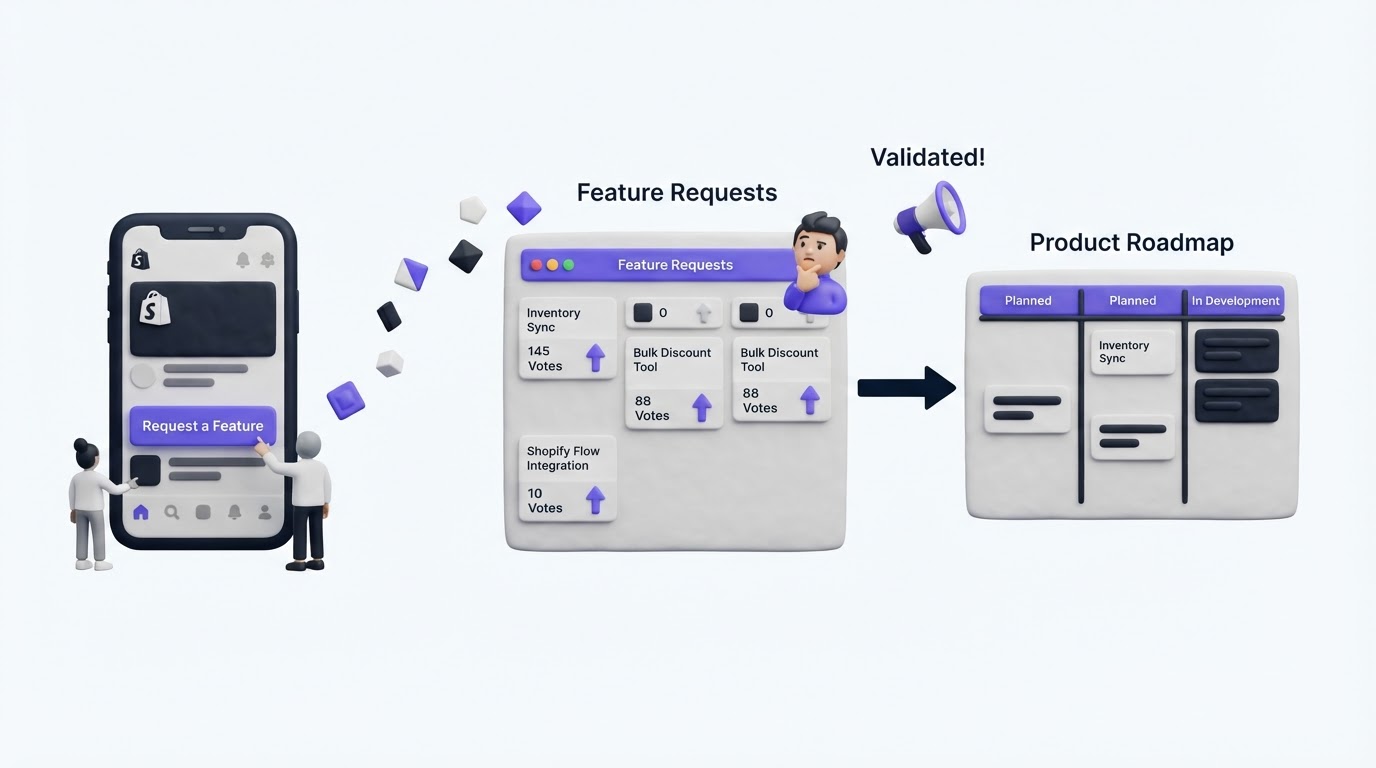
Teams can run this process with spreadsheets, tagged support tickets, and manual follow-ups. The overhead grows quickly as request volume rises. Upvoty keeps the evidence attached to the request throughout the decision and delivery cycle.
Start by creating a feedback board for product ideas. Configure categories that match the parts of your Shopify app where decisions happen, then use custom submission fields to capture the merchant’s use case.
Place the board in a customer portal or bring the request form into the app with a feedback widget. For BundlePilot, the team places the entry point beside the bundle editor and on its help center page, so merchants can submit ideas at two useful moments.
Next, group voters with segments. The team labels merchants by catalog size and plan, then filters the inventory request to see the stores behind the total. Duplicate posts can be consolidated before the weekly review, keeping comments and votes in one decision record.
!Upvoty public voting board showing feature requests and vote totals
Once a request is approved, move it to a visible status and add only meaningful commitments to a public roadmap. When BundlePilot ships its inventory work, the team can publish the update and notify the merchants who voted. That closes the loop without requiring a manual email list.
Turn feature voting into a Shopify app roadmap decision
Feature voting is one input in roadmap planning. Use a repeatable review every week or every two weeks so requests receive attention before the backlog becomes stale.
For each high-interest post, write a one-sentence decision statement. BundlePilot’s statement reads: “Build component-based availability for bundle merchants with large catalogs, because the request is repeated across the target segment and addresses fulfillment risk.” This is specific enough for product, support, and engineering to evaluate together.
Then estimate scope. The team learns that real-time component availability requires changes to inventory handling and clearer merchant-facing messaging around edge cases. The work is larger than first assumed, so the team creates a discovery task before placing a delivery date on the roadmap.
That sequence avoids a common failure mode: presenting an idea as planned before technical validation. Share status honestly. “Under consideration,” “researching,” and “planned” communicate different levels of commitment.
When work is ready to share, use a roadmap that explains the outcome rather than a technical task list. The guide to building a public product roadmap customers can trust covers how to set those expectations. After release, publish what changed and what merchants can do with it. A consistent changelog feedback loop gives voters evidence that their input reaches the product team.
Common feature voting mistakes for Shopify apps
The most costly errors come from treating votes as a full business case. Avoid these patterns:
- Building the highest-voted request without checking who voted and why.
- Leaving duplicates separate, which divides demand across near-identical posts.
- Asking for ideas without asking about the merchant’s current workflow.
- Publishing dates before engineering discovery is complete.
- Closing requests silently after a decision, which trains customers to stop participating.
- Allowing support tickets, bugs, and roadmap requests to share one unstructured queue.
A clear cadence solves much of this. Review new posts, merge duplicates, inspect segments, record a decision, and communicate status. Keep those steps visible to everyone who handles merchant feedback.
FAQ
How many votes should a Shopify app feature need before we build it?
There is no useful universal threshold. Compare vote count with segment fit, retention risk, the severity of the underlying problem, confidence in the evidence, and expected delivery effort. Ten votes from merchants facing a repeated operational blockage can justify discovery work sooner than 100 casual preferences.
Should Shopify app teams use a public feature voting board?
A public board works well when discovery and transparency are priorities. An authenticated board produces richer merchant context and gives teams greater control over voting quality. Many teams use an in-app route for active customers alongside a public page for prospects and partners.
How do we keep feature requests from becoming a backlog?
Review each request against a current product decision, then assign a status: needs clarification, under review, planned, in progress, released, or declined. Add a short explanation for declined items and link related posts to the canonical request. This keeps the board useful long after the first vote arrives.
Feature voting works best when your team can connect each request to the merchant segment behind it and a real roadmap choice. Try Upvoty to collect Shopify app feedback in one place, review the evidence with your team, and keep voters informed as decisions move forward.