
Shopify feedback often arrives in support tickets, product reviews, live chat, and sales calls. Once requests are scattered, teams lose the original context, customers submit duplicates, and planned improvements become hard to communicate.
Upvoty gives Shopify merchants and app developers one place to collect requests, let customers vote, prioritize demand, and publish progress. For most stores, the connection consists of a visible Shopify storefront entry point leading to an Upvoty portal, plus a feedback widget or API-based setup where customer context needs to travel with the request.
Quick answer: how to connect Upvoty to Shopify
- Create an Upvoty feedback board around the products, app features, or customer problems you want to improve.
- Build categories and a submission form that capture useful Shopify context, such as product name, store type, or order use case.
- Add a “Feedback” or “Request a feature” link to your Shopify navigation, account area, support pages, or app interface.
- Place an Upvoty feedback widget on high-intent pages, such as a post-purchase page, help center, or app dashboard.
- Review duplicate requests, merge related ideas, and prioritize the strongest themes using votes, customer segment, and revenue context.
- Move selected items through a public roadmap, publish releases in a changelog, and notify voters when work ships.
Set up Shopify product feedback software around decisions your team can make
Start with a board structure that matches your product decisions. A merchant selling physical products may need boards for product assortment, shipping experience, subscriptions, and store features. A Shopify app developer will usually benefit from boards organized by app workflows, such as reporting, integrations, onboarding, and billing.
Avoid a single catch-all board where every idea competes with every other idea. A request for a new t-shirt color and a request for a wholesale portal have different owners, timelines, and evidence requirements.
Consider Northstar Goods, a fictional Shopify merchant that sells refillable home-cleaning products. Its team receives requests for larger refill packs, bundle subscriptions, and delivery-date selection. The team creates three categories in Upvoty:
- Product range and refill sizes
- Subscription and account experience
- Delivery and checkout
Each submission form asks one practical question beyond the request itself: “Which product or order did this affect?” That field gives the team enough context to spot whether a request relates to the Citrus Kitchen Kit, a recurring subscription, or a one-time order.
For an app developer, replace product fields with app-specific context. Ask for the Shopify plan, store size range, app workflow, and a short description of the task the merchant was trying to complete. Keep forms short. Customers provide better input when they can explain a real problem in a few minutes.
Upvoty’s custom submission forms support this kind of structured intake. Add only fields that will influence a decision or routing rule.
Add Upvoty feedback entry points to your Shopify store or app
Customers need to encounter the feedback channel at a relevant moment. A footer link alone produces passive discovery. Place a clear invitation where customers have just experienced the part of the business they want to improve.
For a Shopify storefront, add a navigation item called “Feedback” or “Request a product improvement” that opens your Upvoty portal. You can also link from your FAQ, order-confirmation email, customer account area, and customer support macros.
For a Shopify app, add the entry point inside the app itself. Good locations include an empty state, a feature settings page, a help menu, or a support screen. Use language that tells people what happens next: “Share an idea and vote on existing requests.”
A widget works well when leaving the current page would interrupt the task. Upvoty’s feedback widget can provide an in-context route into your board. Follow Shopify’s current guidance for storefront extensions when adding code or app UI to an online store. Shopify documents the supported approach in its theme app extension documentation.
Northstar Goods initially placed its feedback link only in the site footer. Most requests continued to arrive through email. The team then added a link to the subscription management help article and a widget prompt after customers changed a delivery frequency. Feedback shifted from vague comments such as “subscriptions are confusing” to specific requests for a skip button and a delivery-date picker.
Choose the right connection model
| Shopify use case | Best Upvoty entry point | Context to capture | Owner |
|---|---|---|---|
| Physical-product store | Navigation link plus help-center link | Product, variant, order scenario | Ecommerce manager |
| Subscription store | Widget near account and subscription flows | Subscription frequency, delivery issue | Retention team |
| Shopify app | In-app feedback link or widget | Workflow, store type, app plan | Product manager |
| Agency-built store | Client portal with private boards | Client, project, requested change | Account lead |
Use a hosted portal when you want a visible destination customers can revisit to vote and follow progress. Use an in-page widget when feedback is most valuable during a task. Use the Upvoty API when your implementation needs to pass customer or account metadata into the feedback workflow.
Collect feature requests without creating a duplicate-request mess
Feature voting only helps when customers can find an existing idea before writing a new one. Set a clear title format for new posts. For example, Northstar Goods uses “Add [outcome] for [customer situation]” rather than open-ended titles such as “Subscription feature.”
Before approving a post, search the board for similar requests. Merge duplicates into the clearest version of the request, retain the useful details in internal notes, and direct voters to the combined post. This turns five slightly different requests into one demand signal the team can evaluate.
Moderation also protects the quality of your board. Approve submissions that identify a real product opportunity, route support incidents into the help queue, and remove personal order information before posts become public. Shopify merchants handling customer details should also review their collection and retention practices against applicable privacy requirements. The European Commission’s GDPR guidance provides a useful starting point for teams serving EU customers.
For a fuller operating model, see this guide to feature request management workflows. It covers intake, review, prioritization, and follow-up as connected activities.
Prioritize Shopify feedback using demand and customer context
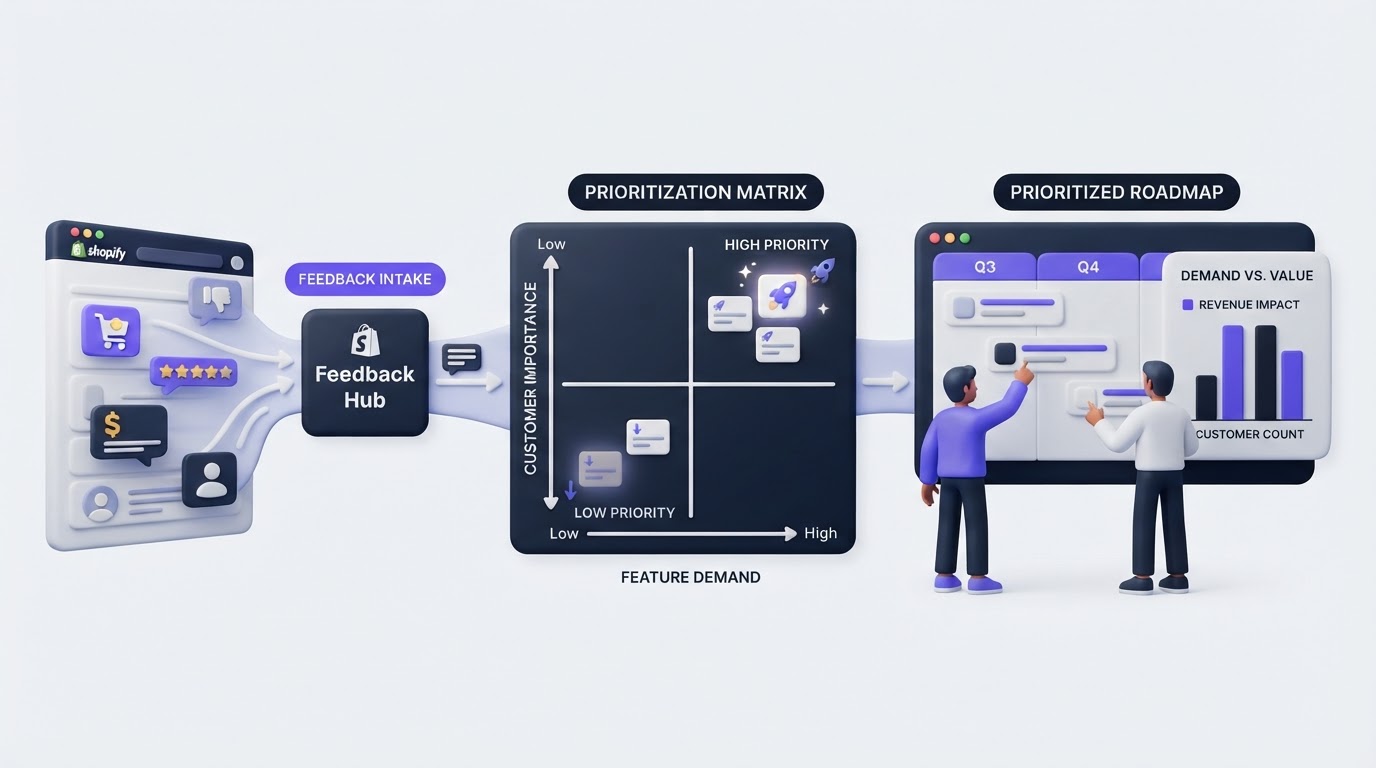
A vote count is a useful signal. It rarely gives a complete priority order on its own. Ten votes from active subscription customers facing a renewal-blocking issue may deserve earlier attention than 30 votes for a cosmetic storefront preference.
Review every high-interest request with four questions:
- Which customer segment asked for it?
- What task, purchase, or retention risk sits behind the request?
- How often does the issue appear across feedback, support, and sales conversations?
- What delivery effort and dependencies would the change require?
Northstar Goods sees 18 votes for delivery-date selection and 24 votes for a new bundle-builder. The bundle-builder appears more popular at first glance. The team finds that delivery-date requests come largely from repeat subscribers who contact support after missed deliveries. The team schedules delivery-date selection for discovery first because the request connects directly to a recurring customer workflow.
Use segments to separate input from wholesale buyers, repeat subscribers, trial users, agency clients, or high-value app accounts. This gives product teams a clearer view of who is asking, beyond the total vote count. For a detailed scoring approach, read how to prioritize customer feedback by revenue, segment, and demand.
How Upvoty supports the Shopify feedback workflow
A Shopify team can run this process with forms, spreadsheets, support tags, and manual updates. The administrative work grows quickly once requests span multiple channels and people need status updates.
Inside Upvoty, the workflow follows the customer journey. First, customers submit requests through a public or private board. They can search, vote, and comment on existing ideas, which concentrates related demand in one place. The team then moderates submissions, merges duplicates, applies tags or segments, and adds internal context before prioritization.
This feedback dashboard shows the working view a product team uses to manage requests and spot patterns.
!Upvoty feedback management dashboard showing customer requests and analytics
Next, selected requests move to status-based planning. A public roadmap can show items under consideration, planned work, and completed improvements without publishing every internal commitment. Northstar Goods could place delivery-date selection in “Researching,” then move it to “Planned” once the subscription platform confirms the technical approach.
Finally, publish the released improvement in a changelog and notify the people who voted for it. This closes the loop with the customers who supplied the evidence. Learn how to set expectations carefully in a public product roadmap customers can trust, then use the changelog workflow to communicate the release.
Publish a Shopify roadmap without overpromising
A customer-facing roadmap should communicate direction and progress. It should avoid dates that depend on unconfirmed technical work, supplier constraints, or platform approvals.
Use broad, clear statuses. “Under consideration” means the team is evaluating the problem. “Planned” signals an accepted initiative. “In progress” indicates active work. “Complete” links to the release details. Add enough detail for customers to recognize the outcome while keeping internal estimates and sensitive commercial decisions private.
For Northstar Goods, “Improve subscription delivery control” is a stronger roadmap item than “Build delivery-date picker by June 15.” The first tells customers the problem being addressed. The second creates a deadline that may move when subscription-platform constraints emerge.
Upvoty’s roadmap feature connects planned work to the feedback that informed it. This gives customers a visible path from request to progress, while the team maintains a focused internal delivery plan.
Common mistakes when using Shopify product feedback software
The first mistake is treating the board as a replacement for customer support. A missing parcel, refund request, or account-access problem needs a service response. Use the board for recurring problems and improvement opportunities.
The second is launching a public board without assigning an owner. Give one person responsibility for moderation at least weekly. Their job includes merging similar ideas, asking clarifying questions, and updating statuses.
The third is promising every highly voted request. Votes express demand. Delivery still requires product judgment, technical assessment, and a viable business case.
The fourth is publishing updates only when a feature ships. Move items through meaningful statuses and explain major decisions where appropriate. Customers can accept a declined request when they receive a clear explanation and an alternative path.
FAQ
Does Upvoty have a Shopify integration?
Upvoty can be connected to a Shopify storefront or Shopify app through a portal link, feedback widget, and API-based implementation. Choose the setup that fits the location where customers should share feedback and the customer context your team needs to capture.
Where should a Shopify store ask for product feedback?
Ask near the relevant customer moment: after purchase, in account management, on subscription help pages, in post-delivery communication, and within support conversations. Start with one or two locations, then review the quality of submissions before adding more prompts.
Should feature requests be public for Shopify customers?
Public boards work well when shared demand and visible progress support trust. Private boards fit agency clients, B2B merchants, beta programs, and feedback containing operational detail. Upvoty supports private or public feedback boards, so teams can choose based on audience and sensitivity.
How often should we review customer feedback?
Review new submissions weekly and review broader priority themes monthly or alongside your product planning cycle. Urgent support patterns deserve a faster route into the responsible team.
If your Shopify team needs one place for requests, votes, roadmap updates, and release communication, set up an Upvoty feedback portal around the customer journeys you actively improve. Start with one focused board, invite a small customer group, and refine the workflow from the requests they submit.