A merchant opens your Shopify app, sees a changed setting, and has no idea why the workflow looks different. Support tickets follow, even when the release solves a request merchants raised for months.
Product changelog software for Shopify apps gives every release a visible home and connects it to the feedback behind the decision. Upvoty can keep feature requests, roadmap status, and merchant-facing updates in one feedback loop.
Quick answer: how to publish Shopify app updates merchants understand
Use this workflow for each meaningful release:
- Collect merchant requests in a dedicated feedback board and merge duplicate ideas.
- Prioritize the request using demand, merchant segment, support impact, and delivery effort.
- Move the selected item through a visible roadmap status.
- Publish a changelog post with the merchant outcome, affected workflow, and setup steps.
- Link the update back to the original request and notify the merchants who voted.
- Track follow-up feedback and clarify the post when questions reveal gaps.
Why Shopify app updates need a merchant-facing changelog
Shopify app releases often affect a live store operation. A change to inventory rules, order tags, subscription behavior, or theme settings can alter work that a merchant repeats every day. Release notes aimed only at developers leave store owners looking for the practical answer: what changed in my work, and what should I do now?
A useful changelog post answers four things quickly: who benefits, what behavior changed, where to find it, and whether any action is required. It also gives support, success, and sales teams one URL to share.
For example, consider a fictional Shopify app called BundleFlow. Its merchants request automatic inventory protection for bundle components. The existing request at feedback.bundleflow.app/feature-requests/bundle-inventory-protection contains several versions of the same problem: overselling a component, manually pausing bundles, and reconciling stock after a sale.
The team merges those submissions into one request, marks it Planned, then releases the feature. A vague update titled “Inventory enhancements” creates more work. A merchant-friendly post titled “Prevent bundle sales when a component is out of stock” explains the result, points to the Bundle settings page, and states that existing bundles require one toggle to activate protection.
Clear public communication also supports the expectations around trustworthy app operations. Review Shopify’s app review requirements before publishing or changing merchant-facing app behavior, especially where billing, data, and store workflows are involved.
How product changelog software for Shopify apps turns feedback into updates
1. Capture requests where merchants can add context
Start with a feedback board organized around product areas merchants recognize, such as Orders, Inventory, Bundles, Analytics, and Integrations. Add a feedback link inside the app near the workflow where the friction occurs. A merchant who has just encountered a stock issue can describe the actual scenario while it is fresh.
Use a short custom form to capture the details your product team needs: store type, current workaround, affected workflow, and desired outcome. Keep required fields lean. Long forms reduce useful submissions from busy operators.
BundleFlow places “Request an inventory improvement” in its bundle configuration screen. A merchant submits: “Pause the bundle when any component reaches zero.” Other merchants vote for that request instead of creating parallel entries. The team now has a visible demand signal and concrete language for the eventual changelog.
Upvoty’s feedback boards give merchants a place to submit, vote on, and discuss ideas. For a broader implementation plan, see how to collect, organize, and prioritize feature requests.
2. Merge duplicates before priority decisions
One feature can arrive under several labels. “Stop overselling bundles,” “component stock validation,” and “disable out-of-stock offers” may describe one underlying need. Keep the clearest request as the parent and merge the others into it.
This housekeeping has a direct effect on changelog quality. A single, well-scoped request gives the release post a clean story: merchants asked for a specific outcome, the team shipped it, and voters can see where to enable it.
Assign an owner and add internal notes with edge cases. For BundleFlow, the main decision concerns how inventory protection works with bundles that have multiple variants. The team records this limitation before development, which later becomes a short “Availability” note in the changelog.
3. Prioritize merchant impact alongside votes
Vote count is useful evidence, yet Shopify app teams need additional context. A request from a high-volume merchant can expose a severe operational issue, while a broadly requested design preference may have lower urgency. Review the request alongside support volume, affected merchant segments, strategic fit, risk, and implementation effort.
| Prioritization input | What it reveals for a Shopify app | BundleFlow inventory example |
|---|---|---|
| Votes and comments | Breadth of demand and merchant language | Several merchants describe manual bundle pauses |
| Merchant segment | Which store types gain value | High-SKU stores face the largest exposure |
| Support conversations | Repeated friction and urgency | Agents repeatedly explain stock workarounds |
| Delivery effort | Scope, dependencies, and release risk | Variant handling requires additional testing |
| Product strategy | Fit with the app’s core promise | Reliable bundle operations are central to BundleFlow |
Set the request status only after this review. Planned communicates intent. In Progress signals active delivery. Completed belongs on the request after the release is available to merchants. A public roadmap earns trust when statuses reflect current reality. Read how to prioritize customer feedback by revenue, segment, and demand for a detailed decision framework.
4. Write the changelog around merchant outcomes
Write the title as a benefit a merchant can identify at a glance. Put the operational change in the first paragraph. Then tell readers where the feature lives and whether they need to change a setting.
For BundleFlow, the post could open with: “BundleFlow can now pause bundle availability when any required component is out of stock. Enable Inventory Protection in each bundle’s Inventory section to prevent new bundle orders until component stock returns.”
Follow with a brief explanation of scope. Mention variant behavior, any conditions, and a support route for unusual configurations. Screenshots work well when the release introduces a new control or setting. Add useful alt text and meaningful captions. The WCAG 2.2 standard provides the accessibility baseline for text alternatives and understandable content.
Avoid internal release language such as “refactored inventory validation service.” A merchant needs the behavioral result and the next action. Technical detail can appear in a small section where API users or advanced administrators genuinely need it.
5. Link the changelog post to the request that informed it
A changelog entry becomes far more credible when merchants can trace it back to a request they submitted or supported. Add a link to the original feedback item in the post, then change that item’s status to Completed after the feature is live.
For BundleFlow, the changelog links to “Prevent bundle sales when a component is out of stock.” The request links back to the release. A voter can travel in either direction: from the problem to the shipped solution, or from the announcement to its original merchant need.
This two-way connection also helps future product decisions. When a merchant comments that the setting needs bulk activation, the team adds that input to a related request instead of scattering product context across support conversations and announcement replies.
6. Notify voters and keep listening after release
Send an update to the people who voted for or commented on the request. The message should include a direct link, a one-sentence outcome, and any activation step. Keep the announcement focused. Merchants want confirmation that their issue moved forward.
Then watch responses during the first days after release. Questions often uncover unclear copy, missing onboarding, or an edge case. BundleFlow sees several comments from merchants who manage hundreds of bundles. The team creates a follow-up request for bulk activation and updates the changelog post with a clear note: inventory protection is enabled per bundle in the current release.
This is how a changelog becomes part of product discovery rather than a final announcement. More guidance appears in how to close the customer feedback loop with a changelog.
How to use Upvoty as product changelog software for Shopify apps
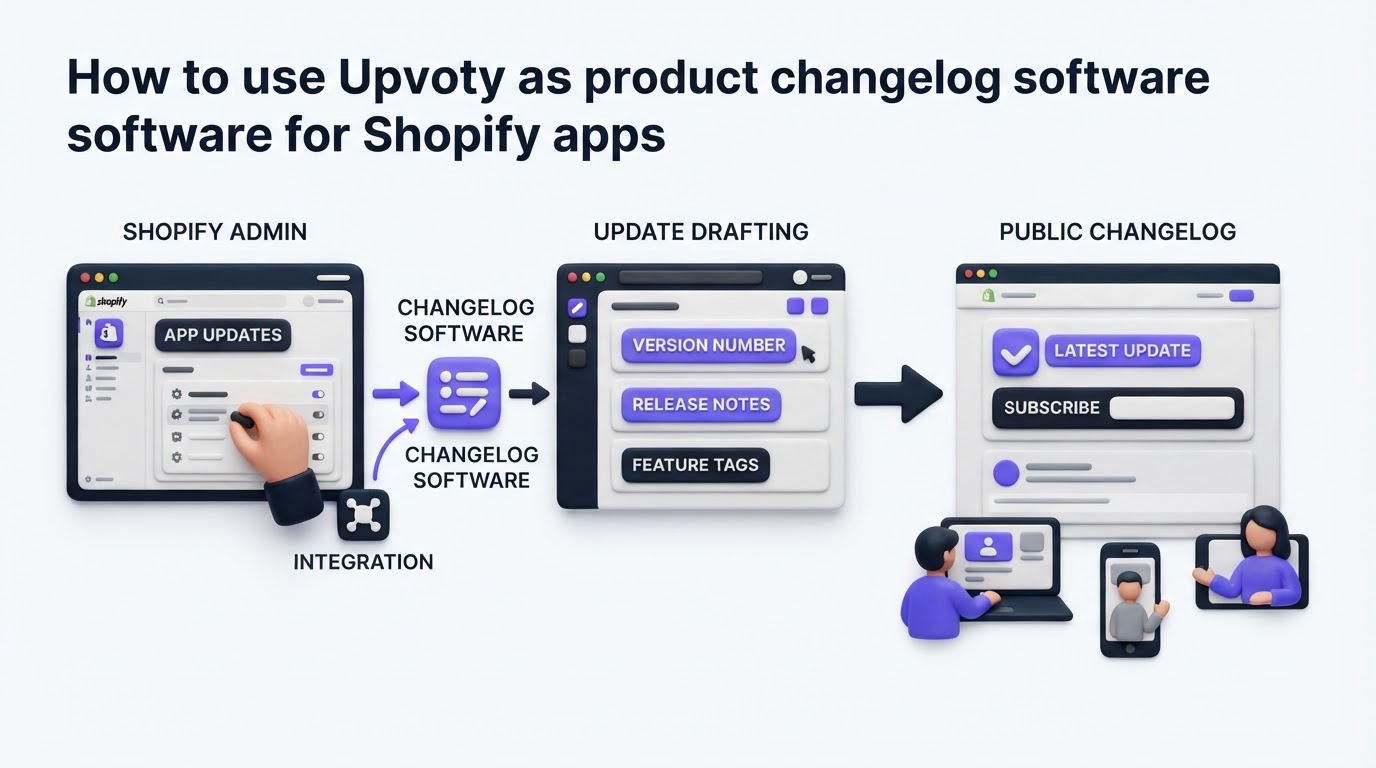
Upvoty brings the workflow into one merchant-facing system. The practical value comes from preserving the connection between each stage rather than copying updates between disconnected tools.
Start by creating feedback boards for the areas of your Shopify app where merchants commonly have ideas or friction. Publish the board through a portal or place the feedback widget inside your app so requests arrive close to the relevant workflow.
Next, merge duplicate requests, use internal notes for delivery context, and assign a status as the team decides what to build. The roadmap feature can show merchants which approved work is Planned or In Progress without publishing a speculative release date.
When BundleFlow ships inventory protection, the team creates a post in Upvoty’s changelog. The post includes the merchant benefit, the enablement step, a screenshot, and a link to the completed feedback item. Voters receive the release update and can add follow-up comments in the same product feedback environment.
The screenshot below shows the kind of public release feed merchants can use to scan recent changes and open the updates that affect their stores.
!Public changelog showing product launches and update posts
This approach reduces the hunt for context during release day. Product, support, and merchant-facing teams can share the same source of truth while each group uses it for a different purpose.
Common mistakes with Shopify app changelog updates
The most common failure is publishing a title with no merchant outcome. “Version 3.8.0” forces readers to open the post and interpret technical detail. Use a descriptive title that names the workflow improved.
Another failure is announcing a feature before it reaches every eligible merchant. If access rolls out in stages, say so plainly and explain who has access today. Set expectations in the roadmap and use the changelog for the release state merchants can actually use.
Teams also lose trust when a release post avoids limits. BundleFlow’s inventory protection may support standard bundles first while a special fulfillment setup needs further work. State the supported scope, offer a route for feedback, and create a visible request for the next iteration.
Finally, avoid treating every small maintenance item as a merchant announcement. Publish meaningful workflow changes, fixes that address visible pain, and releases that require action. Keep a lighter cadence for minor changes so important updates remain easy to find.
FAQ about changelog software for Shopify apps
Should every Shopify app release have a changelog post?
Publish a merchant-facing post for updates that change a workflow, solve a recurring issue, introduce a setting, alter permissions, or require merchant action. Minor internal maintenance can stay within engineering release records unless it affects store behavior.
How detailed should a Shopify app changelog be?
Use enough detail for a merchant to understand the outcome and complete the next step. Include screenshots for unfamiliar screens, state key conditions or limits, and place advanced implementation details below the main explanation.
Can a changelog replace a public roadmap?
A changelog documents releases that are available. A roadmap shows work that is being considered or built. Publishing both gives merchants visibility from request through delivery. For roadmap structure and status guidance, read how to build a public product roadmap customers can trust.
What should Shopify app teams do when a requested feature ships only partly?
Describe the shipped scope with precision, connect it to the original request, and create or retain a separate request for the remaining use case. This preserves an accurate delivery record and gives merchants a place to vote on the next increment.
Give merchants a clear path from request to release with Upvoty. Create feedback boards, share realistic roadmap statuses, and publish changelog posts that explain exactly how each Shopify app update helps their store.


