
A request titled “add exports” leaves a product team with several expensive guesses. Which data format? Who needs it? How often does the job occur? What breaks in the customer’s current workflow?
A well-designed feature request form collects those answers while the customer still has the problem in front of them. Upvoty helps teams collect requests, group similar demand, add internal context, and keep customers informed as decisions move forward.
Quick answer: how to create a feature request form
Build your form around the decisions your team needs to make:
- Ask for a short request title that describes the outcome.
- Ask what the customer is trying to accomplish and how they handle it today.
- Capture frequency, affected users, consequences, and supporting evidence.
- Attach account context such as plan, segment, role, and product area.
- Check for duplicates, ask targeted follow-up questions, then score the consolidated request.
- Close the loop when the request reaches a roadmap, ships, or is set aside.
Start your feature request form with the prioritization decision
Write the form after defining the decision it must support. Product teams generally need to assess reach, customer impact, strategic fit, effort, and confidence. Each customer submission can contribute evidence to the first three areas. Engineering and product discovery fill in the remaining areas later.
Use a clear opening sentence above the form: “Tell us what you are trying to achieve, where the workflow slows down, and who is affected.” This sets an expectation for useful detail and produces stronger submissions than a blank text box.
Follow one request through the process. Imagine a B2B inventory platform called StockPilot. An operations manager submits: “Please add Excel exports.” The team can treat that as a loose idea, or collect the context needed to decide whether to build an XLSX export, scheduled reports, a warehouse-level permissions model, or an API improvement.
The form should help the manager describe the job. StockPilot learns that the manager exports a weekly shortage report for 14 warehouse supervisors, manually cleans CSV columns, and sends the file to a finance team every Friday morning. The actual request becomes much clearer: “Export the shortage report as formatted XLSX with warehouse filters.”
Include these fields in a feature request form
Ask enough questions to establish a useful product case, then keep the route to submission short. A form with five focused fields usually performs better than a long intake questionnaire. Put the title and goal first. Place account details behind prefilled fields wherever possible.
| Field | Suggested prompt | What the team learns | Setup |
|---|---|---|---|
| Request title | “What would you like to achieve?” | A concise outcome for search and grouping | Required |
| Customer goal | “What are you trying to accomplish?” | The underlying job, beyond a proposed solution | Required |
| Current workflow | “How do you handle this today?” | Workarounds, competing tools, and friction | Required |
| Frequency and impact | “How often does this happen, and what happens when it takes too long?” | Severity and recurrence | Required |
| Affected people | “Who uses this workflow?” | Role, team size, and reach | Required |
| Product area | “Where did you expect to find this?” | Routing to the relevant product owner | Required |
| Evidence | “Add a screenshot, example file, or error message.” | Reproducible details for discovery | Optional |
Use “what would you like to achieve?” for the title field. It encourages an outcome such as “Share filtered shortage reports with finance” over “Build an Excel button.” Proposed solutions still matter, yet the customer’s goal gives your team room to identify the right solution.
Keep labels visible above each input. The W3C guidance on form instructions explains why clear labels, required-field indicators, and specific input guidance improve form accessibility.
Ask follow-up questions that reveal urgency and scope
The initial form captures a baseline. Follow-up questions add the detail that changes a roadmap decision. Ask them after a person submits, especially when a request gains votes or matches a strategic area.
For StockPilot’s export request, the product manager asks: “Which report fields require formatting?” “Would a CSV with saved column order solve the immediate problem?” and “Does finance need the file on a schedule?” The answers show that file format alone carries limited value. Scheduled delivery and repeatable filters represent the higher-value workflow.
Use these follow-ups when the request warrants deeper discovery:
- “Can you share an example of the output you need?”
- “Which step takes the longest today?”
- “What would change for your team if this worked?”
- “Who else in your account encounters this issue?”
- “Is there a deadline, renewal, audit, or launch connected to this?”
Ask a customer-facing question only when its answer could change the decision. A request with 40 voters may still require interviews if each vote reflects a different job. A smaller request from a strategically important segment can justify a faster investigation.
Capture customer context automatically where possible
A request becomes easier to prioritize when the team can see who submitted it. Prefill known details from your application or customer record: account name, role, plan, lifecycle stage, region, product usage, and assigned account owner. Keep personal data proportional to the decision you need to make. The GDPR data minimisation principle in Article 5 provides a useful standard for collecting only relevant information.
For StockPilot, the request comes from an operations manager at a multi-warehouse account. That context changes the discussion. A request from a single-location trial account and a request from an established account with 14 warehouse supervisors carry different evidence about reach and fit.
Segment context also reveals patterns hidden by raw vote totals. Five requests from warehouse managers may point to an operational reporting gap. Five requests from procurement users may indicate a separate workflow. Keep those groups visible. The practical scoring model in how to prioritize customer feedback by revenue, segment, and demand shows how to combine these signals into a repeatable decision.
Route duplicates before counting votes on a feature request form
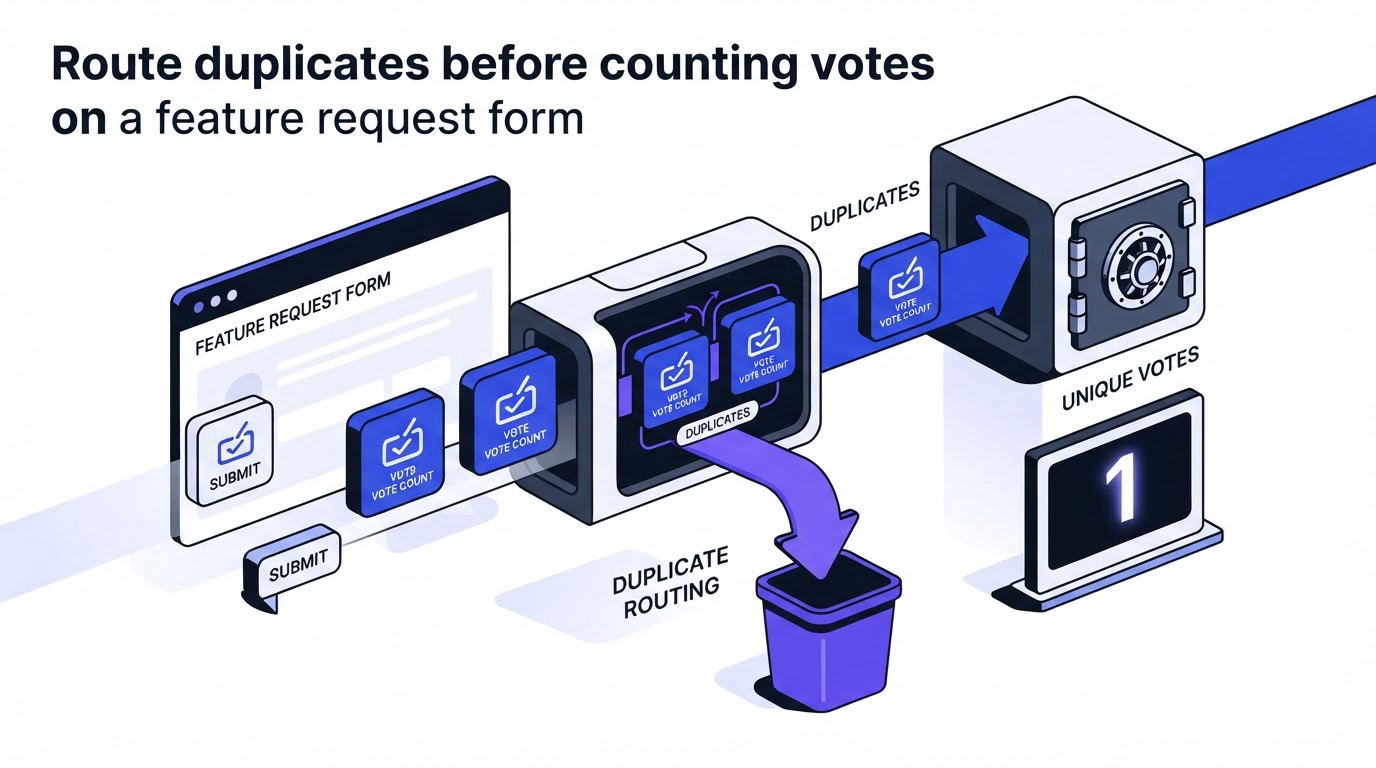
Duplicate requests fragment demand. One customer asks for “Excel export,” another asks for “weekly reporting,” and a third asks for “send reports to finance.” Each could describe the same product opportunity, yet the wording obscures that connection.
Search existing requests as the customer types. When a close match appears, invite them to vote and add their use case to the existing post. Keep a direct submission option for genuinely distinct needs.
A moderator should review new posts regularly. For StockPilot, the moderator links the three export-related submissions to a single parent request: “Scheduled, filtered operational reports for finance.” The original language stays available in comments or internal notes, preserving the evidence behind the merged demand.
This routine avoids a common failure mode: prioritizing the loudest wording instead of the largest shared problem. Establish a weekly triage window, assign an owner, and use consistent merge criteria. The broader workflow is covered in this guide to collecting, organizing, and prioritizing feature requests.
Build the feature request form workflow in Upvoty
A form needs an operational home after submission. With Upvoty, start by creating a feedback board for the product area or audience you want to hear from. Configure custom submit forms with the title, goal, workflow, impact, and product-area prompts above.
Next, place a feedback widget inside the relevant product screen. A request submitted from StockPilot’s reporting page arrives with a clearer starting point than a request gathered from a generic contact form. Direct customers to the board when they need to browse, vote, or add context to existing ideas.
!Upvoty feedback dashboard showing organized product feedback
During triage, use segments to view demand by customer type and apply internal notes or assignees to capture discovery findings. Merge related submissions when they describe the same job. Upvoty’s Merge AI can assist with identifying similar feedback, while a product owner still checks the underlying context before combining posts.
When the team commits to the reporting work, move the consolidated request to a public roadmap. After release, publish the update through the changelog and notify the voters. This sequence turns the form into an ongoing customer communication channel. For the customer-facing side of that workflow, see how to close the customer feedback loop with a changelog.
Use request forms to qualify demand from content-led acquisition
Product teams often publish comparison pages, workflow guides, and integration content to attract people who already feel a specific pain. Those visitors can become valuable feature-request contributors when the article leads to a form tailored to the problem discussed.
For example, StockPilot could publish a guide about inventory reporting workflows and link to a request form preselected with “Reporting and exports” as the product area. The form can ask which report the visitor needs, whether they use spreadsheets or an API today, and how often their team prepares the data. Each answer turns anonymous interest into product evidence.
A managed link building service can help bring relevant audiences to that kind of useful, problem-focused content. Teams evaluating that channel can review Backlinks Autopilot’s managed link building service for its approach to done for you link building and relevant backlinks service work. Keep the landing page and the request form tightly aligned. A visitor arriving for warehouse reporting advice should see reporting questions, while a visitor reading about integrations should see integration questions.
Review source and request patterns monthly. If one content theme consistently produces detailed submissions from a target segment, create a dedicated discovery track for that product area.
Common feature request form mistakes
The most damaging mistake is a single large “Share your idea” text box. Customers often provide a solution label, while the product team needs the underlying workflow, impact, and user group.
Another mistake is forcing every customer through the same long sequence of questions. Use conditional prompts. Someone selecting “Bug or reliability issue” needs reproduction details. Someone selecting “New capability” needs outcome and frequency. The form should match the type of input.
Avoid treating votes as a standalone priority score. Votes provide demand evidence. Segment, impact, strategic fit, confidence, and delivery cost belong in the final decision as well. Preserve original comments when merging so product managers can test whether the apparent theme holds up.
Finally, set expectations after submission. Tell contributors where they can follow progress and when the team reviews requests. A clear roadmap process builds more trust than an abandoned intake form. This guide to building a public product roadmap customers can trust explains how to communicate progress at each status.
Feature request form FAQ
What is the best feature request form question to ask first?
Ask, “What are you trying to achieve?” This prompt surfaces the customer’s goal before they anchor the conversation to a specific interface or implementation. Follow it with a question about their current workflow.
How many fields should a feature request form have?
Start with five to seven fields: title, goal, current workflow, frequency and impact, affected users, product area, and optional evidence. Prefill account details through your product or CRM where available.
Should customers be able to submit feature requests anonymously?
Anonymous submissions can help gather broad signals from prospects or community visitors. Identified submissions give product teams the ability to ask follow-up questions and evaluate customer context. Use the approach that fits your audience and privacy requirements.
How should a team respond after someone submits a request?
Send a confirmation that explains what happens next, point the contributor to the existing request if the team merged it, and share progress when the request changes status. Notify voters when a related capability ships.
Build your form around customer goals, current workflows, and accountable follow-up. Upvoty gives your team a place to collect those requests, understand the demand behind them, and keep contributors informed as product decisions move forward.


