
A Shopify inbox can fill with scattered signals: a return comment about sizing, three requests for a bundle builder, and a support ticket from an app user asking for export options. When those messages stay in email, chat, and reviews, product decisions depend on whoever remembers them.
Shopify customer feedback becomes useful when every signal reaches one place, similar requests are grouped, customers can vote, and the team communicates progress. Upvoty gives Shopify merchants and app teams a structured place to run that process.
Quick answer: how to turn Shopify customer feedback into product ideas
- Gather feedback from support conversations, reviews, surveys, app users, and post-purchase messages in one feedback board.
- Merge duplicate requests into a single clearly named problem or product idea.
- Tag each post by customer type, store area, product line, and revenue relevance.
- Let customers vote and add context so recurring needs become visible.
- Review demand alongside effort, strategy, and operational impact before setting a priority.
- Publish selected work on a roadmap and notify voters when it ships.
Start by centralizing Shopify customer feedback
Choose a single destination for feedback before asking customers for more of it. A shared spreadsheet can work for a short validation period, yet it becomes hard to search, merge, and update once requests arrive every week. A dedicated board gives each idea a permanent record and lets shoppers see whether someone has already raised it.
Create separate boards when the audiences have genuinely different needs. For example, a Shopify merchant might use one board for store customers and another private board for wholesale buyers or internal staff. A Shopify app team can separate merchant requests from agency-partner requests while keeping both visible to the product team.
Use consistent intake prompts. Ask for the situation that caused friction, the desired outcome, and any product or order context that helps the team investigate. “Add more filters” leaves too much open. “Filter subscription orders by renewal week in the merchant dashboard” points to a specific workflow.
For store feedback, draw from these channels:
- Post-purchase surveys and return-reason forms
- Customer support tickets, live chat, and social messages
- Product reviews and review follow-ups
- On-site feedback forms for account, cart, and checkout-adjacent journeys
- Shopify app support requests and merchant onboarding calls
- Conversations with wholesale, loyalty, or subscription customers
Shopify’s own guidance on customer feedback and research is useful for planning interviews and surveys. Feed the resulting themes into the same board as written requests, rather than storing research findings in a separate folder.
A public board works well when shoppers can safely see and discuss ideas. Use a private board for security issues, account-specific requests, or early concepts that need internal review. Upvoty supports public and private feedback boards, so the collection method can match the audience.
Turn repeated Shopify feedback into one voteable idea
Raw feedback rarely arrives in product-language. Customers describe symptoms. Your job is to preserve their context while grouping related requests under a decision-ready title.
Consider Trail & Tide, a fictional Shopify store selling hiking gear with a companion app for trail packing lists. Its support team receives these messages over two weeks:
- “Can I buy a tent, mat, and sleeping bag as one kit?”
- “I keep adding the same camping basics individually.”
- “A beginner bundle under $250 would help.”
- “Please include a suggested starter pack.”
The team should create one post called Build-your-own beginner camping bundles, then attach the original messages as internal context. Creating four separate posts splits the vote count and hides the shared job customers are trying to complete.
Keep the title specific enough for a customer to recognize. Use the description to capture boundaries: eligible categories, desired price range, and whether customers expect fixed bundles or mix-and-match kits. This detail prevents a misleading vote total for several different solutions.
| Feedback state | What the team does | Trail & Tide example | Decision value |
|---|---|---|---|
| Raw signal | Preserve the source and customer wording | “I keep adding basics individually” | Reveals the customer’s friction |
| Merged idea | Group requests around one job to be done | Build-your-own beginner camping bundles | Concentrates demand |
| Tagged request | Add audience and operational context | First-time buyer, camping, cart | Enables meaningful filtering |
| Prioritized item | Assess demand, effort, margin, and strategy | Bundle builder enters discovery | Supports a delivery decision |
| Roadmap update | Share the current status | Researching bundle options | Sets clear expectations |
Merge carefully. “Bundle recommendations” and “subscription refill packs” may both involve grouped products, while their buying journeys, inventory rules, and economics can differ sharply. Keep them as separate posts when the solution path changes.
Upvoty’s feedback boards provide a shared destination for these posts, comments, and votes. For a detailed operating model, see this guide to collecting, organizing, and prioritizing feature requests.
Use votes to measure demand, then add business context
Voting helps a Shopify team see which needs recur across customers. It works best after similar requests have been merged. A board with duplicate posts produces fragmented demand and encourages teams to chase whichever wording happens to appear first.
Votes alone cannot decide every product investment. Trail & Tide’s beginner bundle idea may receive 42 votes from first-time buyers, while a shipping-address validation issue receives six votes from wholesale accounts that place large repeat orders. Both deserve review, yet they carry different commercial and operational consequences.
Review each high-signal post through four lenses:
Who is asking?
Segment feedback by customer type. New shoppers, repeat buyers, wholesale accounts, loyalty members, and app merchants often want different things. A feature requested by five high-value wholesale accounts may justify faster research than a broadly popular cosmetic preference.
What journey does it affect?
Tag the relevant area: product discovery, product page, cart, delivery, returns, account, subscriptions, or app administration. Journey tags reveal clusters that a vote total alone can hide. Ten separate requests across cart and delivery may point to one checkout-confidence problem.
What would change if you built it?
Estimate the operational effect before promising delivery. Bundles can affect inventory allocation, discount rules, fulfillment, returns, and merchandising. For an app, an export feature may require data permissions, performance testing, and support documentation.
Is it aligned with the next product bet?
Set a simple status such as under review, planned, in progress, and complete. Reserve “planned” for work with a real owner and a credible window. This prevents a public board from becoming a list of vague promises.
Read more about weighting feedback by customer value and demand in how to prioritize customer feedback by revenue, segment, and demand.
How Upvoty manages Shopify customer feedback from request to roadmap
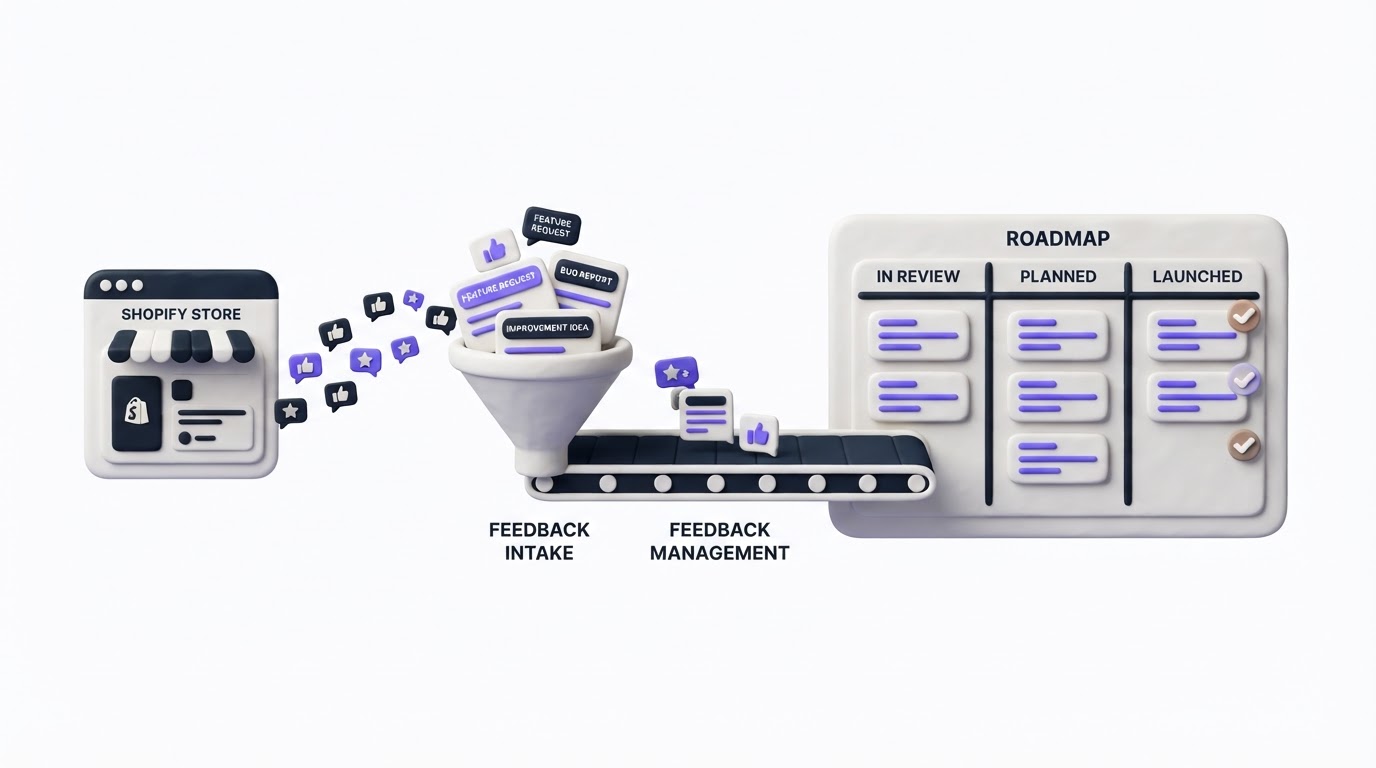
Upvoty removes the manual handoff between scattered feedback, prioritization conversations, and customer updates. Here is how Trail & Tide could run the bundle idea through the product workflow.
First, the team adds a link to its Upvoty portal in a post-purchase email, help center, and merchant app support reply. Customers submit requests or vote on an existing post rather than creating another email thread. A branded feedback portal keeps the process familiar and easy to share.
Next, the product owner reviews incoming posts, merges the four bundle requests, and adds internal notes about Shopify inventory constraints. Tags identify first-time buyers and cart-related feedback. The owner can then filter the board to compare the bundle request with other early-funnel issues.
After discovery confirms that a mix-and-match approach is feasible, the team changes the status to planned and adds the item to the product roadmap. Customers can see that the idea is receiving active work without being given a release date the team cannot support.
This dashboard view shows the kind of central workspace that makes feedback review easier for a small Shopify team.
!Upvoty dashboard for managing customer feedback, tags, and product requests
When the bundle builder launches, Trail & Tide publishes a changelog entry and notifies the customers who voted. That follow-up produces a clear trail from request to delivery. Learn how to set those expectations in this guide on closing the customer feedback loop with a changelog.
Connect referral feedback to Shopify product decisions
Referral programs generate a useful kind of Shopify customer feedback: customers reveal what they feel confident recommending to friends. A merchant may notice that advocates share a product after a strong unboxing experience, while referrals drop when the referral journey asks shoppers to complete too many steps.
Use a feedback board to collect ideas from both advocates and referred customers. At Trail & Tide, a post such as “Let me send a starter-kit recommendation with my referral” could reveal demand for shareable bundles and a clearer landing page. Tag those requests as referral-related, then compare the pattern with conversion feedback and support questions.
For teams running recurring commissions or partner programs, affiliate tracking software for SaaS and Stripe referral programs can support the operational side of tracking referrals and commissions. Keep the product-learning loop separate from program administration: send participant suggestions into Upvoty, merge repeated requests, and use votes to determine whether a referral feature deserves development time.
This approach also prevents a common failure mode. A single affiliate’s request can sound urgent because it comes from a valuable channel partner. Review it alongside the number of affected customers, program fit, implementation effort, and the merchant’s broader acquisition strategy.
Publish a roadmap that customers can understand
A public roadmap gives customers a place to check progress before contacting support. It also forces teams to state the scope of an item in plain language. Trail & Tide can list “Build-your-own beginner camping bundles” under planned, then move it to in progress once the collection logic and fulfillment rules are being built.
Keep roadmap cards outcome-focused. “Improve starter-kit shopping” tells customers more than an internal project name such as “Bundle API phase two.” Add detail where it reduces uncertainty, such as eligible categories or the first release channel.
Avoid publishing dates until the work has cleared the major dependencies. Shopify themes, apps, inventory systems, and fulfillment partners can create constraints that emerge during implementation. A status-based roadmap is often more dependable than a calendar full of speculative dates.
For a stronger structure, use the practical advice in how to build a public product roadmap customers can trust. Shopify app teams should also review Shopify’s app review requirements before releasing changes that affect app behavior or merchant data.
Common mistakes with Shopify customer feedback
The fastest way to weaken a feedback program is to collect more requests than the team can review. Set a weekly or biweekly triage cadence, assign a board owner, and publish status changes consistently.
Another failure mode is treating the loudest customer as the roadmap. A detailed comment is valuable evidence, though it needs supporting signals from votes, segments, interviews, behavioral data, and feasibility review.
Teams also lose trust when they invite votes and remain silent afterward. Even a short update such as “Reviewed: this needs changes to our inventory rules” shows customers their input reached a real decision process. Use status changes and changelog updates as part of the operating rhythm.
Finally, protect personal data. Remove order details, addresses, and account-specific information from public posts. Merchants serving European customers should apply the principles described by the European Commission’s GDPR guidance when deciding what information belongs in a public feedback space.
FAQ about Shopify customer feedback
How do I collect feedback from Shopify customers after purchase?
Send a short post-purchase message after delivery, ask one focused question, and link to a feedback board where customers can vote on existing ideas. Match the timing to the product. A hiking backpack may need several weeks of use before a customer can give useful feedback.
Should Shopify feedback boards be public or private?
Use a public board for broadly useful product ideas and community voting. Keep account-specific, security-related, wholesale, and early internal feedback in a private board. Many teams use both formats for different audiences.
How many votes should a Shopify feature request need before development?
There is no reliable universal threshold. Compare votes with customer segment, revenue relevance, strategic fit, effort, and risk. Ten votes from active wholesale buyers can carry a different weight from 100 votes for a minor visual preference.
Can a Shopify app use Upvoty for merchant feature requests?
Yes. A Shopify app team can collect merchant requests, merge duplicates, segment by plan or app usage, publish roadmap progress, and notify voters after release. The workflow gives support and product teams one shared record of demand.
Turn scattered Shopify customer feedback into a board your team can act on. Start with Upvoty to collect requests, identify recurring needs, and show customers how their ideas move forward.