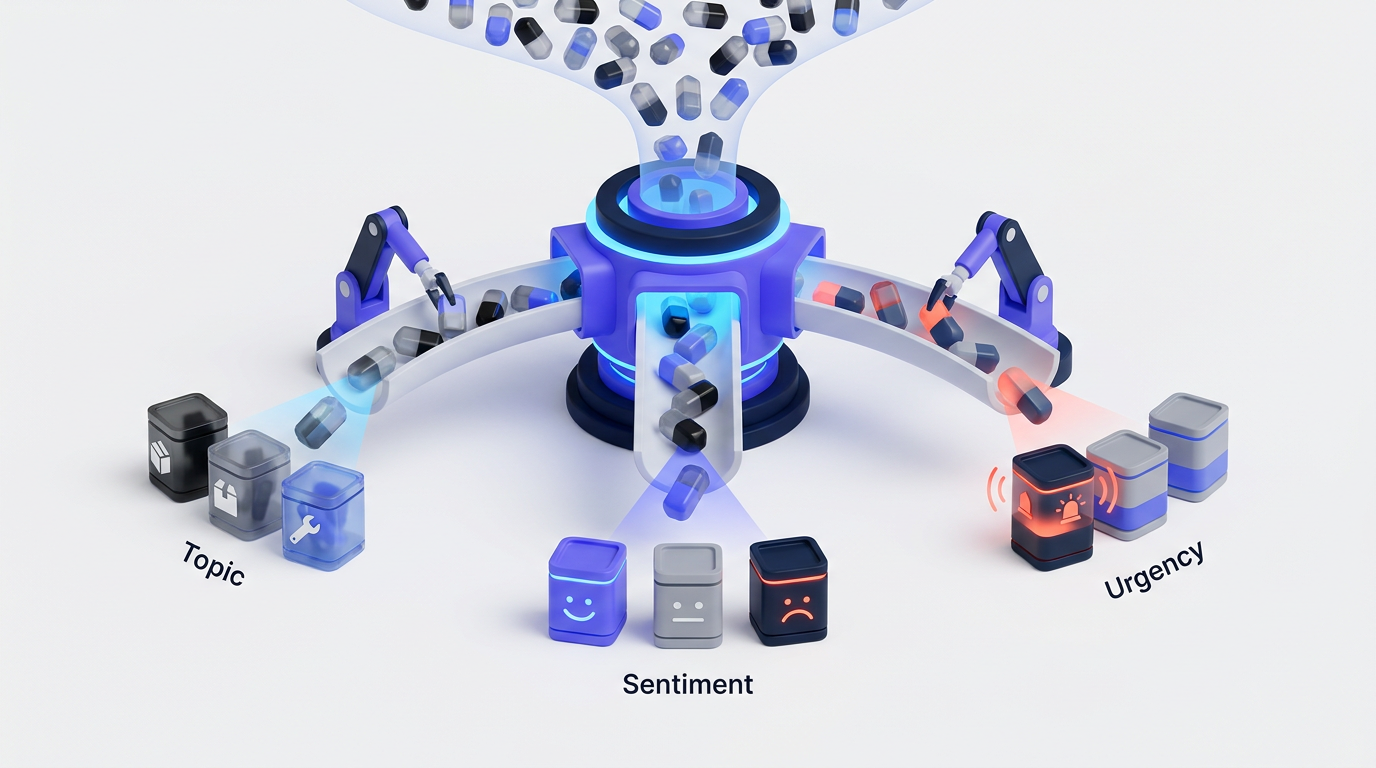
A product team receives the same request through a feedback board, support ticket, sales note, and in-app form. Each version uses different language, so duplicate requests get different labels and reach different teams.
AI customer feedback automation fixes this by applying a controlled taxonomy, measuring confidence, and routing feedback according to explicit rules. Tools such as Upvoty Smart Tags can support that structure, but the workflow still needs to be designed around your product and decision process.
Quick answer: how to automate customer feedback tagging
Use this sequence to build a reliable tagging workflow:
- Define a small topic taxonomy with clear inclusion and exclusion rules.
- Send feedback from every source into one normalized intake format.
- Remove noise while preserving the customer's original wording.
- Classify each item by topic and relevant product area.
- Score sentiment and urgency as separate attributes.
- Route items by tag, confidence, customer segment, and risk.
- Review a sample regularly and correct systematic tagging errors.
- Use the structured data for analysis and prioritization, not automatic roadmap decisions.
The rest of this guide expands those steps in the same order. It uses a fictional billing platform called Northstar Billing as a worked example.
Define a taxonomy for automated feedback tagging
Start with the decisions your tags need to support. A taxonomy designed only to describe feedback will become bloated. One designed around ownership and reporting stays useful.
Northstar Billing initially had tags such as feature request, important, dashboard, customer issue, and billing. These overlapped. A request for scheduled invoice exports could receive all five without telling anyone who owned it or what should happen next.
The team replaced them with four distinct tag families:
- Feedback type: bug, feature request, usability issue, question, praise
- Product area: invoicing, reporting, payments, account administration
- Customer intent: complete a task, reduce manual work, meet compliance needs, understand data
- Workflow state: new, needs review, routed, merged, planned, closed
Keep sentiment and urgency outside the topic taxonomy. A negative comment is not automatically urgent, and an urgent request may be written in neutral language.
Each tag needs a short definition plus examples of what does not belong. For reporting, Northstar included exports, dashboards, filters, and scheduled reports. It excluded requests about correcting the amount on an invoice, even when the customer wanted to export that invoice later. Those belonged to invoicing.
Limit the first version to tags that change ownership, reporting, or prioritization. Twenty well-defined tags usually produce cleaner operational data than a hundred labels copied from internal feature names.
Bring every feedback source into one intake format
Automated tagging becomes unreliable when every source has a different data shape. A feedback board may provide a title, description, votes, and user identity. Support may provide a long conversation. Sales notes might contain one sentence written by an account executive rather than the customer.
Create a normalized record before asking an AI model or rules engine to classify anything. At minimum, preserve the feedback text, source, submission time, customer identifier, account segment, product area selected by the user, and the URL of the original record.
For Northstar, the common record looked conceptually like this:
``json { "feedback_id": "FB-1842", "source": "support", "title": "CSV export fails for large reports", "body": "Our quarterly invoice export stops after several minutes.", "customer_segment": "mid-market", "submitted_at": "2026-02-12T15:24:00Z", "source_url": "https://support.example.com/tickets/1842" } ``
Do not discard source metadata after classification. The words in the comment explain the request, while account and source fields explain its commercial and operational context.
An in-app feedback widget can capture more consistent input because the page, product area, and signed-in user may already be known. If you are still designing that collection point, follow the practical steps for setting up an in-app feedback widget without interrupting the user's task.
Prepare customer comments without erasing useful evidence
Customer feedback is messy. It contains email signatures, copied error logs, agent replies, greetings, previous messages, and internal notes. Clean those elements before classification, but retain an untouched copy of the original record.
For a support conversation, extract the latest customer-authored problem statement and a short amount of relevant context. Do not send an entire 40-message thread if 35 messages are password resets and scheduling notes. Extra text increases classification noise and may expose personal data that the workflow does not need.
Preserve product names, error codes, plan names, device types, and quoted interface labels. These terms often distinguish two otherwise similar topics. Removing CSV, for example, might cause Northstar's failed export report to be tagged as a general dashboard performance issue.
Language detection should happen here too. Either classify in the original language with a model that supports it or translate into one internal working language while retaining the source text. Record which path was used. Translation can flatten tone, especially when customers use idioms or indirect criticism.
Before transferring customer text to any external model provider, establish a lawful purpose, retention policy, access controls, and deletion process. The European Commission's explanation of the GDPR data protection principles is a useful baseline for data minimization and purpose limitation.
Classify customer feedback by topic
Use rules for exact, stable signals and AI classification for language that varies. Combining both is more dependable than expecting one method to handle every case.
A deterministic rule can recognize an error code such as EXPORT_TIMEOUT_04 and assign reporting. An AI classifier can understand that “I have to pull every month separately and stitch the files together” is also about reporting, even though the comment never says “export.”
Give the classifier the permitted tags, definitions, exclusions, and a small set of representative examples. Require structured output rather than free-form commentary. The output could contain feedback_type, product_area, customer_intent, confidence, and a short evidence span copied from the source.
Validate that output against a schema before it enters the feedback system. The official JSON Schema documentation explains how to constrain required fields, accepted values, and data types. Schema validation prevents accidental variants such as Reports, reporting-feature, and analytics from fragmenting one category.
Allow multiple topic tags only when the text genuinely contains multiple requests. A long support message may report a failed CSV export and request scheduled email delivery. Store those as two linked feedback statements when possible. One oversized record is harder to merge, route, and close accurately.
For Northstar's FB-1842 example, the classifier returned:
``json { "feedback_type": "bug", "product_area": "reporting", "customer_intent": "complete a task", "confidence": 0.94, "evidence": "quarterly invoice export stops" } ``
That result is useful because every field serves a different purpose. The feedback type influences handling, the product area determines ownership, and the evidence helps a reviewer verify the decision quickly.
Score sentiment and urgency separately
Sentiment describes emotional tone. Urgency describes how quickly the organization may need to respond. Treating them as one score creates avoidable mistakes.
“Your export screen is confusing, and I hate using it” is strongly negative but may describe a longstanding usability problem. “Our finance team cannot submit tax records tomorrow because exports fail” may be restrained in tone and highly urgent.
Use a limited sentiment scale such as positive, neutral, negative, and mixed. Mixed matters because customers frequently praise one part of a feature while criticizing another. Store the evidence behind the score rather than a bare label.
Urgency should combine textual signals with operational context. A practical model can evaluate whether work is blocked, whether there is a deadline, whether data or security may be at risk, whether a workaround exists, and whether multiple customers report the same current failure.
The following structure keeps the signals distinct and makes routing rules easier to audit:
| Signal | Example input | Stored value | Operational use | Important caveat |
|---|---|---|---|---|
| Topic | “Quarterly CSV export stops” | Reporting | Assign product owner | Similar words may refer to invoicing |
| Feedback type | Error during an existing task | Bug | Send to triage | Customers may call a missing feature a bug |
| Sentiment | “This is frustrating” | Negative | Track experience trend | Strong wording does not prove urgency |
| Urgency | Deadline tomorrow, no workaround | Critical | Alert support and engineering | Account size alone should not set severity |
| Confidence | Clear error and product term | 0.94 | Permit automatic routing | Thresholds require testing on your data |
| Segment | Mid-market account | Mid-market | Analyze affected demand | Segment is context, not a topic |
Northstar's original comment was negative but did not mention a deadline or broad outage, so the workflow marked sentiment as negative and urgency as medium. A later reply said a regulatory filing was due the next morning and no smaller export worked. That new evidence raised urgency to critical without changing the topic.
Reclassify when meaningful comments arrive. Feedback is not static.
Route automated feedback using confidence and risk

A routing rule should consider more than the predicted topic. Combine the classification with confidence, urgency, source, customer segment, and any safety or security indicators.
Northstar used three paths. High-confidence reporting bugs went to the reporting triage queue. Lower-confidence records entered a product operations review queue. Critical items also alerted support, regardless of which product team owned the underlying area.
Set thresholds from observed performance, not from a convenient round number. Test whether records above a proposed threshold are accurate enough for the action they trigger. Automatically adding a tag is low risk. Paging an engineer or promising a response to a customer carries more risk and needs stronger evidence.
Build an explicit fallback for unknown or conflicting feedback. If the classifier selects payments but an exact error-code rule selects reporting, do not silently choose one. Send the conflict for review and retain both proposed results.
Do not let the automation publish roadmap commitments, close requests, or send sensitive incident messages without a controlled approval step. AI can organize the queue. Product and support leaders remain accountable for decisions and communication.
Test AI customer feedback automation on historical data
Export the last 90 days first. Choose a sample that covers every source, product area, language, and customer segment rather than taking only the newest records.
Have two knowledgeable reviewers label the same subset independently. Where they disagree, inspect the taxonomy before blaming the classifier. If experienced teammates cannot distinguish reporting from analytics, the definitions probably need work.
Measure errors by field. Overall accuracy can conceal a serious failure in a small but important class. A workflow may classify common feature requests correctly while missing security reports, outage language, or billing complaints.
Track at least these review outcomes:
- Correct tag and correct route
- Correct topic but wrong feedback type
- Incorrect sentiment
- Understated or overstated urgency
- Low-confidence item routed automatically
- Duplicate feedback not recognized
Northstar's first test revealed that comments containing “invoice export” were often routed to invoicing. The training examples overemphasized the object being exported rather than the failed action. The team added an exclusion to the invoicing definition and examples showing that export generation belongs to reporting.
Run a shadow period before turning on automatic routing. Let the system propose tags while humans continue the existing process, then compare results. This exposes routing side effects without losing customer reports inside the wrong queue.
Review quality after launch as well. New features, renamed menus, and changing customer language create classification drift. A monthly review may be enough for a stable product, while a major release may justify daily checks for the first week.
The NIST AI Risk Management Framework provides a useful structure for documenting ownership, measurement, monitoring, and human oversight without prescribing one model or vendor.
Use automated feedback tags for prioritization without outsourcing the decision
Clean tags make aggregate analysis possible. They do not decide what the product team should build.
Once Northstar grouped reporting feedback consistently, it could see which requests concerned reliability, scheduled delivery, formatting, and permissions. It could then compare demand across customer segments, count affected accounts rather than raw submissions, and review whether a workaround existed.
Merge duplicates before reading vote totals. Otherwise, one request split across five slightly different posts can look weaker than a broad request collected under one title. Upvoty's Merge AI feature is designed around consolidating related feedback, while votes and comments remain useful evidence of demand.
Do not rank items on volume alone. Revenue exposure, strategic fit, implementation cost, customer concentration, risk, and the severity of the underlying problem all matter. The guide to prioritizing feedback with revenue, segment, and demand data explains how to combine those factors without treating the loudest request as the winner.
Tags should also preserve the reason behind a request. Ten customers asking for PDF exports may want different outcomes: regulatory filing, executive presentation, record retention, or offline review. Building one export button might satisfy only two of those jobs.
How the automated feedback workflow works in Upvoty
The do-it-yourself workflow involves collecting records, normalizing fields, maintaining tags, merging duplicates, assigning owners, and preparing customer communication. Upvoty brings those steps into the same feedback process without turning every tag into a roadmap promise.
First, customers submit feedback through a board or feedback widget. The original post, author context, votes, and comments stay attached to the request instead of being reduced to a line in a disconnected spreadsheet.
Next, Smart Tags organize incoming posts around the taxonomy you have chosen. Keep public category labels understandable to customers and use internal tags for routing detail. Customers may understand Reporting, but they do not need to see an internal label such as triage-p2-data-pipeline.
Then, Merge AI helps consolidate similar submissions. This prevents demand from being scattered across titles such as “scheduled CSV,” “email reports,” and “automatic monthly exports.” A product manager can review the match rather than relying on raw text similarity as a final decision.
After consolidation, assignees and priorities connect structured feedback to the responsible team. Segments can add customer context, while internal notes preserve reasoning that should not appear on a public board.
This screenshot shows the type of central dashboard where feedback can be reviewed and managed.
!Dashboard for managing customer feedback and feature requests
When a decision is ready for customers, selected work can move to a roadmap. Once released, the team can publish an update and notify the people who supported the request. The practical process for closing the feedback loop with a changelog covers that final stage.
For a broader view of collection, analysis, and response workflows, see how small businesses can use AI to automate customer feedback. The tagging system in this guide supplies the structured data that broader automation needs.
Govern AI customer feedback automation over time
Assign an owner to the taxonomy. Without one, teams create near-duplicate tags, change definitions informally, and lose the ability to compare one quarter with another.
Record taxonomy versions and effective dates. If analytics is renamed to reporting, decide whether historical records should be migrated or mapped only in reporting. Document the choice so a sudden trend is not mistaken for a change in customer demand.
Restrict access according to the sensitivity of the source. Public feedback may be visible broadly, while support conversations can include contract details, personal data, or security information. Public boards also need moderation rules that separate transparent product discussion from private account issues. Upvoty's guide to governing public feedback boards explains where that boundary usually belongs.
Keep an audit trail containing the original text, model or rule version, proposed tags, confidence, human edits, and final route. When a routing failure occurs, that record shows whether the cause was bad input, an unclear taxonomy, a model error, or an incorrect workflow rule.
Define a deletion process too. Removing a customer account from the source system while retaining copied comments indefinitely in an automation database defeats the purpose of the original retention policy.
Common mistakes in automated customer feedback tagging
The first common mistake is creating too many tags before enough feedback exists to distinguish them. Teams often reproduce their internal component hierarchy, then discover that customers describe outcomes rather than architecture.
The second is using sentiment as a proxy for priority. Angry wording can reflect a minor inconvenience, while a calm message may report a blocked payroll run or regulatory deadline.
The third is routing low-confidence classifications as if they were certain. Confidence thresholds should control automation depth. A questionable topic tag can wait for review. A possible security report should reach a trained person quickly even when the exact product area is unclear.
The fourth is counting posts rather than affected customers. Duplicates, forwarded sales notes, and repeated support contacts can make one account appear to represent broad demand. Preserve customer identity and merge related records before analyzing frequency.
The fifth is exposing internal labels on a customer-facing roadmap. Routing tags are built for operational precision. Public statuses and categories need plain language, careful moderation, and commitments the team is prepared to explain.
Finally, teams sometimes evaluate the classifier once and stop. Product vocabulary changes. Test after major releases, taxonomy edits, new integrations, and changes to the model or prompt.
FAQ about automatically tagging customer feedback
Can ChatGPT automatically tag customer feedback?
Yes, a language model can classify feedback when it receives a controlled list of tags, clear definitions, examples, and a required output structure. Production use also needs privacy controls, schema validation, confidence thresholds, monitoring, and a human review path. Pasting sensitive conversations into a general chat window is not a substitute for that workflow.
How many customer feedback tags should we start with?
Start with the smallest set that changes a decision, owner, or report. For many SaaS products, separate tag families for feedback type, product area, intent, and workflow status are easier to maintain than one long flat list. Add a tag only when reviewers can define it clearly and act differently because it exists.
Should customers choose their own feedback tags?
Customers can select a broad category, but do not require them to understand your internal product structure. Use their selection as one signal rather than unquestioned truth. Automated classification can add internal routing tags while preserving the category the customer chose.
Can automated tagging identify duplicate feature requests?
Tagging narrows the comparison set, but duplicate detection needs additional semantic matching. Two requests can share a topic without asking for the same outcome. Require human confirmation when merging records because votes, comments, and customer notifications may be transferred to the surviving request.
Is negative sentiment enough to mark feedback as urgent?
No. Urgency should consider blocked work, deadlines, security or data risk, incident scope, and available workarounds. Sentiment remains useful for tracking frustration and customer experience, but it should not page a team by itself.
Should AI decide which feature requests enter the roadmap?
No. AI can group requests, summarize evidence, detect patterns, and prepare data for review. Roadmap decisions still require strategy, technical judgment, customer context, cost, risk, and an accountable product owner. Feature voting is evidence, not an automatic ranking system.
How often should we review an automated tagging workflow?
Review a sample continuously during rollout, then set a regular schedule based on feedback volume and product change. Also trigger a review after new feature launches, taxonomy changes, routing incidents, or model updates. Monitor high-risk categories more frequently than routine feature requests.
A useful tagging workflow gives every request a traceable path from customer language to the right owner. Use Upvoty to organize feedback, merge related requests, and connect the resulting decisions to your roadmap. Read next: How to Automatically Tag and Route Customer Feedback.


