
Feature requests arrive through support tickets, sales calls, Slack messages, and spreadsheets. When those inputs are separated from the roadmap, product teams lose context and customers cannot tell whether anyone heard them.
Upvoty product roadmap software puts collection, voting, prioritization, roadmap communication, and release updates into one connected workflow.
Quick answer: how to use product roadmap software
Use this workflow to turn customer requests into a roadmap your team can maintain:
- Create feedback boards for the products or customer groups you serve.
- Collect requests in one place and merge duplicate ideas.
- Review votes, comments, customer context, and strategic fit.
- Move selected requests onto a roadmap with clear statuses.
- Publish the appropriate roadmap view to customers.
- Update statuses as plans change and explain important decisions.
- Announce shipped work through a changelog and notify followers.
Consider a SaaS team building a reporting platform at app.example.com. Customers repeatedly ask for scheduled PDF exports, but the requests are spread across 14 support conversations, three sales notes, and a spreadsheet row labeled “automated reports.” We will use that example throughout this page to show how the workflow works and where it can fail.
What product roadmap software should actually do
A roadmap is useful only when each item retains enough evidence to support a decision. A colorful timeline without customer context becomes a presentation artifact, not an operating system for product work.
Effective product roadmap software should connect four records: the original request, the people who support it, the product team's decision, and the final release announcement. That connection lets a product manager inspect scheduled PDF exports and see who asked, why they need it, how demand changed, and what customers were told.
The roadmap also needs a clear audience. An internal plan may include estimates, dependencies, commercial context, and technical risks. A customer-facing roadmap should communicate direction without exposing sensitive notes or making promises the team cannot keep.
Use broad states such as Under Review, Planned, In Progress, and Shipped when dates remain uncertain. If you publish a quarter or exact date, treat it as a commitment that requires active maintenance. Upvoty's roadmap feature is designed to make progress visible while keeping feedback connected to the work under consideration.
How product roadmap software works, step by step
1. Create focused feedback boards
Start with a board whose scope customers can understand. “Product feedback” is often too broad. A reporting SaaS might create separate boards for dashboards, exports, and data integrations, or use one board with categories if submission volume is modest.
Write a short submission prompt that asks for the problem, current workaround, and desired outcome. Do not ask customers to design the implementation. A request titled “Add an export button” may conceal a need for scheduled delivery, recipient controls, branded PDFs, or audit records.
For the running example, the team creates an Exports category and records the underlying need: finance managers must email a PDF report to executives every Monday without signing in. The proposed button is no longer the central issue. Feedback boards for product teams give that request a consistent home.
2. Consolidate requests before measuring demand
Search existing posts before adding a new idea. Merge duplicates and preserve the people attached to them, since splitting one need across several titles makes demand look weaker than it is.
Normalize vague internal notes as well. “Automated reports,” “email reports,” and “recurring PDF” may represent the same job. Keep the clearest customer language as the public title, then store implementation detail in the description or internal workflow.
This is where teams often damage their own data. They delete duplicate posts without transferring supporters, or merge requests that look similar but have different use cases. A scheduled executive PDF is not necessarily the same feature as exporting raw CSV data for analysis.
The full feature request management workflow explains how to collect, organize, and assess requests without losing their origin.
3. Prioritize customer feedback with context
Vote totals are useful, but they are not a product strategy. One request may receive many votes from free users while another removes a renewal blocker for a core customer segment. Review demand alongside strategic fit, urgency, effort, reach, and the severity of the problem.
For scheduled PDF exports, the team finds that several supporters work in finance and operations. Comments show a repeated weekly workflow, while sales notes indicate the capability appears in procurement reviews. That evidence makes the request more meaningful than its raw vote count alone.
Apply the same method to every candidate. A simple comparison model keeps the discussion consistent:
| Decision input | What to inspect | Scheduled PDF example | Risk if ignored |
|---|---|---|---|
| Demand | Unique supporters and comments | Multiple accounts describe weekly delivery | Loud individuals can dominate |
| Segment fit | Plan, role, or target market | Finance and operations users | Votes may come from a low-priority segment |
| Problem frequency | How often the task occurs | Every Monday | Rare requests can look urgent |
| Strategic fit | Connection to product direction | Supports reporting automation | Roadmap becomes reactive |
| Effort and risk | Engineering, design, security | Scheduling, email delivery, permissions | Delivery scope expands late |
| Commercial context | Retention or sales relevance | Appears during procurement reviews | Revenue can override user value |
Do not reduce all of this to a single score unless the inputs are kept visible. Scores create false precision when estimates are weak. See the practical guide to prioritizing feedback by revenue, segment, and demand for a more disciplined review process.
4. Move selected requests onto the product roadmap
Once the team accepts the problem, move it from Under Review to Planned. Before publishing that change, define the first releasable scope.
In our example, the initial scope is one weekly schedule, PDF format, account-level recipient controls, and delivery logs. Custom templates and daily schedules stay outside the first release. Publishing that boundary prevents customers from filling vague roadmap language with their own assumptions.
Keep internal delivery work in the engineering system if that is where developers plan sprints and dependencies. The customer roadmap should represent outcomes, not every task. Product roadmap software works best as the communication layer connected to validated demand, while the issue tracker remains the execution layer.
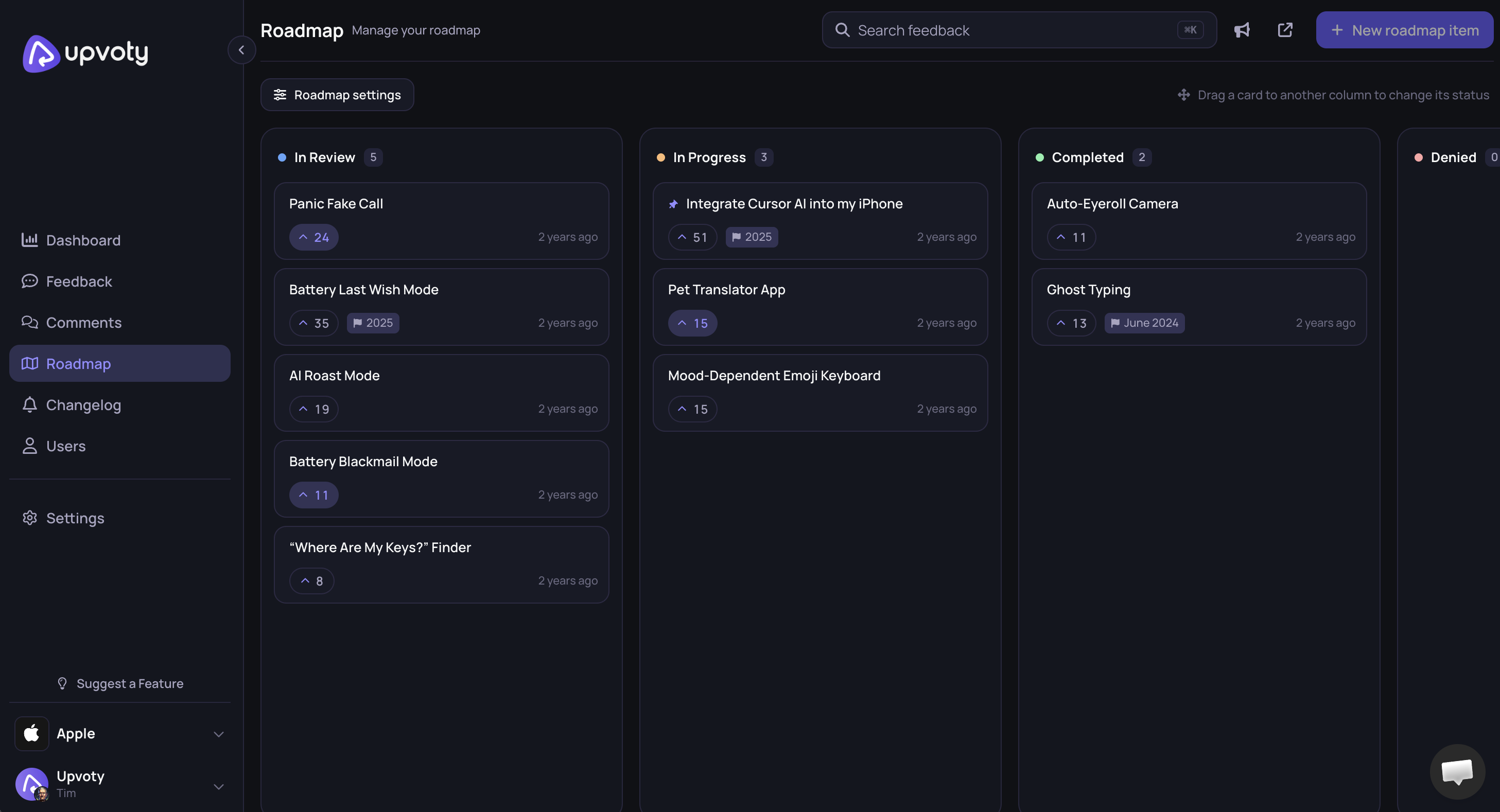
The following product view shows how roadmap items can be organized in a dedicated dashboard.
5. Publish a customer-facing roadmap
A public roadmap reduces repeated status questions and gives customers a place to follow work. It should not expose internal debate, named customer contracts, security findings, or unsupported release dates.
For scheduled PDF exports, the public item explains the outcome, identifies the planned first scope, and uses a status rather than an exact ship date. Internal notes retain the technical dependency on the email service and the permissions review.
Choose visibility based on the product and audience. A fully public roadmap helps prospects and users see direction. A restricted customer roadmap may suit B2B products where plans contain sensitive information. An internal-only roadmap is appropriate during early discovery, but it does not reduce customer uncertainty.
This walkthrough explains how to build a public product roadmap customers can trust, including what to publish and what to keep private.
Atlassian's official guidance distinguishes a product roadmap from a delivery plan and explains why audience-specific views matter in its product roadmap overview. The format should match the decision being communicated.
This video from Product School gives product managers a practical explanation of roadmap construction and communication.
6. Maintain roadmap statuses without overpromising
Assign an owner to every public item and review the roadmap on a fixed cadence. Weekly works for active products. Monthly may be enough for products with longer release cycles.
Update the status when the decision changes, not only when development starts. If the permissions review makes scheduled PDF exports larger than expected, explain that the scope is being revised. Silence creates more frustration than a clear delay.
Use these status rules consistently:
- Under Review means evidence is being assessed, not that delivery is likely.
- Planned means the team intends to build a defined outcome.
- In Progress means active delivery has started.
- Shipped means the capability is available to the stated audience.
- Closed means the request will not proceed or has been superseded.
Avoid putting every popular idea into Planned. That turns the roadmap into a backlog and teaches customers not to trust it. The 10 tips for writing a clear product roadmap can help teams tighten titles, scope, and status language.
7. Close the loop when roadmap items ship
Shipping is not the end of feedback management. Publish a changelog entry that explains what changed, who benefits, and how to use it. Then notify the people who supported or followed the original request.
For scheduled PDF exports, the release note should state where scheduling controls live, which plans or roles can access them, and any current limits. Link it back to the roadmap item so customers can trace the request from review to release.
Use the Upvoty changelog to publish product updates in the same workflow. The guide to closing the customer feedback loop with a changelog covers the final communication step in detail.
How Upvoty product roadmap software removes manual handoffs
A do-it-yourself setup can work, but someone must repeatedly copy submissions into a spreadsheet, transfer approved ideas to a roadmap, update public status pages, and find every requester after release. Those handoffs are where context disappears.
With Upvoty, a customer first submits the scheduled PDF request on a feedback board. Other users vote and comment on that post rather than opening disconnected tickets. The product team manages the feedback in a central dashboard, reviews the visible demand and discussion, and updates the request as its status changes.
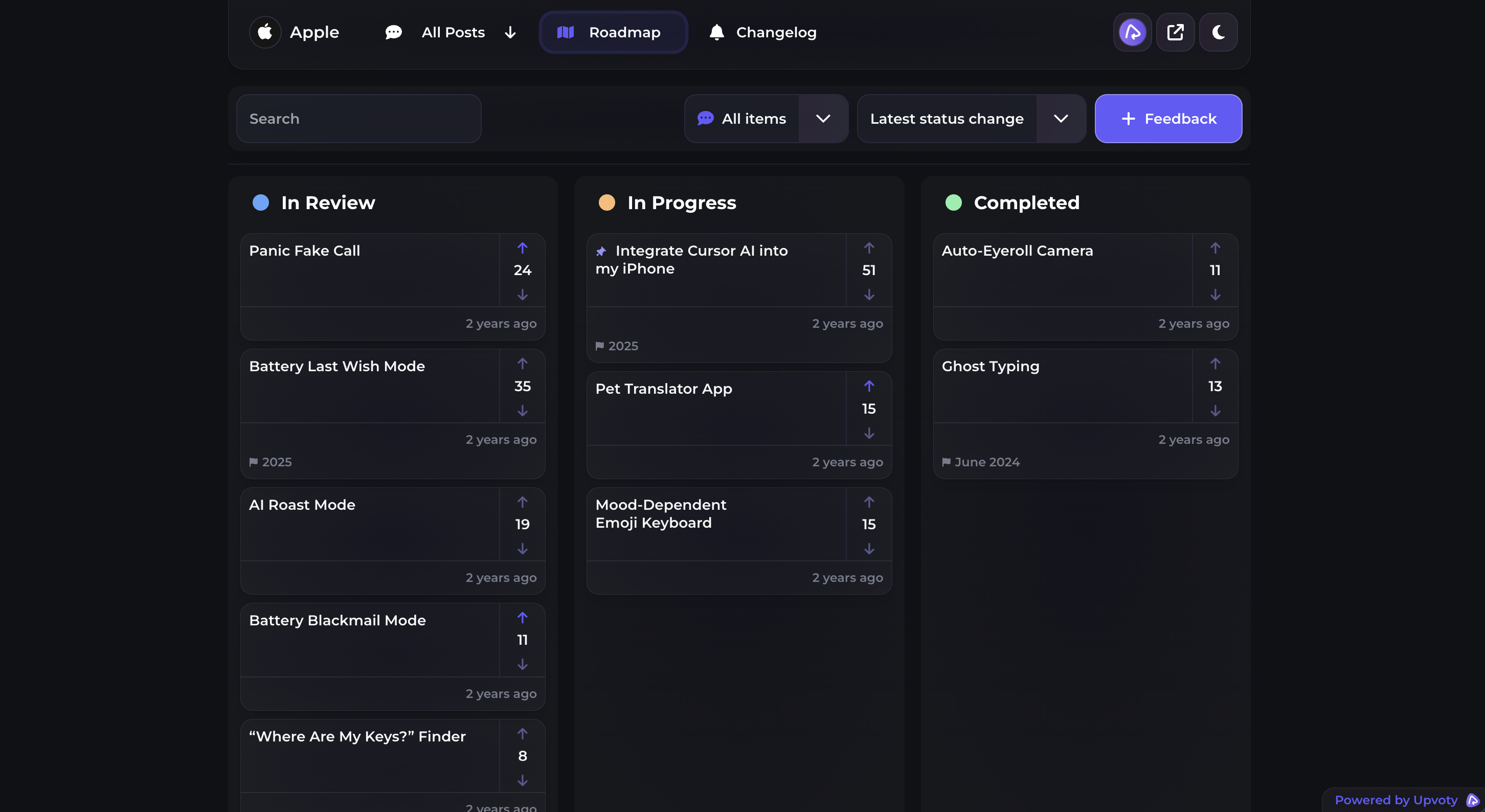
Once the team commits to the defined outcome, it can place the item on a public product roadmap. Customers can see what is under consideration, planned, in progress, or complete without asking support for a private status check.
The public view makes upcoming work easy to scan without exposing the team's internal implementation details.
When scheduled exports ship, the team publishes the update through the changelog and closes the loop with interested users. The request, demand, roadmap state, and release communication remain part of one product feedback process. Review the live Upvoty demo to inspect the customer experience before configuring your own boards.
How to choose product roadmap software
Test software using one real request rather than a polished sample workspace. Import or recreate a current idea, add duplicate submissions, attach comments from different customer segments, move the item through each roadmap state, and publish a release update. The test should expose the administrative work your team will face every week.
Evaluate these practical requirements:
- Can customers search existing ideas before submitting duplicates?
- Can the team preserve votes and context while consolidating requests?
- Are public and internal information kept appropriately separate?
- Can roadmap statuses avoid false date commitments?
- Does the release workflow notify people who expressed interest?
- Can administrators manage the process without constant manual exports?
Canny, Featurebase, and Nolt are common alternatives teams may compare with Upvoty. Product scope and pricing can change, so verify each vendor's own current materials and run the same end-to-end request test. Upvoty's product feedback tools selection guide provides a structured evaluation process, while the Upvoty versus Canny comparison addresses that specific shortlist.
Also check basic operational controls. If customer names, emails, or account details enter the platform, document why the data is collected and who can access it. The European Commission's data protection guidance is a useful primary source when your organization handles personal data covered by EU rules.
Common product roadmap software mistakes
The first mistake is treating votes as binding commitments. Voting shows interest, but customers do not see technical dependencies, strategy, or the needs of segments outside their own. Explain that votes inform review rather than determine delivery automatically.
The second is publishing exact dates too early. Discovery can expose security, permissions, migration, or performance work that changes the estimate. Use status-based communication until the team has enough delivery confidence.
The third is leaving rejected requests open forever. Close them with a plain explanation. For example, a fully custom PDF designer might conflict with the reporting product's focus, while a limited set of branding controls remains viable.
The fourth is publishing internal task language. “Build cron worker and queue retries” means little to customers. “Schedule weekly PDF reports for selected recipients” communicates the outcome.
Finally, do not launch a roadmap without assigning maintenance ownership. A stale public board is worse than no public board because it provides misleading information with the authority of an official source.
Product roadmap software FAQ
Is product roadmap software the same as project management software?
No. Product roadmap software communicates which customer problems and product outcomes are being considered, planned, built, or shipped. Project management software coordinates delivery tasks, assignees, dependencies, and sprint work. Many teams use both, with the roadmap serving customers and stakeholders while the project system serves the delivery team.
Should a product roadmap be public?
Publish a roadmap when customers benefit from visibility and the team can maintain it. Keep confidential commercial details, security work, sensitive research, and uncertain dates private. A public roadmap can show statuses and outcomes without exposing the complete internal plan.
How often should we update a customer-facing roadmap?
Review active items weekly and the complete roadmap at least monthly. Update an item whenever its status, scope, or expected direction materially changes. Assign one owner who is responsible for checking stale entries and coordinating explanations with product and support.
Can feature voting decide what goes on the roadmap?
Feature voting supplies demand evidence, not an automatic decision. Combine votes with customer segment, problem frequency, strategic fit, effort, risk, and commercial context. Read comments as well, because two customers can vote for the same title while expecting different outcomes.
Can Upvoty replace a spreadsheet roadmap?
It can replace the part of a spreadsheet used to collect customer ideas, show roadmap status, and communicate releases. Engineering estimates, technical dependencies, and sprint planning may still belong in your delivery system. Check the available plans on the Upvoty pricing page against your required workflow.
What should we put on a public product roadmap?
Publish customer-readable outcomes, honest statuses, useful scope boundaries, and changes that affect expectations. Exclude unvalidated ideas presented as commitments, confidential notes, named customer negotiations, and precise dates the team cannot support.
If scattered requests are making roadmap decisions harder, use Upvoty to connect feedback with your product roadmap. Start with one board and one active request, then carry it through prioritization, public status updates, and the final changelog announcement. Read next: Customer Feedback Analytics: Turn User Input Into Product Decisions. Read next: How to Connect Customer Feedback With Roadmap and Changelog Software.