
A feature request arrives in support, three customers discuss the same issue on calls, and another user posts a similar idea in a community channel. Without one feedback repository, the product team sees separate messages instead of shared demand. Upvoty brings those signals into a workflow built around feedback boards, roadmap updates, and changelog posts.
Quick answer: How to build a feedback repository
Use this workflow to turn scattered customer comments into product decisions:
- Collect feedback from every customer-facing channel in one repository.
- Merge duplicates and classify each request by product area and problem.
- Preserve customer, segment, revenue, and use-case context.
- Prioritize requests using demand, strategic fit, effort, and customer impact.
- Publish selected work to a customer-facing roadmap with clear statuses.
- Announce shipped improvements and notify the customers who requested them.
A repository only becomes useful when those six steps stay connected. Storage alone produces a larger backlog, not better product decisions.
What belongs in a customer feedback repository?
A customer feedback repository is a structured record of requests, complaints, ideas, votes, and supporting context. Each entry should represent a customer problem or desired outcome rather than a proposed engineering task.
Consider a hypothetical invoicing SaaS with a feedback board at feedback.example.com. One customer asks for “automatic CSV reports,” another wants “weekly transaction exports,” and a third requests “scheduled spreadsheets for finance.” These should not remain three isolated tickets. They point to one underlying need: sending recurring transaction data to finance teams without manual exports.
The merged repository entry should retain the original wording, affected accounts, submission dates, votes, comments, product area, and current status. It can also record whether the request came from a trial account, active customer, high-value segment, or recently churned account.
Keep personal data to the minimum required for follow-up. Article 5 of the EU General Data Protection Regulation establishes data minimization and storage limitation principles. Teams serving California residents should also review the state’s official CCPA guidance when deciding what customer information to retain.
How to collect customer feedback in one repository
Start with the channels customers already use. Review support tickets, sales notes, cancellation responses, onboarding calls, community discussions, surveys, and existing feature request lists. Export the last 90 days first. That window is usually manageable enough to clean while still exposing recurring requests.
Do not paste every sentence into a backlog as a new feature. Record the source comment, then attach it to a normalized problem statement. For the invoicing example, the repository entry could be titled “Schedule recurring transaction exports” while preserving each customer’s original request underneath it.
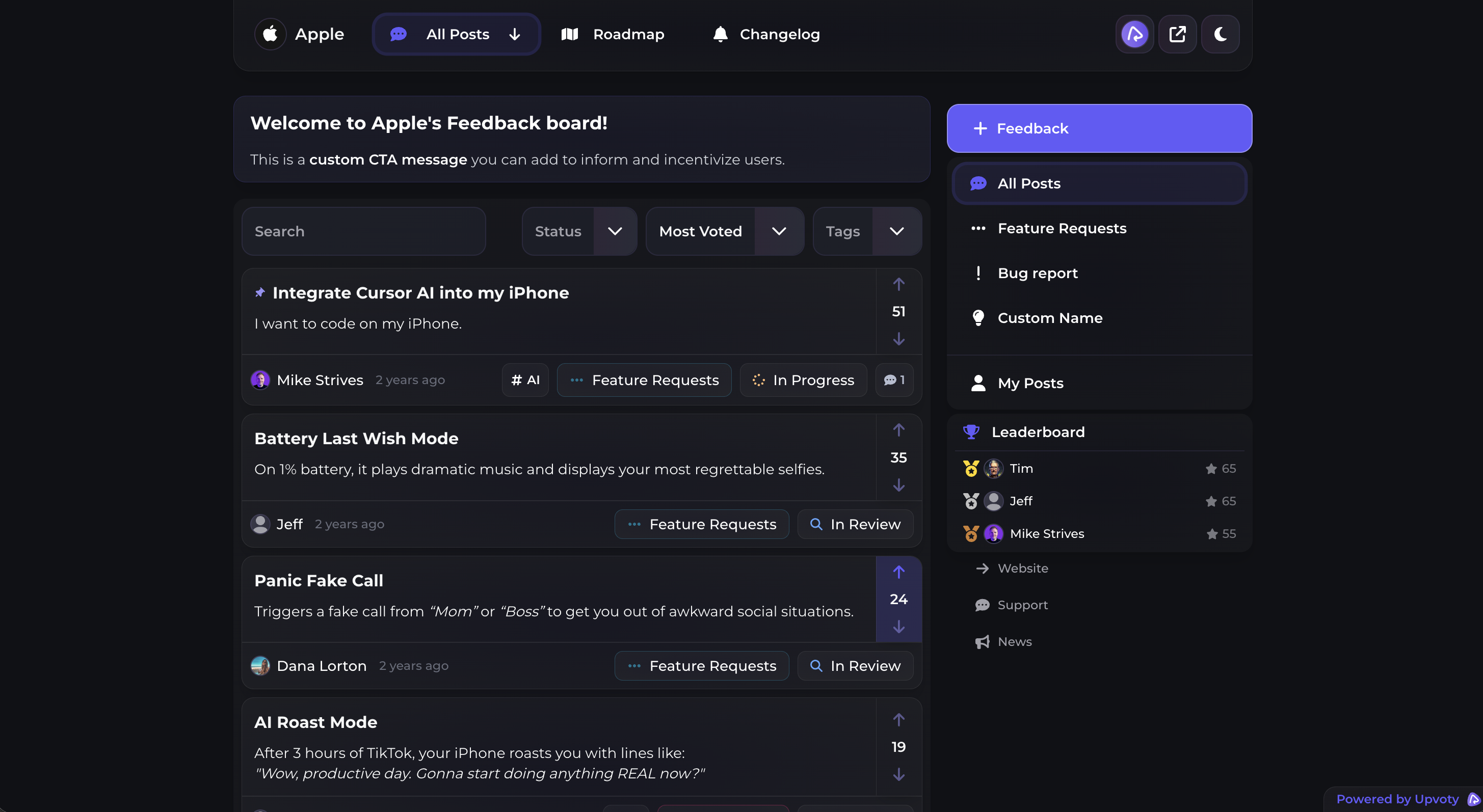
A public or private feedback board gives customers a consistent place to submit ideas and vote on existing requests. It also reduces duplicate submissions because customers can find related ideas before creating another post.
This is what a public voting board can look like when submissions and feature requests share one visible space.
Keep an assisted route open for customers who will never visit a board. Support and success teams should be able to add feedback on their behalf, using the same naming and classification rules.
How to organize a customer feedback repository
Merge requests based on the problem being solved, not shared words. “Scheduled CSV reports” and “automatic spreadsheet exports” belong together if the same workflow would satisfy both. A request for a live accounting integration may sound related but could require a different solution and should remain separate.
Use a small, controlled set of fields. Product area, request type, status, customer segment, account reference, source, and date are usually more useful than dozens of loosely maintained tags. Define what each field means and who can change it.
For the invoicing example, 14 comments might be attached to the scheduled export entry. The product area is Reporting, the problem type is Workflow Automation, and the affected segment is finance-led accounts. The repository still keeps each comment available, so the product manager can see whether customers need email delivery, cloud storage, or a downloadable file.
Structured records also make later AI analysis more reliable. If your team wants to examine repository data in external assistants, review the workflow for analyzing customer feedback with MCP before granting access. Apply role-based permissions and avoid exposing unrestricted customer records. The OWASP access control guidance recommends least privilege and access checks for every request.
How to prioritize feedback repository entries
Vote totals show frequency, but they do not settle priority. Ten votes from occasional users may matter less than four requests from customers blocked during a core financial workflow. Conversely, one large account should not automatically redirect the roadmap.
Evaluate each repository entry against the same factors: number of affected accounts, account segment, revenue relevance, severity, strategic fit, implementation effort, and confidence in the proposed solution. Write down the reason for the decision. That record helps when the same request returns six months later.
For scheduled exports, the team might find that demand is concentrated among finance teams on higher-tier plans. Discovery calls reveal that weekly email delivery solves most cases, while direct integrations introduce much greater maintenance. That evidence supports a narrower first release rather than an open-ended “reporting automation” project.
Use the method in this guide to prioritize feedback by revenue, segment, and demand. It explains how to use commercial context without allowing revenue alone to determine every decision.
How to connect a feedback repository to your roadmap
Once a request is accepted, link it to a roadmap item instead of copying it into another disconnected tool. The repository remains the evidence base. The roadmap communicates what the team is considering, planning, or actively building.
Keep roadmap statuses broad enough to remain accurate. Avoid publishing exact delivery dates before engineering has validated the scope. For the invoicing example, “Scheduled exports” could move from Under Review to Planned after discovery, then to In Progress once the email delivery workflow enters development.
A public product roadmap lets customers follow that movement without asking support for an update. Explain what each status means and update items when plans change. The practical guide to building a public roadmap customers can trust covers status definitions, scope changes, and communication choices in more detail.
When the feature ships, publish a release note that explains the customer outcome and links back to the original request. A product changelog completes the feedback loop by showing customers that their input led to a visible result. Follow the process for closing the customer feedback loop with a changelog rather than quietly marking the repository item as complete.
How Upvoty manages the feedback repository workflow
Upvoty is built around a simple operating principle: customer input should remain connected from submission through release. This removes the handoffs that commonly cause context to disappear.
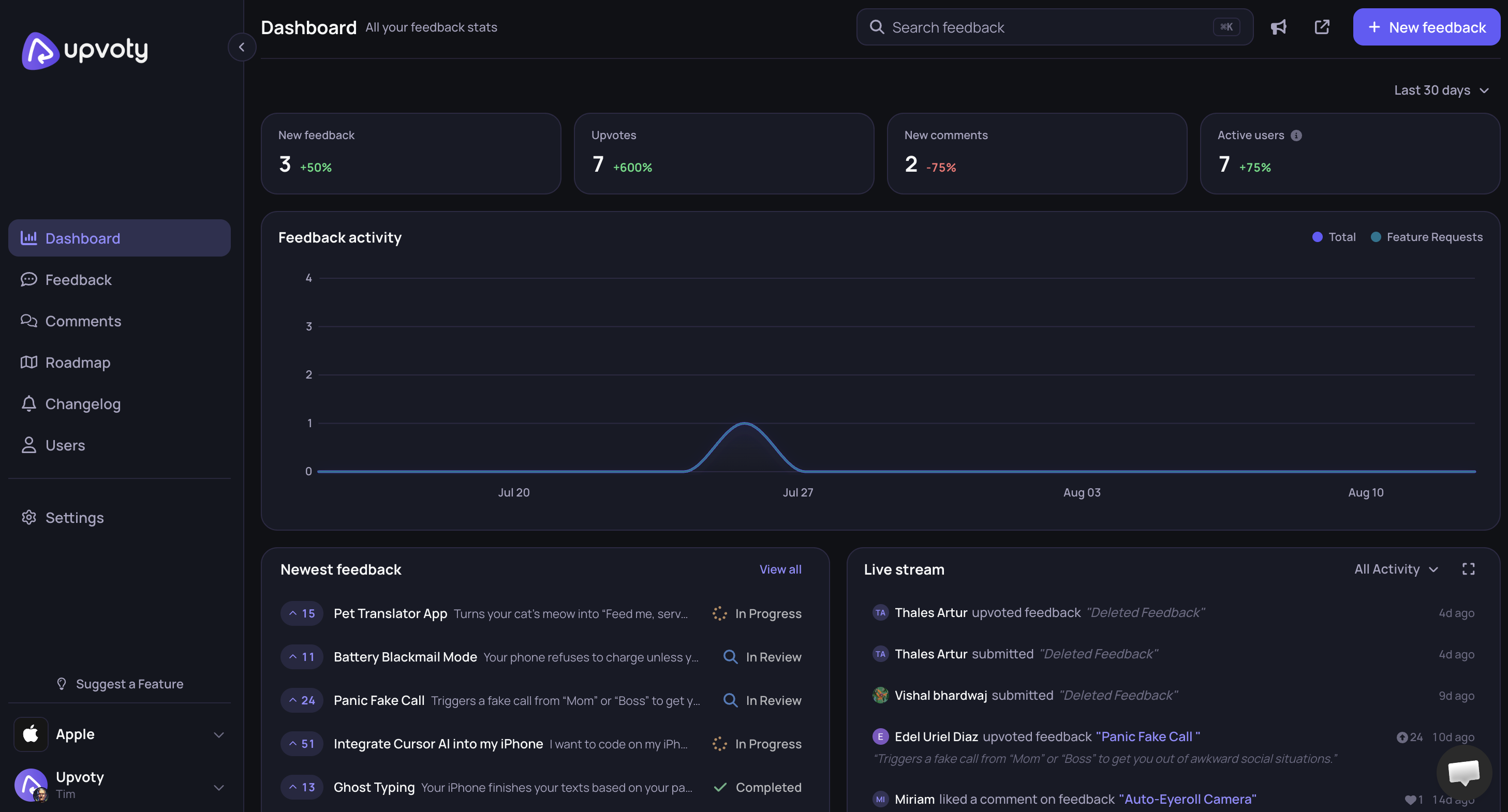
First, customers submit ideas and vote on a feedback board. Product teams review those submissions in the feedback dashboard, combine overlapping requests, and keep the discussion attached to the relevant idea. The scheduled export requests from the invoicing example would become one managed item rather than separate support notes.
Next, the team changes the status as a decision takes shape. Accepted work can appear on the roadmap, where customers see whether it is planned or in progress. The original feedback remains available, so product and engineering can check the requested outcome while refining scope.
This dashboard view shows how feedback can be managed without reducing every request to a vote count.
Finally, the team publishes a changelog update when scheduled exports are released. Customers can see that the item moved from suggestion to shipped improvement. Explore the live Upvoty demo to inspect this sequence from the customer and product-team perspectives.
Feedback repository options compared
The right setup depends on submission volume, visibility requirements, and how much manual administration your team can sustain.
| Repository approach | Customer submissions | Duplicate handling | Public roadmap | Release communication | Best fit |
|---|---|---|---|---|---|
| Spreadsheet | Manual entry | Manual search and merging | Separate document | Separate email or post | Early validation with low volume |
| Internal issue tracker | Usually entered by staff | Labels and manual triage | Usually requires another tool | Usually requires another tool | Engineering-led internal requests |
| Standalone public board | Direct submissions and votes | Visible related requests | Varies by setup | Often separate | Teams focused mainly on idea collection |
| Upvoty workflow | Feedback boards and staff-managed entries | Central review and consolidation | Connected product roadmap | Connected changelog | SaaS product teams managing the full feedback loop |
When comparing Upvoty with Canny, Featurebase, or Nolt, test the complete workflow instead of counting isolated features. Submit a duplicate request, change its status, place it on a roadmap, publish an update, and check what the customer sees at each stage. If Canny is on your shortlist, use this detailed product comparison and verify current pricing on each vendor’s own pricing page.
Common feedback repository mistakes
The most damaging failure mode is treating votes as a direct build queue. Public voting can expose demand, but prominent ideas often attract more attention simply because they already have votes. Review the customer context and underlying problem before committing development time.
Another mistake is allowing statuses to become stale. An item marked Planned for a year creates a promise whether the team intended one or not. Review published statuses on a fixed schedule and explain when priorities change.
Avoid turning the repository into a support archive. Bugs that require immediate resolution should follow the incident or support process, although recurring defects can still be referenced as product evidence. Keep access controls clear as well. A public board should never reveal private account details, contract discussions, or internal prioritization notes.
If your current process has accumulated duplicates and unclear ownership, use the full feature request management workflow to clean the backlog in stages.
Feedback repository FAQ
What is the difference between a feedback repository and a product backlog?
A feedback repository stores customer evidence, including requests, comments, votes, segments, and use cases. A product backlog contains work the team may implement. One repository entry can support several backlog tasks, and many repository entries may lead to no engineering work at all.
Should a customer feedback repository be public?
The submission board and selected statuses can be public while internal notes remain private. Public visibility helps customers find existing ideas and follow progress. Private handling is better for sensitive feedback, enterprise account details, security reports, and early product strategy.
How often should product teams review feedback?
Triage new submissions at least weekly when volume is moderate. Review prioritization and public roadmap statuses on a regular product-planning cadence. High-volume teams may need daily duplicate merging so customers do not split votes across several versions of the same request.
Can a feedback repository replace customer interviews?
No. Repository data identifies patterns and affected customers, but interviews explain constraints, current workarounds, and the outcome users need. Use the repository to select interview participants and record what those conversations change about the request.
How do we move from a spreadsheet to feedback repository software?
Export current requests, remove obvious spam, and merge clear duplicates before importing or recreating the active set. Keep original submission dates and customer references where permitted. Start with open and recently closed requests rather than transferring years of unstructured notes that nobody plans to review.
What should we look for in customer feedback software?
Test submission, moderation, duplicate management, voting, status updates, roadmap publishing, and release communication. Include support, product, and customer success in the trial. For a broader evaluation framework, read the product feedback tools selection guide.
Turn scattered requests into a repository that connects customer demand with roadmap decisions and shipped updates. Create your feedback workflow with Upvoty and give customers one clear place to contribute and follow progress. Read next: How to Create a Customer Feedback Portal That Customers Actually Use. Read next: SaaS Feedback Tool: Collect, Prioritize, and Close the Loop.