A product manager opens three tabs to compare feature requests, copy customer quotes, check vote totals, and update a roadmap. By the time the analysis reaches ChatGPT, Claude, or Cursor, the source data is already stale and much of its context has been stripped away.
MCP customer feedback workflows reduce that manual transfer. Upvoty can serve as the organized feedback layer, while an MCP connection gives an AI client controlled access to the records and actions needed for analysis.
Quick answer: how to use MCP for customer feedback
Use this workflow to connect an AI assistant to customer feedback without giving it unnecessary control:
- Organize feedback into boards, posts, votes, comments, statuses, and roadmap items.
- Choose an MCP server or connector that exposes only the required feedback operations.
- Add that MCP server to ChatGPT, Claude, or Cursor using the client's configuration flow.
- Authenticate with a dedicated account or scoped credential, not a personal administrator login.
- Test read-only questions against a small board and verify every returned record.
- Ask the AI to cluster requests, extract evidence, compare segments, and identify duplicates.
- Require approval before creating posts, changing statuses, replying, or publishing roadmap updates.
- Record accepted decisions in the feedback system so customers and teammates see the same source of truth.
How MCP customer feedback analysis works
The Model Context Protocol provides a standard way for an AI application to discover and use external context and tools. Instead of pasting a spreadsheet into a conversation, the AI client can request structured records from an authorized server when the task requires them. The official MCP architecture documentation explains the host, client, and server roles behind that exchange.
In this setup, ChatGPT, Claude, or Cursor is the host application. An MCP server exposes permitted resources or tools. The feedback platform remains the system where posts, votes, comments, statuses, and roadmap decisions live.
MCP does not make an AI model authoritative. It gives the model a defined route to current information and, where permitted, a defined route to take an action. Your prompt, permissions, source quality, and review process still determine whether the result is useful.
Consider a fictional B2B reporting product called Northstar Metrics. Its Upvoty board contains these requests:
/b/integrations/slack-alerts, with requests for scheduled Slack summaries and threshold alerts/b/reports/pdf-export, where finance teams ask for branded monthly reports/b/security/saml-sso, with comments from larger accounts about identity policy/b/mobile/ios-dashboard, which has many votes but sparse commercial context
The product manager wants to prepare a planning review. A basic chatbot prompt might treat the highest vote count as the winner. An MCP workflow can retrieve the full posts and comments, separate scheduled summaries from urgent alerts, and expose the evidence behind the SAML requests. That produces a better review packet, but only if access is designed correctly.
Set up MCP customer feedback step by step
Exact menus differ across AI clients and MCP servers, so treat configuration snippets as deployment-specific. The durable setup sequence stays the same.
1. Clean the feedback source before connecting AI
AI analysis amplifies the structure it receives. If one request is titled “Slack,” another “Alerts,” and a third “Send reports to channels,” the model may cluster them, but it cannot reliably repair missing customer context or contradictory statuses.
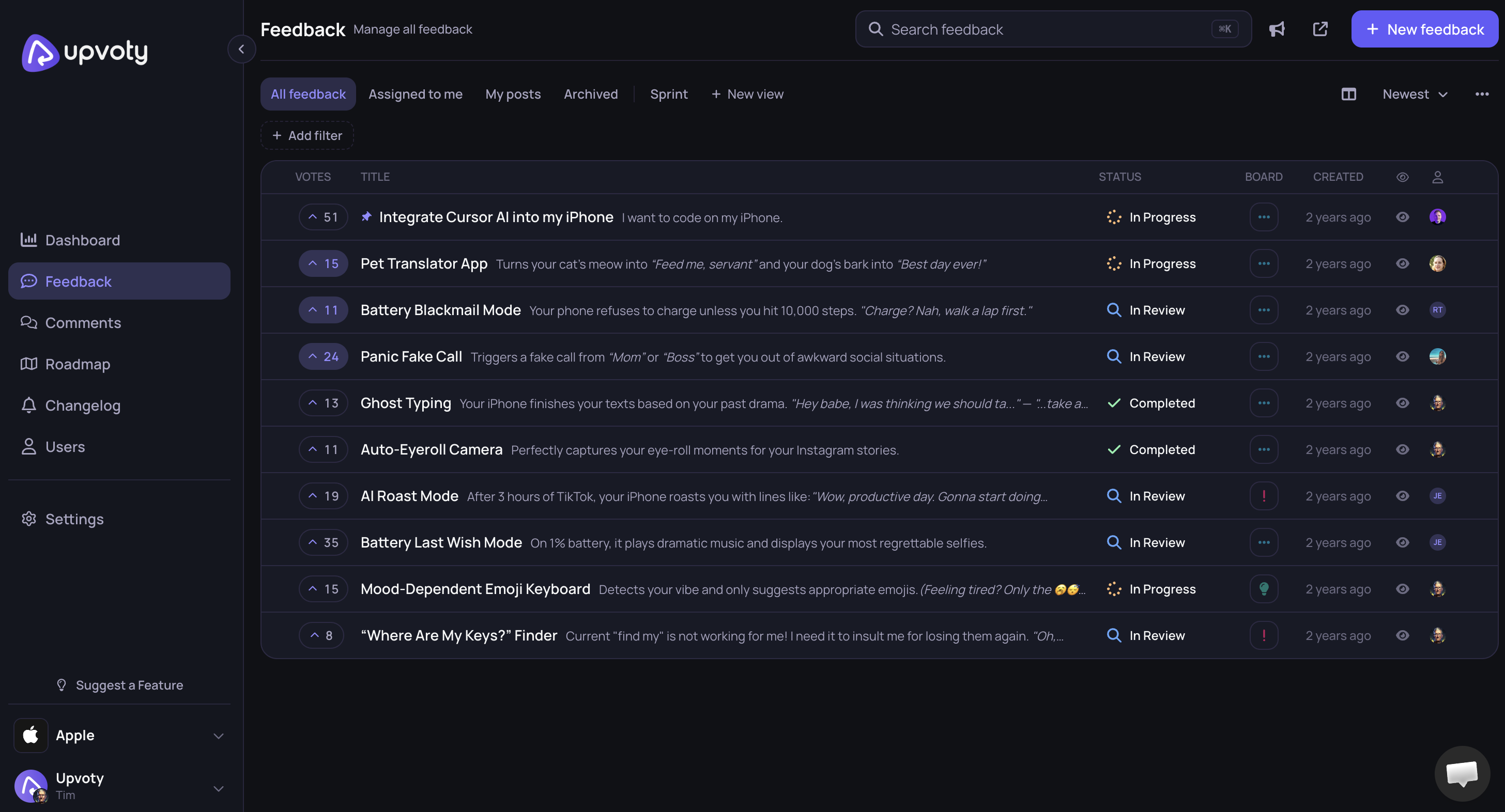
Start with the operating system for feedback. Give each request a descriptive title, merge confirmed duplicates, retain comments that explain the job to be done, and make statuses mean one thing across all boards. Upvoty's feedback boards provide a place to collect and organize those records before an AI client queries them.
For Northstar Metrics, the team discovers that /b/integrations/slack-alerts combines two needs. Operations users want immediate threshold alerts. Executives want a Monday summary. They keep one parent theme for discovery but label the two use cases separately in the analysis input.
Do this cleanup first. Otherwise, an apparently strong cluster may hide two different products, delivery costs, and buyer groups.
This screenshot shows the type of centralized dashboard an operator reviews before exposing feedback to an AI client.
If your underlying process is still taking shape, use the feature request management workflow to define intake, deduplication, review, and status ownership first.
2. Define the smallest useful MCP surface
Write down the questions the team needs answered, then map each question to the minimum data and actions required. Do not begin by exposing every endpoint.
A planning analyst may need to list posts from one board, read comments and vote totals, inspect status, and retrieve tags. That role does not need to delete posts, publish roadmap items, or message customers. A support lead investigating duplicates may need search and comment creation, but still should not change roadmap commitments.
MCP commonly distinguishes between resources that provide context and tools that perform operations. The implementation can vary, but the security principle is stable: separate reading from writing, and separate internal analysis from customer-visible publishing.
For Northstar, the first version exposes only board listing, post retrieval, comment retrieval, vote totals, tags, and status. Create, update, merge, reply, and delete operations remain disabled.
3. Connect the MCP server to ChatGPT, Claude, or Cursor
Use the client's documented connector or MCP configuration screen. Add the server endpoint or local command, complete authentication, and confirm which tools the client detects. If a client requires a JSON configuration, keep secrets in environment variables or an approved secret store rather than pasting them into a file committed to source control.
Support differs by client, plan, workspace policy, and deployment type. Check the current official instructions for the product you use. OpenAI documents its supported connection methods in the ChatGPT developer mode and MCP guide, while Anthropic maintains MCP connection guidance for Claude-related development workflows.
Cursor is especially useful when feedback analysis sits beside technical discovery. A product engineer can inspect request evidence, search the codebase for affected components, and draft an implementation note in one working session. Keep the feedback credential separate from repository permissions. Access to customer comments should not quietly imply authority to modify production code.
4. Authenticate with a dedicated identity
Create an integration-specific user or token where the available setup allows it. Name it clearly, record its owner, limit it to the relevant workspace or board, and set a review date.
Avoid using a founder's or product leader's full-access credential. It becomes difficult to distinguish human activity from AI-assisted activity, and offboarding becomes risky. A dedicated identity also gives the team one switch to disable if the connector behaves unexpectedly.
Northstar creates mcp-product-analysis with access to its integrations, reporting, security, and mobile boards. It can read private comments because those comments matter for prioritization, but it cannot retrieve user email addresses or make changes.
Test denial as well as success. Ask for a board outside the scope, request a write operation, and attempt to retrieve a restricted field. A secure setup should refuse all three.
5. Validate retrieval before trusting analysis
Select a small set of known records and ask precise questions. Compare the answer with the source interface.
For example: “Retrieve the Slack alerts post, give me its current status, total vote count, comment count, and the titles of any records the tool identifies as related. Do not infer missing values.” Then manually verify each field.
Watch for pagination. An AI answer based on the first page of comments can sound complete while omitting older evidence. Also check date handling, deleted records, merged posts, private notes, and whether vote totals represent unique users or raw events.
At Northstar, the first test misses comments beyond the connector's default page size. That changes the apparent demand: enterprise comments describing audit requirements sit on the omitted page. The team fixes pagination before running any prioritization prompt.
What actions should an MCP customer feedback setup support?
A useful connection does not need dozens of tools. It needs operations that match real product work, with clear boundaries around customer-visible changes.
| Workflow action | Data or tool needed | Recommended default | Human review point |
|---|---|---|---|
| Find duplicate requests | Search titles, bodies, tags, and comments | Read-only | Confirm before merge |
| Summarize a theme | Retrieve posts, comments, votes, and status | Read-only | Check quotes against source |
| Compare segments | Retrieve approved account or segment fields | Read-only, restricted | Review privacy and sample size |
| Create a consolidated request | Create post with source references | Approval required | Edit title, scope, and links |
| Change request status | Update status | Approval required | Product owner confirms decision |
| Add roadmap item | Create or update roadmap record | Approval required | Confirm timing language |
| Close the feedback loop | Draft reply or changelog text | Draft only | Owner approves publication |
Start read-only. Add one write action only after the team has observed how the model selects tools, interprets ambiguous prompts, and reports failures.
The most dangerous operations are often not deletion. A status update to “Planned” or an AI-written public reply can create a customer commitment. Treat changes to a public product roadmap and posts on a product changelog as publication steps, even if the underlying API calls look like routine updates.
Questions to ask AI about customer feedback
Good questions define scope, evidence, output, and limits. “What should we build?” asks the model to combine customer demand, strategy, cost, and commercial judgment without enough information.
Ask narrower questions that produce reviewable work:
- “Retrieve open requests from the integrations board submitted or updated in the last 90 days. Group them by customer job, cite the source URL for every group, and list ambiguous records separately.”
- “Compare Slack threshold alerts with scheduled Slack summaries. Show supporting comments, affected segments, vote totals, and evidence that these are separate use cases. Do not recommend priority.”
- “Find likely duplicates of
/b/security/saml-sso. Return confidence as high, medium, or low and explain the matching evidence. Do not merge anything.” - “Draft a problem statement for PDF exports using only retrieved customer language. Remove names, email addresses, and company identifiers.”
- “Identify requests marked Planned that have no public update in the last 60 days. Draft internal follow-up notes, not customer replies.”
- “For each top theme, state what evidence is missing before a prioritization decision can be made.”
The last instruction is particularly valuable. AI systems tend to produce a complete-looking answer even when segment data, revenue context, delivery estimates, or strategic fit are absent.
For Northstar, the assistant returns Slack as one broad theme. The product manager follows up: “Split this cluster by trigger, delivery frequency, recipient, and expected response.” The resulting groups show threshold alerts for operators and scheduled summaries for executives. One label had concealed two workflows.
When commercial context is permitted, combine demand with account segment and strategic value rather than ranking by votes alone. The customer feedback prioritization guide explains how to use revenue, segment, and demand without letting a single number make the decision.
Permissions for safe MCP customer feedback workflows
Treat prompts and retrieved content as untrusted input. A customer can paste instructions into a feedback post, and an AI client may read that text during analysis. Those instructions must never override the system's tool policy.
Use four permission layers: identity, scope, operation, and approval. Identity says which integration is calling. Scope limits accessible workspaces, boards, records, and fields. Operation determines whether it can read, create, update, merge, publish, or delete. Approval requires a person to confirm sensitive calls.
Sensitive fields deserve separate handling. Customer email addresses, internal account notes, contractual details, revenue, and security disclosures may be useful for a narrow workflow, but that does not justify exposing them to every conversation. Redact them at the server where possible. Prompt-only redaction is weaker because the model has already received the field.
Keep an audit trail containing the initiating user, time, requested tool, parameters, affected record, response, and approval outcome. Be cautious about logging full comment bodies, which may duplicate personal or confidential information in a second system.
For Northstar, a product manager may retrieve anonymized segment labels such as Enterprise or Self-serve. Only a smaller planning group can access account-level commercial fields. The connector cannot publish. When a roadmap status changes, the product owner performs or approves that action in Upvoty.
Use MCP customer feedback inside Upvoty workflows
Once the manual flow works, Upvoty removes the scattered intake and publication steps around the AI analysis. The product remains the record customers and teammates can inspect, rather than leaving conclusions buried in a chat transcript.
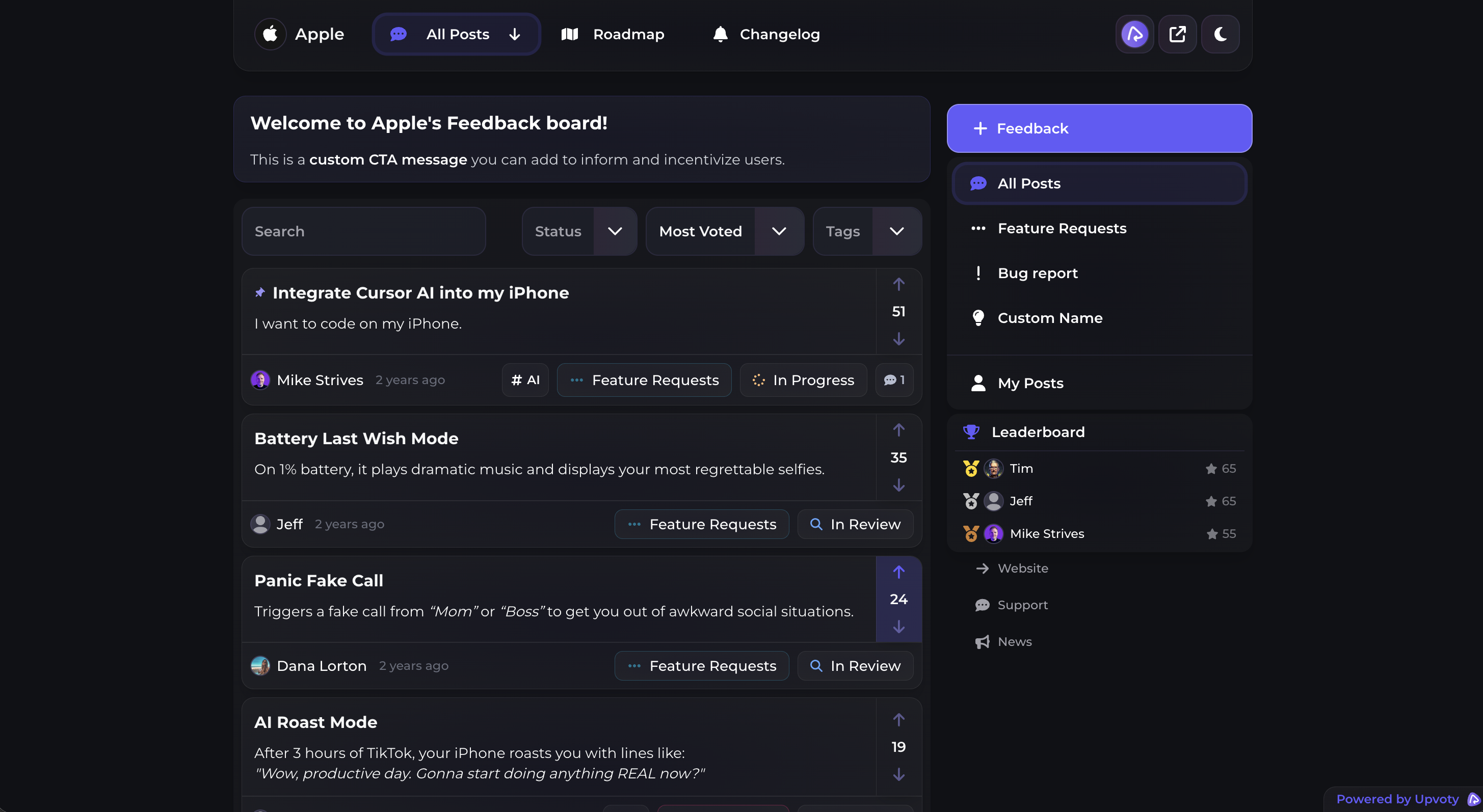
First, requests arrive on a public feedback board, where users can submit ideas and vote. The product team moderates titles, merges confirmed duplicates, and preserves comments that explain why the request matters.
Next, the approved MCP connection retrieves the relevant posts, comments, votes, labels, and statuses for a specific question. ChatGPT, Claude, or Cursor can then group related problems, surface contradictory evidence, or draft a planning brief. The human reviewer checks every cited URL and corrects weak clusters.
This is what a public voting board can look like before the records are analyzed and consolidated.
Then the team makes the priority decision using evidence the model cannot supply by itself, including product strategy, engineering constraints, contractual risk, and opportunity cost. The decision and status are recorded back in Upvoty through an approved action or by a product owner.
If the item is selected, a carefully worded roadmap entry communicates direction without turning an estimate into a promise. The practical guidance in building a public roadmap customers can trust is useful here.
After release, the team publishes an update and notifies the relevant users. The customer feedback loop and changelog workflow shows how to connect a shipped change to the original request rather than posting a generic release announcement.
For Northstar, this means the assistant may prepare two evidence briefs from the Slack request. A product owner decides to schedule threshold alerts first, changes only that scoped item to Planned, and leaves weekly summaries under review. When alerts ship, the original voters receive a relevant update. No AI conversation becomes an invisible parallel roadmap.
This walkthrough gives a useful technical introduction to MCP concepts and tool connections before you configure a production feedback workflow.
Common mistakes with MCP customer feedback
Giving the model broad write access on day one
A successful read test does not prove that autonomous writes are safe. Similar post titles, merged records, and unclear status names can cause a tool call to affect the wrong item. Begin with retrieval, then drafts, then approved writes.
Treating votes as priority
Votes indicate visible demand within the audience that found the board. They do not contain implementation cost, retention risk, segment fit, strategic direction, or the severity of an unmet need. Ask the AI to present vote totals as one evidence column, not a final ranking.
Accepting uncited summaries
A polished synthesis without record URLs is hard to audit. Require citations to the source post and identify whether a statement comes from a customer comment, a vote count, an internal note, or model inference.
Mixing customer evidence with instructions
Feedback text may contain phrases such as “ignore earlier instructions” either accidentally or maliciously. The MCP server and host policy must treat retrieved records as data. Tool permissions should remain fixed regardless of text inside a post.
Letting analysis disappear in chat
A useful cluster that never updates the feedback repository will be rediscovered next quarter. Save confirmed relationships, status decisions, and customer-facing updates in the system of record. Use chat for analysis, not institutional memory.
How to choose between ChatGPT, Claude, and Cursor
Choose based on where the work occurs and which controls your organization can verify. Product managers who live in conversational workspaces may prefer ChatGPT or Claude for recurring synthesis and planning briefs. Engineers may prefer Cursor when request evidence needs to be examined beside code and technical documentation.
Do not choose solely from model quality claims. Confirm that your plan and deployment support the required MCP connection, administrator controls, authentication method, approval behavior, data retention settings, and audit needs. These details change. Verify them in each vendor's current official documentation before rollout.
A mixed setup can be sensible. Product may use one approved client for board analysis while engineering uses Cursor for read-only technical discovery. Both should call the same narrowly scoped feedback tools and return the same source URLs. Consistency at the data layer matters more than forcing every role into one interface.
FAQ about MCP customer feedback
Can ChatGPT analyze customer feedback through MCP?
Yes, when the applicable ChatGPT workspace or developer setup supports a configured MCP connection and the server exposes feedback resources or tools. Start with read-only access, validate retrieved records against the feedback platform, and check OpenAI's current documentation for plan and configuration requirements.
Can Claude connect to a customer feedback board?
Claude can use supported MCP connections to retrieve data from a server that exposes the board. Availability and setup depend on the Claude product, account, and deployment. The feedback platform or a custom connector must provide the authorized MCP interface.
Why use Cursor for product feedback analysis?
Cursor is useful when a request must be traced into a codebase. An engineer can retrieve the customer problem, inspect related modules, and draft technical questions in the same environment. Keep customer-data access read-only and separate from code-writing authority unless the organization has explicitly approved both.
Does MCP send all customer feedback to the model?
It should not. A well-designed server returns only the records and fields needed for a particular request, subject to scope and permissions. Review the AI provider's data handling terms and your own privacy obligations before sending personal, confidential, or regulated information.
Should AI automatically merge duplicate feature requests?
Usually not at first. Duplicate detection is a strong use case for AI, but merging can discard distinctions between jobs, segments, or expected behavior. Let the model propose candidates with evidence, then have a product owner confirm the merge.
Can AI update a public roadmap through MCP?
Technically, it can if the MCP server exposes a write tool and the credential has permission. Operationally, require human approval because roadmap status and timing can create expectations. Use scoped status language and preserve an audit record.
Do I need MCP if I can export feedback as CSV?
A CSV works for occasional, fixed analysis. MCP is more useful when the AI needs current records, repeatable queries, source links, controlled tools, and actions that return to the feedback system. The trade-off is additional authentication, permission design, monitoring, and maintenance.
MCP is a good fit when your team already has organized feedback and repeatedly loses time moving it into AI tools by hand. Use Upvoty as the feedback system behind your MCP workflow, begin with a read-only board, and add approved actions only after retrieval is reliable. Read next: Customer Feedback Analytics: Turn User Input Into Product Decisions.


