
Feature requests arrive through support tickets, sales calls, customer interviews, and scattered spreadsheets. Without one shared workflow, duplicate requests inflate demand, key customer context disappears, and product teams struggle to explain what happened next.
The best product feedback tools collect requests in one place, group similar ideas, show who asked, help teams set priorities, and close the loop through a roadmap and changelog. Upvoty is built around that end-to-end customer-facing workflow.
Quick answer: how to choose the best product feedback tools
- Map every place feedback enters today, then choose a tool that can collect it through a portal, widget, or integrations.
- Require voting, duplicate merging, moderation, and customer context before comparing visual design.
- Score requests with demand, customer segment, revenue context, effort, and strategic fit.
- Confirm that roadmap statuses and changelog updates can connect directly to the original request.
- Test AI features with real duplicate requests and keep a human owner responsible for the final grouping.
- Review current plan limits, privacy requirements, implementation effort, and the cost of future upgrades.
How to evaluate the best product feedback tools
Start with the workflow, then assess the interface. A polished voting board creates little value when product managers still have to copy requests into a separate roadmap, search support conversations manually, and email every voter after a launch.
Use one realistic scenario during evaluation. Consider a B2B expense-management product with a public /feedback page and an in-app request widget. Customers submit “download receipts as CSV,” “bulk receipt export,” and “export receipt archive.” The team initially treats these as three items, sends them to different owners, and later discovers that every request describes the same underlying job.
A capable platform should help the team combine those requests, preserve each voter, add account context, and assign one owner. When the feature reaches the roadmap, customers should see its status. When it ships, the team should publish an update and notify the people who voted.
Evaluate these six capabilities in that order:
Feedback collection and submission quality
Look for a hosted portal, embedded widget, and configurable submission forms. A portal works well for customers who actively want to browse ideas. An in-app widget captures feedback while a customer is using the relevant workflow. Custom fields can capture product area, use case, account type, or urgency without forcing customers to write a long explanation.
Public forms also need accessible labels, keyboard support, and clear error states. The W3C guidance on accessible forms is a useful review point for teams putting a feedback board in front of customers.
Voting and duplicate handling
Voting provides a demand signal. It works best when voters can search existing requests before submitting another variation. Moderation and merging keep the board readable while retaining the original votes and comments.
For the expense-management example, merge the three export requests into “Export receipt archives to CSV.” Add an internal note that enterprise finance teams need the export for monthly reconciliation. The vote total now reflects a single problem, and the product team retains the reason behind the request.
Prioritization with customer context
A high vote count alone can lead teams toward a loud but narrow request. Look for segments, tags, internal notes, assignees, priorities, and analytics that expose who is asking.
Give each request a repeatable review: demand, affected segment, strategic alignment, implementation effort, urgency, and evidence from sales or support. Our guide to prioritizing customer feedback by revenue, segment, and demand shows how to make that judgment visible rather than leaving it inside a single product manager's head.
Roadmaps and changelogs
A roadmap should communicate intent and current status with enough precision for customers to plan. Avoid dates that engineering has yet to validate. Statuses such as Under Consideration, Planned, In Progress, and Complete give customers a useful view without turning every request into a delivery promise.
A changelog completes the communication cycle. The product team can describe what shipped, link to instructions, and alert the voters who asked for it. Read how to build a public product roadmap customers can trust before publishing the first version.
AI capabilities that reduce review work
AI is most useful where repetition creates administrative work. It can suggest similar requests, cluster themes, propose tags, and prepare a starting point for analysis. Product managers still need to inspect the merged request because phrases that sound similar can represent different jobs.
In the example, “receipt archive export” and “monthly reconciliation CSV” may belong together. “Export expense policy exceptions” requires a separate item despite the shared word “export.” Treat AI suggestions as a review queue, then make the merge decision with product context.
Privacy, permissions, and exports
Feedback often includes account details, support context, and contact information. Confirm where data is processed, who can access private boards, and how teams can export or delete records. Organizations serving people in the EU should also assess their process against the official GDPR text. Keep private customer feedback separate from public ideas when account context would create a disclosure risk.
Best product feedback tools compared
Canny, Featurebase, Nolt, and Upvoty are common options for SaaS teams that want a feedback board and a more organized product feedback process. Each vendor changes plans and feature access over time, so use this comparison to narrow the shortlist, then verify current limits on each vendor's pricing page before procurement.
| Tool | Feedback collection and voting | Prioritization workflow | Roadmap and changelog | AI workflow | Pricing review focus |
|---|---|---|---|---|---|
| Upvoty | Public or private boards, widgets, custom forms, voting, moderation | Segments, smart tags, internal notes, assignees, priorities, analytics | Public roadmap and changelog with voter notifications | Merge AI plus MCP access for feedback analysis | Review plan limits, team needs, and required integrations |
| Canny | Feedback boards, voting, and customer request collection | Feedback triage and customer data context | Roadmap and changelog options | AI-assisted feedback workflows | Review feature access, tracked users, and organization requirements |
| Featurebase | Feedback portal, widget, and voting | Centralized feedback management and categorization | Public roadmap and changelog options | AI-assisted feedback organization | Review plan limits, branding needs, and integration access |
| Nolt | Simple boards, idea submission, and voting | Board-level moderation and request review | Roadmap and changelog options | Confirm current AI availability during evaluation | Review board limits, customization, and team requirements |
Upvoty is a strong fit for teams that want a connected public workflow without treating collection, roadmap communication, and release updates as separate systems. Canny suits teams that prefer its established feedback workflow. Featurebase can appeal to teams seeking an integrated customer-facing portal. Nolt is worth considering when a simpler idea-board experience is the priority.
Pricing should cover more than the starting plan. Model the next stage of your business: more feedback boards, additional teammates, private portals, custom domains, SSO, integrations, or higher submission volume. A tool that fits a single public board can create a migration project once those requirements arrive.
How Upvoty runs the product feedback workflow
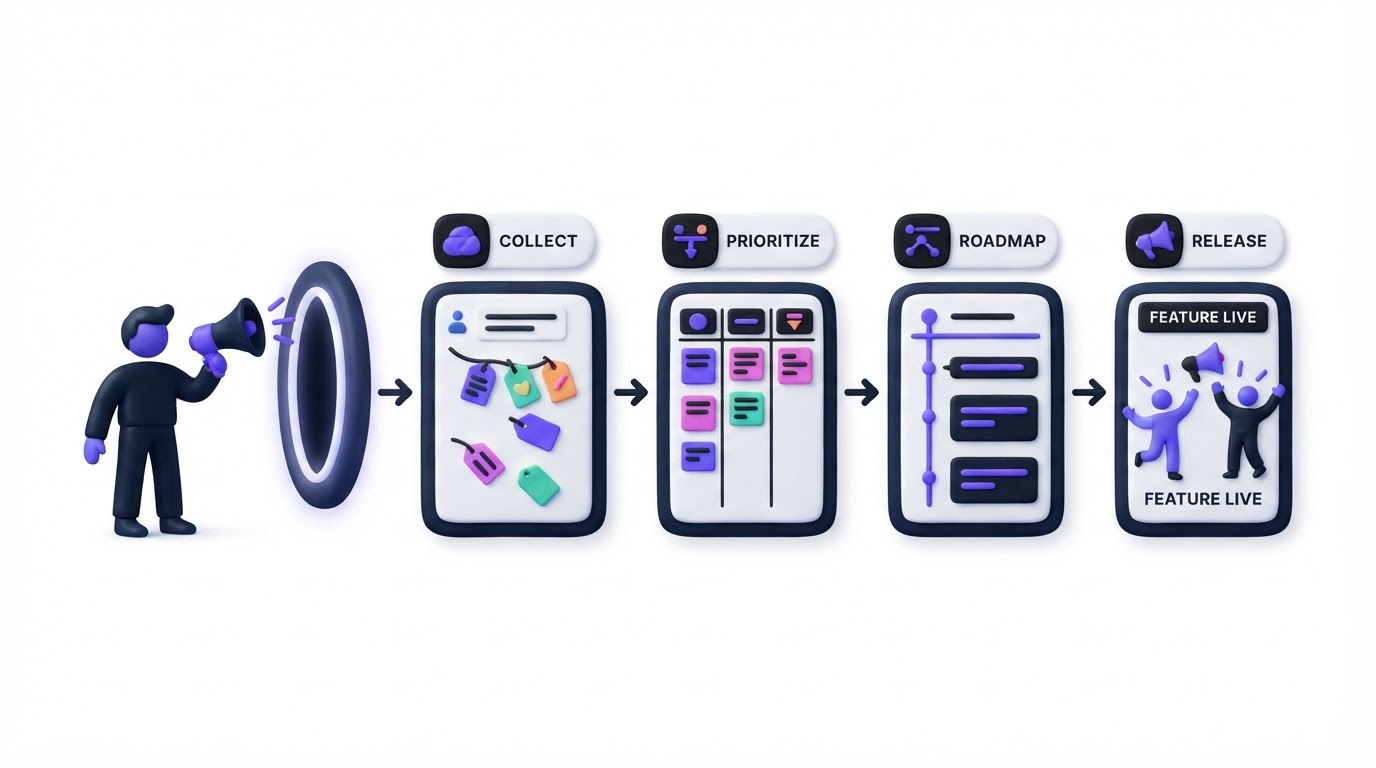
The strongest evaluation comes from building the same workflow in each shortlisted tool. In Upvoty, start by creating a feedback board for product ideas and choosing whether it should be public or private. Add categories such as Reporting, Expenses, and Integrations. Use custom submission fields to capture the workflow that prompted the request.
Next, place the feedback widget inside the expense-management product. A customer submitting “bulk receipt export” can search existing requests, vote for the merged item, and add context instead of creating another duplicate.
The team then works from the dashboard. Use moderation to review submissions, Merge AI to surface similar ideas, and internal notes to attach context from support or sales. Apply segments such as Enterprise, Accounting, or Trial. That turns an undifferentiated vote total into a visible picture of demand.
This dashboard view shows the operational layer where incoming feedback becomes a prioritized request.
!Upvoty dashboard for managing customer feedback, analytics, and product requests
When the team selects the export feature, move it to the product roadmap. Customers can follow the status while the team controls which columns and details are visible. The roadmap should communicate direction and progress in language customers understand.
After release, publish the update through the changelog and notify voters automatically. The original feedback record becomes the thread connecting discovery, prioritization, delivery, and follow-up. For a deeper operational setup, use the feature request management workflow.
Common mistakes when choosing product feedback software
Teams often buy a voting board and discover later that the surrounding process remains manual. Avoid these failure modes during trials.
First, avoid importing every historical support ticket as a public request. Clean the data first, merge repeats, remove sensitive account details, and preserve the original source in private notes.
Second, avoid using votes as the sole priority score. A request from a strategically important segment, a compliance deadline, or a broken core workflow may deserve attention with modest public demand.
Third, avoid publishing roadmap dates before the delivery team has validated scope. Customers interpret dates as commitments. Status-based roadmaps build a more durable expectation.
Finally, avoid letting release communication depend on memory. Link the changelog to the request and notify voters as part of the release process. Our article on how to close the customer feedback loop with a changelog covers the communication details that keep customers engaged after they submit an idea.
FAQ about the best product feedback tools
What should a product feedback tool include?
Choose a tool with a feedback portal or widget, feature voting, duplicate merging, moderation, customer context, prioritization fields, a roadmap, and a changelog. Integrations with the team's support and delivery systems reduce copy-and-paste work.
Are public feedback boards useful for B2B SaaS?
Yes, when the board has clear moderation and visibility rules. A public board helps customers discover existing requests, vote, and see progress. Private boards work better for account-specific feedback, security-sensitive products, and internal employee ideas.
How should product teams prioritize feature requests?
Combine demand with the affected customer segment, strategic value, evidence from customer conversations, effort, risk, and timing. Record the reasoning beside the request so future reviewers can understand the decision when circumstances change.
Can AI decide which feature to build?
AI can speed up clustering, tagging, and first-pass analysis. Product decisions still need human review of customer value, product strategy, technical constraints, and commercial context. Use AI to reduce sorting work and preserve a clear accountable decision owner.
When should a team use a roadmap and changelog?
Use a roadmap once customers need visibility into the direction and status of product work. Use a changelog for every meaningful release that affects customers. Together, they show progress from consideration through delivery.
Choose a tool that lets customers submit, vote, follow progress, and hear about releases in one connected process. Try Upvoty when your team wants that workflow without rebuilding it across spreadsheets and disconnected tools.