
A support inbox contains dozens of feature requests, but nobody can tell which customers asked for each one or whether the requests overlap. Product managers copy ideas into a spreadsheet, update a separate roadmap, and leave customers waiting for an answer.
Upvoty provides idea management software that connects feedback collection, feature voting, roadmap communication, and product updates in one workflow.
Idea management software: the quick answer
Use this workflow to turn scattered product ideas into decisions customers can follow:
- Collect ideas on a dedicated feedback board.
- Organize requests and merge duplicates.
- Add customer votes and context to each idea.
- Prioritize ideas using demand, value, effort, and strategy.
- Publish selected ideas on a customer-facing roadmap.
- Announce completed work through a changelog.
How idea management software works, step by step
Consider a hypothetical B2B reporting SaaS. Customers repeatedly request scheduled PDF exports through support tickets, sales calls, and chat. The product team records the requests in different places, so one customer suggestion becomes five backlog items with slightly different titles.
A structured idea management workflow prevents that fragmentation.
1. Collect product ideas in one place
Start with a feedback board that customers and internal teams can use without learning your engineering tools. Give each idea a clear title, problem description, category, and status.
For the reporting SaaS, the team creates feedback.example.com and adds categories for dashboards, exports, billing, and account administration. A customer submits “Email a PDF report every Monday” under exports. A sales representative can direct similar requests to that existing post instead of creating another note in the CRM.
A public board also lets customers see whether an idea already exists. That reduces duplicate submissions before they enter the backlog.
This is what a structured public voting board can look like:
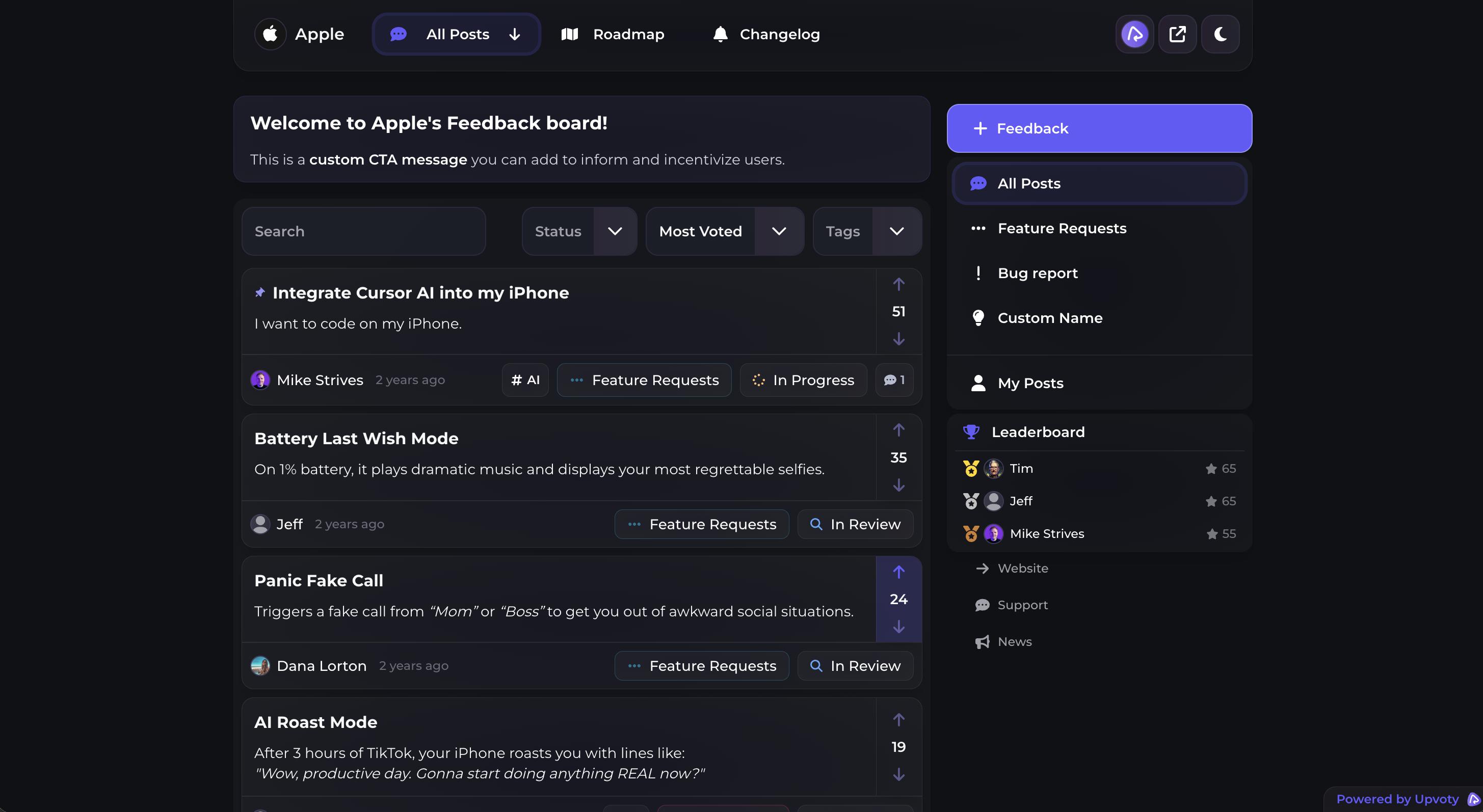
Use the Upvoty feedback boards page to see how a dedicated board brings requests and votes together.
2. Organize ideas and merge duplicates
Review new submissions before treating them as distinct opportunities. Customers often describe the same underlying need with different solutions.
“Scheduled exports,” “weekly executive emails,” and “automatic PDF reports” may all reflect the need to distribute recurring reports without logging in. Merge or consolidate those requests under one primary idea while preserving the language customers used.
Do not organize ideas only by requested feature. Add categories tied to product areas so the relevant owner can review them. Keep the taxonomy short enough that customers can choose correctly.
For a detailed operating model, follow this feature request management workflow.
3. Add votes and customer context
A vote shows demand, but it does not explain value. Ten free users asking for a cosmetic option may carry a different product impact than three contracted accounts blocked by a missing security control.
Record the context available to your team, including:
- The customer segment and plan
- The workflow the request would improve
- How often the problem occurs
- Whether the issue blocks adoption, renewal, or expansion
- Existing workarounds
- Relevant sales or support notes
Collect only what you need. The European Commission's data minimisation guidance explains why organizations should limit personal data collection to information necessary for a stated purpose.
For the reporting SaaS, votes establish that scheduled exports have recurring demand. Comments reveal the stronger signal: several users currently download reports manually before weekly management meetings.
This Y Combinator session explains how to ask users about actual behavior rather than relying on polite opinions.
4. Prioritize customer ideas
Score ideas consistently, but do not let a formula make the decision without review. Product strategy, customer impact, implementation effort, risk, and demand all matter.
For scheduled exports, the team compares the request with an unrelated dark mode suggestion. Dark mode has more public votes, but scheduled exports remove a repeated manual task and support the product's reporting strategy. Engineering also identifies a failure mode: generated reports could include outdated data if the scheduling system runs before nightly processing finishes.
That technical risk changes the scope. The team plans delivery timing controls and clear “data updated at” labels rather than approving the original request unchanged.
The customer feedback prioritization guide explains how to weigh demand alongside segment and commercial context. The official Scrum Guide also describes the Product Backlog as an ordered, evolving source of work rather than a fixed list of promises.
5. Publish a product roadmap customers can understand
Move an idea to the roadmap only when the team is prepared to communicate intent. Use plain statuses such as planned, in progress, and completed. Avoid publishing precise dates unless delivery is genuinely committed and dependencies are understood.
For scheduled exports, the team adds the idea to “Planned” after technical discovery. The roadmap description states the intended outcome and known scope without promising every format or scheduling option requested in comments.
A public roadmap is a communication layer, not a copy of the engineering backlog. Keep security work, internal maintenance, and uncertain experiments out of public commitments when disclosure would create confusion or risk.
See how product roadmap software connects selected feedback to visible product plans. The guide to building a public product roadmap customers can trust covers status language and expectation setting in more depth.
6. Close the loop when an idea ships
Publishing a feature is not the end of idea management. Update the original request, notify interested users through your established process, and explain what changed.
The reporting SaaS moves scheduled exports to completed and publishes a changelog entry covering supported report types, schedule options, and where users can configure delivery. Customers who asked for the feature can now connect the release to their original request.
Use a product changelog to maintain that final communication step. A practical guide to closing the customer feedback loop shows why a release note should explain the customer outcome, not merely list technical work.
How to choose idea management software
Choose based on the full workflow, not the submission form alone. A basic form can collect ideas, but teams usually lose time when prioritization, roadmap updates, and release communication live in separate systems.
| Approach | Collection | Prioritization context | Customer visibility | Main trade-off |
|---|---|---|---|---|
| Spreadsheet | Manual entry from multiple channels | Flexible but inconsistent | Usually none | Low initial cost, high maintenance |
| Project tracker | Strong internal task tracking | Focused on delivery work | Limited for customers | Feedback becomes mixed with engineering tasks |
| Survey tool | Good for structured questions | Useful for one research round | No persistent request history | Weak for ongoing feature requests |
| Dedicated idea management software | Central board, comments, and voting | Demand tied to individual ideas | Board, roadmap, and updates | Requires workflow ownership and moderation |
Test how each option handles duplicates, status changes, exports, permissions, branding, moderation, and customer notifications. If a board is public, verify that keyboard navigation, labels, and color contrast support accessible use. The W3C Web Content Accessibility Guidelines overview provides the recognized framework for assessing web accessibility.
Canny, Featurebase, and Nolt may appear alongside Upvoty during research. Compare the workflow your team will actually run, then check each vendor's own pricing page for current limits and terms. Upvoty also provides a practical product feedback tool selection guide and a detailed alternative comparison for closer evaluation.
How Upvoty handles idea management software workflows
Upvoty keeps the customer-facing parts of idea management connected. A user starts on a feedback board, searches existing ideas, submits a request, or votes for one that already describes the need.
The product team reviews submissions in the feedback dashboard. Related requests can be handled together rather than copied across spreadsheets and disconnected lists. Votes and comments remain attached to the idea, giving the team a visible record of demand and customer reasoning.
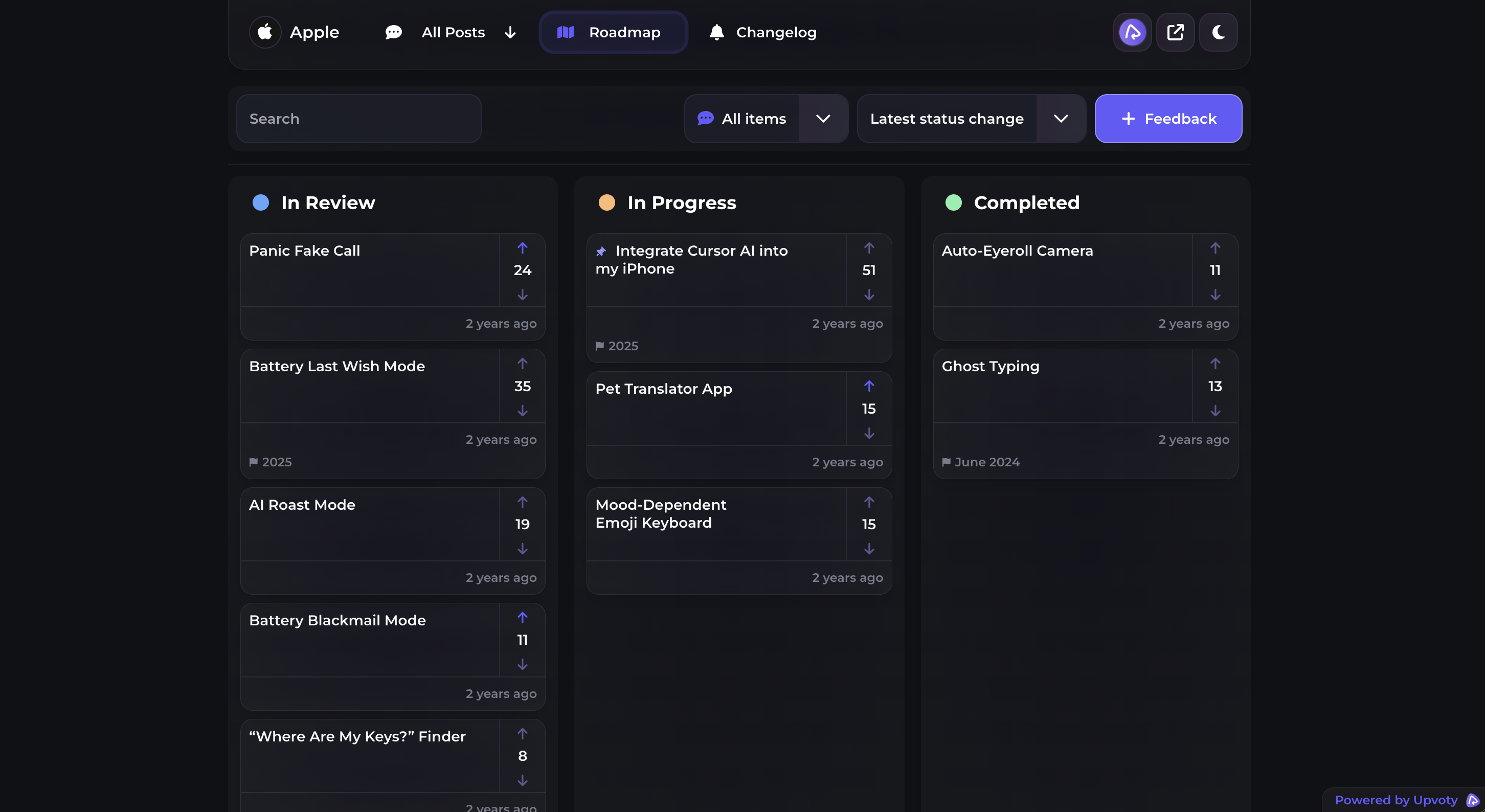
Once the team decides to pursue an idea, it can communicate progress through a public roadmap. Customers see whether an item is being considered, planned, worked on, or completed based on the statuses the team publishes.
This view shows how roadmap items can be presented to customers:
When work ships, the team can publish a changelog update and close the communication loop. That board-to-roadmap-to-changelog sequence is the main advantage of keeping idea management in one customer-facing system. Review the live Upvoty demo and current pricing against the number of boards, users, and workflows your team needs.
Common idea management software mistakes
The first mistake is treating the highest vote count as an automatic commitment. Voting measures expressed demand among participating users, not strategic fit or implementation cost.
The second is publishing every request on a roadmap. Unreviewed ideas create implied promises and make the roadmap difficult to trust.
Another failure mode is collecting feedback without assigning an owner. Set a regular review cadence, merge duplicates promptly, and update statuses even when the decision is “not planned.” Silence causes customers to submit the same request through other channels.
Be cautious with AI-generated summaries and categories. AI can reduce reading time, but it can also remove qualifiers, merge requests that only appear similar, or overstate sentiment. Keep the original customer language available and require human review before prioritization decisions.
Idea management software FAQ
What is idea management software used for?
Idea management software collects suggestions from customers and internal teams, groups related requests, records votes and comments, supports prioritization, and communicates decisions through statuses, roadmaps, or release updates. Product teams use it to replace fragmented spreadsheets, inbox labels, and informal notes.
Is idea management software different from project management software?
Yes. Idea management begins before delivery work is approved and remains customer-facing throughout the feedback loop. Project management software focuses on assigning and completing planned work. Many teams keep both, using the idea platform for discovery and communication and the project tracker for engineering execution.
Should our feedback board be public?
A public board works well when customers benefit from discovering existing requests, voting, and seeing progress. It may not suit security reports, contractual discussions, sensitive account issues, or unreleased strategic work. Define what belongs on the board and direct private matters to an appropriate support channel.
How often should product teams review submitted ideas?
Review often enough to merge duplicates and remove spam before the board becomes difficult to use. Prioritization can happen on a separate product planning cadence. Do not confuse acknowledging a request with promising delivery.
Can AI prioritize customer feedback automatically?
AI can assist with summarization, tagging, and identifying possible themes. It should not independently decide the roadmap because it lacks full commercial, technical, and strategic context. Verify AI output against original requests and let accountable product leaders make the final decision.
Turn scattered requests into a visible process customers can follow. Use Upvoty for idea management to connect feedback boards, roadmap communication, and product updates without maintaining three separate customer-facing systems. Read next: Customer Idea Management Software.