A release ships, support receives the same questions, and customers who asked for the feature hear about it weeks later, if at all. That gap makes completed product work hard to see and harder to trust.
Upvoty gives product teams one connected place for feedback, roadmaps, and customer-facing release updates. A solid changelog process turns every meaningful release into a clear answer for the people who requested it.
Quick answer: How changelog software works
Use changelog software to follow this release workflow:
- Capture the customer problem, request, and affected audience before work begins.
- Record the shipped change in plain language, with screenshots or links where useful.
- Publish the update to a public or private changelog with a clear date and category.
- Notify voters, requesters, and relevant customer segments about the release.
- Link the update to the feedback item and roadmap status, then measure follow-up questions and engagement.
Start changelog software with the customer problem
Good release notes begin before engineering marks a ticket complete. Gather the original request, the user outcome, and any limits that customers need to understand. This material prevents a changelog post from becoming an internal sprint recap full of ticket names and implementation details.
Consider a hypothetical scheduling SaaS with a request on feedback.example.com: “Let account owners block booking links for specific regions.” The product team combines 14 similar requests into one post, confirms that enterprise workspaces account for most demand, and plans a region rules feature.
When the feature ships, the useful customer update is not “Added geo rules API.” It says that account owners can restrict booking pages by country or region, explains where to configure the rule, and flags that existing links retain their settings until an owner updates them.
Build this context into the request itself. A structured feedback board gives customers a place to add their use case, vote on an existing request, and follow its progress. For a fuller intake and prioritization process, see this guide to feature request management workflows.
Write changelog entries customers can act on
Each entry should answer three practical questions quickly: what changed, who benefits, and what action should the reader take? Lead with the customer outcome. Put technical detail behind a link when technical readers need it.
For the scheduling SaaS example, the title could be “Control where your booking links are available.” The opening paragraph can explain the availability control in one or two sentences. A second paragraph can direct account owners to Settings > Booking Pages > Region Rules. A short note can explain the existing-link behavior.
Add product visuals when the interface changed in a meaningful way. Images need descriptive alternative text so screen-reader users receive the same context. The W3C guidance on text alternatives is a practical reference for writing useful image descriptions.
A release entry also needs a stable published date. Teams often use it when answering support cases, reviewing launch history, or checking whether a customer had access to a capability at renewal time.
Publish changelog updates in the right format
Changelog software should support the level of detail your audience needs. A public SaaS changelog commonly uses a short entry, a category, a date, and a link to documentation. Private products may publish release notes only to signed-in customers or specific workspace members.
Use this comparison to decide what each release needs:
| Release type | Customer-facing message | Useful supporting detail | Best distribution |
|---|---|---|---|
| New feature | The new outcome customers can achieve | Setup steps, screenshot, documentation link | Changelog, email to interested users |
| Improvement | The workflow that became faster or clearer | Previous friction removed, any new controls | Changelog and in-app announcement |
| Bug fix | The customer impact that has been resolved | Affected area and workaround removal | Changelog, targeted support follow-up |
| Security or policy update | The action customers need to take | Deadline, scope, help contact | Changelog, direct customer communication |
For customer-visible product releases, keep the public entry focused on the practical outcome. Put deployment logs, ticket IDs, and internal incident detail in the engineering system. GitHub’s release documentation provides a useful model for treating releases as clear, versioned records.
Make the entry easy to scan later. Consistent categories such as New, Improved, Fixed, and Security help customers find relevant updates without reading every post. A searchable changelog becomes especially valuable after a year of frequent releases.
Use changelog software to close the feedback loop
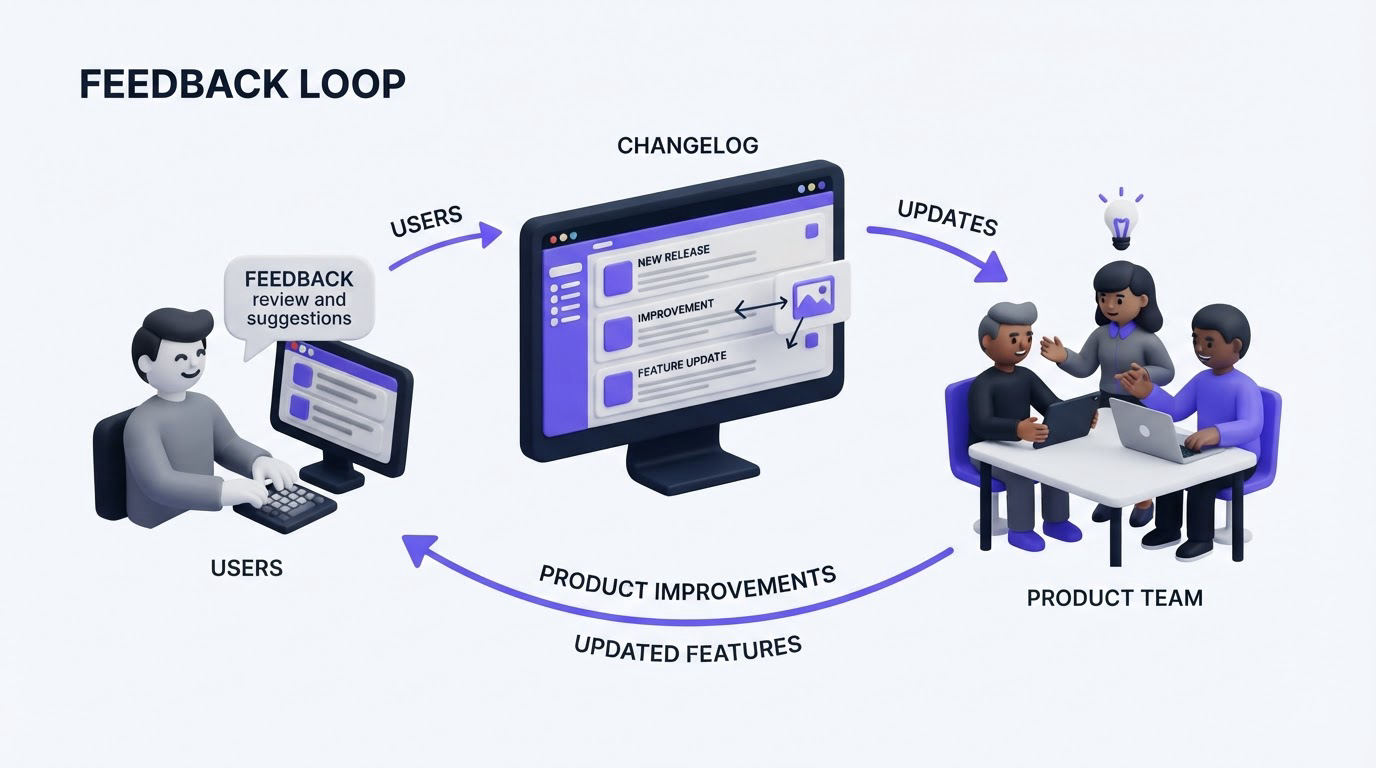
Publishing alone leaves work unfinished. The people who voted, submitted a request, or described a problem deserve a direct signal that the team acted on it.
Return to the region rules example. Once the changelog post is live, update the original request status to complete, link the release, and notify the 14 contributors. The message can say, “Region rules are now available for booking pages. Configure them in Settings > Booking Pages > Region Rules.” That message gives each requester a clear next step and creates a direct connection between their input and the shipped work.
This practice also improves product decisions. Responses to a release can reveal confusing setup, missing edge cases, or demand for adjacent controls. Teams can then create a follow-up request rather than losing that context in support threads. Read more about how to close the customer feedback loop with a changelog.
How Upvoty changelog software connects feedback, roadmap, and releases
Upvoty is built for the full route from customer request to product update. Start by collecting submissions on a feedback board or through an embedded widget. Merge duplicate requests so votes and customer context sit in one place. Use that demand alongside customer segment context when deciding what moves forward.
Next, move planned work onto a public product roadmap. The scheduling SaaS could show Region Rules under Planned, then In Progress, giving customers a realistic view of the work before launch.
When the feature is available, create an update in the Upvoty changelog. Add the customer-facing title, explanation, release category, and visual guidance. Then connect the release back to the request and use voter notifications to tell interested customers the work is ready.
The public changelog view gives customers a single place to review product progress and recent updates.
!Upvoty public changelog showing product launch and update posts
This connected workflow removes the manual hunt across support tickets, spreadsheets, roadmap slides, and release emails. It also makes a public roadmap more credible because completed items lead to visible release evidence. This guide explains how to build a public product roadmap customers trust.
Choose changelog software based on your release workflow
Evaluate changelog software by following one real feature from first request to customer notification. Ask the team to demonstrate the full sequence using a recent release. Screens that look polished during a product tour offer limited value if the handoff between feedback, prioritization, publishing, and follow-up remains manual.
Focus on these operational questions:
- Can customers submit requests and add their support to an existing idea?
- Can your team connect a request to a planned roadmap item and a shipped update?
- Can you publish public and private information at the level your product requires?
- Can the right customers receive a notification when their requested work ships?
- Can support link directly to a permanent release entry during customer conversations?
Canny, Featurebase, and Nolt are common options in this category. Compare each vendor using your own release workflow, audience permissions, publishing needs, and budget. A product team with frequent customer-driven releases benefits from a system where the feedback record remains connected through publication and follow-up.
A common failure mode is publishing long, generic “monthly updates” that bury the changes customers actually requested. Publish individual meaningful releases as they happen, then use a monthly digest as an additional recap. This keeps the update timely and preserves a useful historical record.
Changelog software FAQ
What should changelog software include?
Look for a publishable update feed, categories, dates, rich content, audience controls, and a way to connect releases with product feedback or roadmap items. Notification tools are valuable when customers have explicitly shown interest in a request.
How often should a SaaS company publish a changelog?
Publish when a customer-visible feature, improvement, fix, or policy change is ready. High-frequency teams may post several times per week. Smaller teams can publish after each meaningful release. Consistency builds confidence because customers learn where to check for product progress.
Should bug fixes appear in a public changelog?
Publish fixes that affected customer workflows, data, performance, or access. Describe the resolved impact in clear language and avoid exposing sensitive security details. Minor internal corrections can remain in internal release records.
How do you measure whether release updates help customers?
Track views, reactions, direct responses, follow-up support questions, and activation of the released capability. Compare those signals with the original request volume and customer segment. A release with repeated setup questions needs clearer onboarding, even when the underlying feature works as intended.
Can a changelog support a public roadmap?
Yes. A roadmap explains intended direction, while changelog entries document completed work. Connecting the two gives customers a traceable path from request to plan to release, which makes product communication more credible.
Turn your next shipped feature into a customer update that people can find and act on. Try Upvoty to connect feedback, roadmap progress, and changelog publishing in one workflow.